Lyra • jukebox
23
Overview of General Controls
LIKE
DISLIKE
MENU
SELECT
VOLUME
+
-
O
N
/
O
F
F
3
6
1
2
4
5
8
7
9
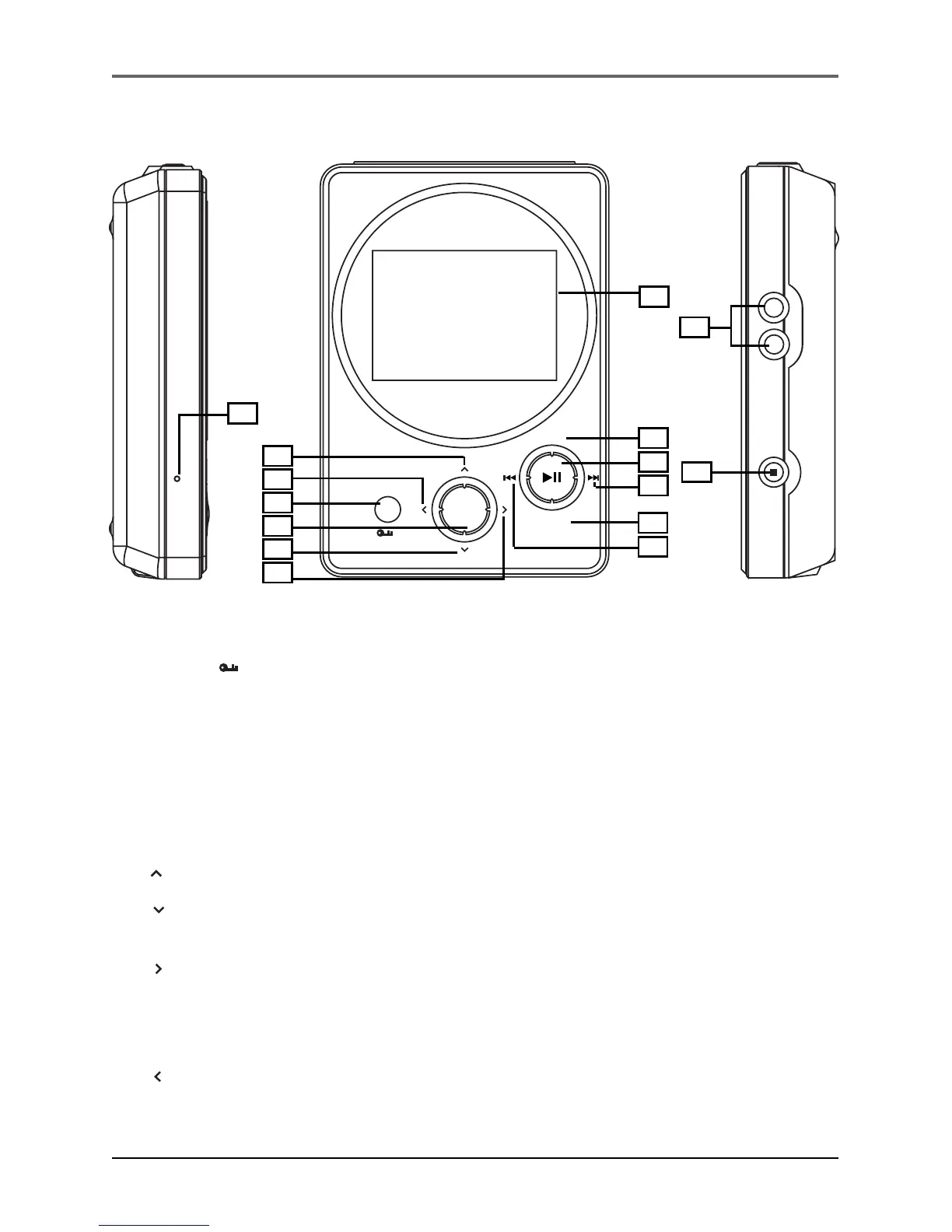
Front View
1. MENU/ Lock - Returns to Top Menu.
- Press and hold to select between key lock and key activation.
Navigation Controls
2. SELECT - Selects a highlighted item in navigation mode.
Press SELECT to tag any item to be included in the My Selection playlist. These items
can be individual songs, or a group of songs under an artist, album, etc. Press
SELECT on a tagged item to remove it from My Selection playlist.
3. Navigation Up - Scrolls up Lyra Jukebox menu and move the highlight up.
4. Navigation Down - Scrolls down Lyra Jukebox menu and move the highlight
down.
5. Enter - Enters the highlighted item.
- Views the content of the highlighted item.
- Shows info screen during playback or when the item selected is a song.
- Activates a feature when the selected item is a setting.
6. Back - Returns to the previous menu.
continued on next page
12
10
11
14
13
15


 To Next Page