Chapter 1: Connections & Setup
4 Chapter 1
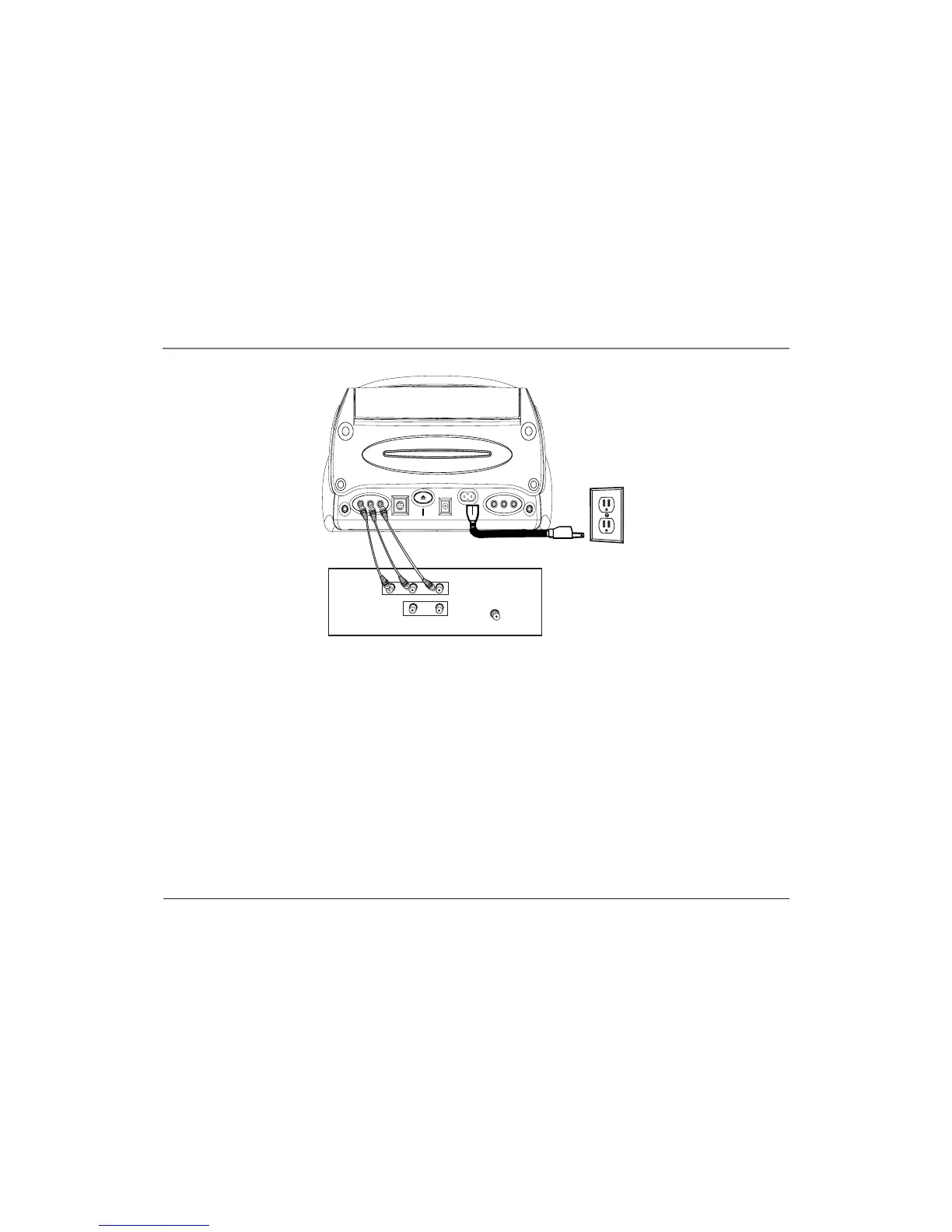
Connect to a TV
1. Connect audio cables (white and red) to the Audio Input Jacks on the back of the TV
(sometimes labeled AUDIO L/MONO and R) and to the AUDIO OUTPUT jacks (L AUDIO R) on
the DVD player.
2. Connect the video cable (yellow) to the Video Input Jack on the back of the TV and to the
VIDEO OUTPUT jack on the DVD player.
3. Connect the AC power cord to the AC POWER (HOME) jack on the DVD player and plug the
other end into the wall outlet.
PHONES PHONESEXTERNAL PANEL EJECT DC POWER (CAR) AC POWER (HOME)
V
I
D
E
O
L
A
U
D
I
O
R
V
I
D
E
O
L
A
U
D
I
O
R
TV (back panel)
CABLE/
ANTENNA
VIDEO
R
L / MONO
AUDIO
L
R
IN
OUT
OUTPUT
INPUT



 To Next Page