Chapter 1: Connections & Setup
Chapter 1 5
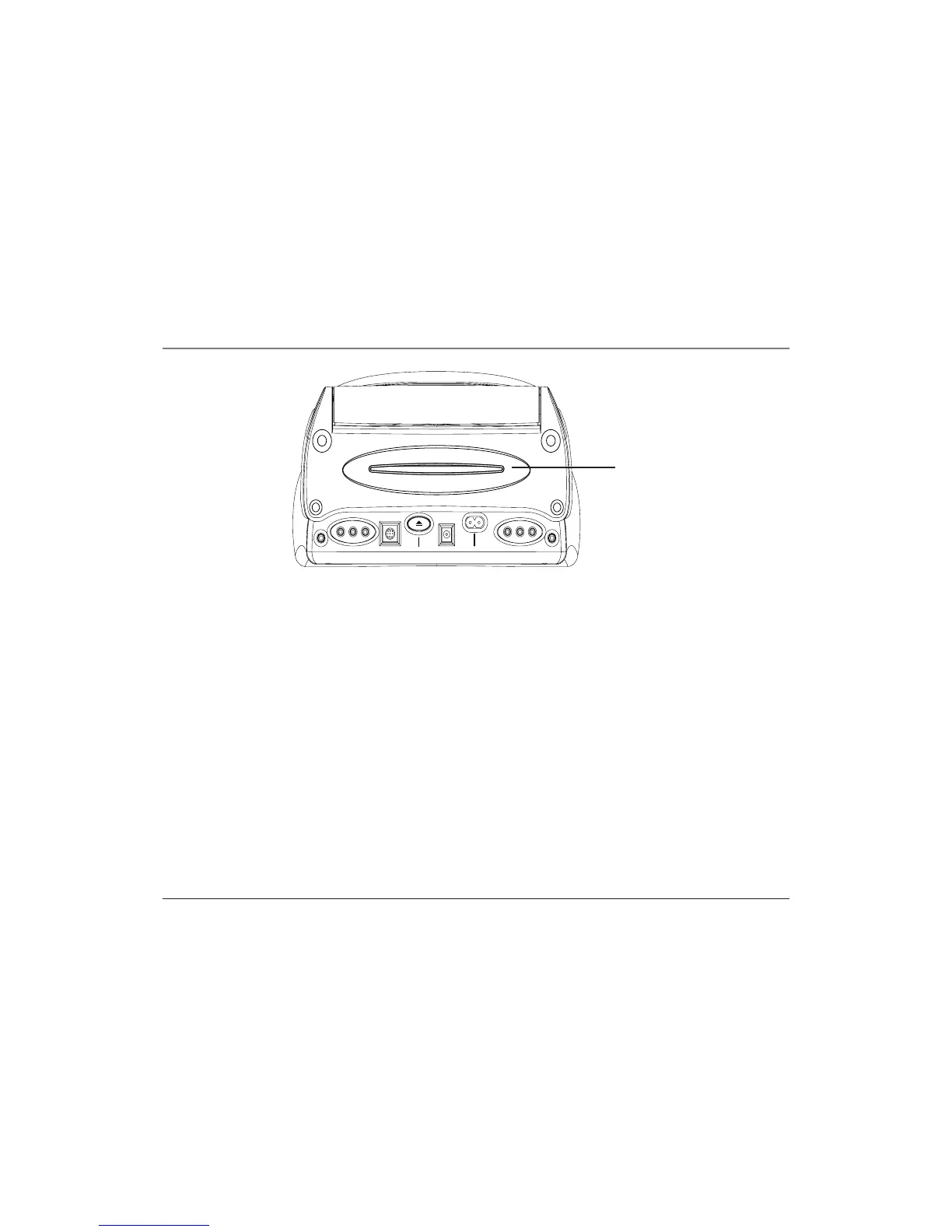
The Back of the Mobile DVD Player
Disc slot Insert discs into this slot.
PHONES Allows you to connect headphones to listen to the sound.
Note: When either or both of the headphones are in use, there will be no sound coming from the
speakers.
OUTPUT VIDEO Sends the video playing in the DVD player to another component such as a TV.
OUTPUT L/R AUDIO Sends the audio playing in the DVD player to another component such as
a TV or sends the sound to powered (amplified) speakers.
EXTERNAL PANEL Sends the audio and the video that’s playing in the DVD player to a
component that has a compatible 8-pin input jack, such as an external monitor.
Notes: For vehicle use, connect the mobile DVD player to a factory equipped compatible display. To
determine if the display is compatible, check the owner’s manual provided with your vehicle.
Damage can occur to the mobile DVD player if you do not use a compatible monitor with a compatible
8-pin input jack.
EJECT Ejects the disc from the disc slot.
PHONES PHONESEXTERNAL PANEL EJECT DC POWER (CAR) AC POWER (HOME)
V
I
D
E
O
L
A
U
D
I
O
R
V
I
D
E
O
L
A
U
D
I
O
R
OUTPUT
INPUT
Disc slot



 To Next Page