52
1
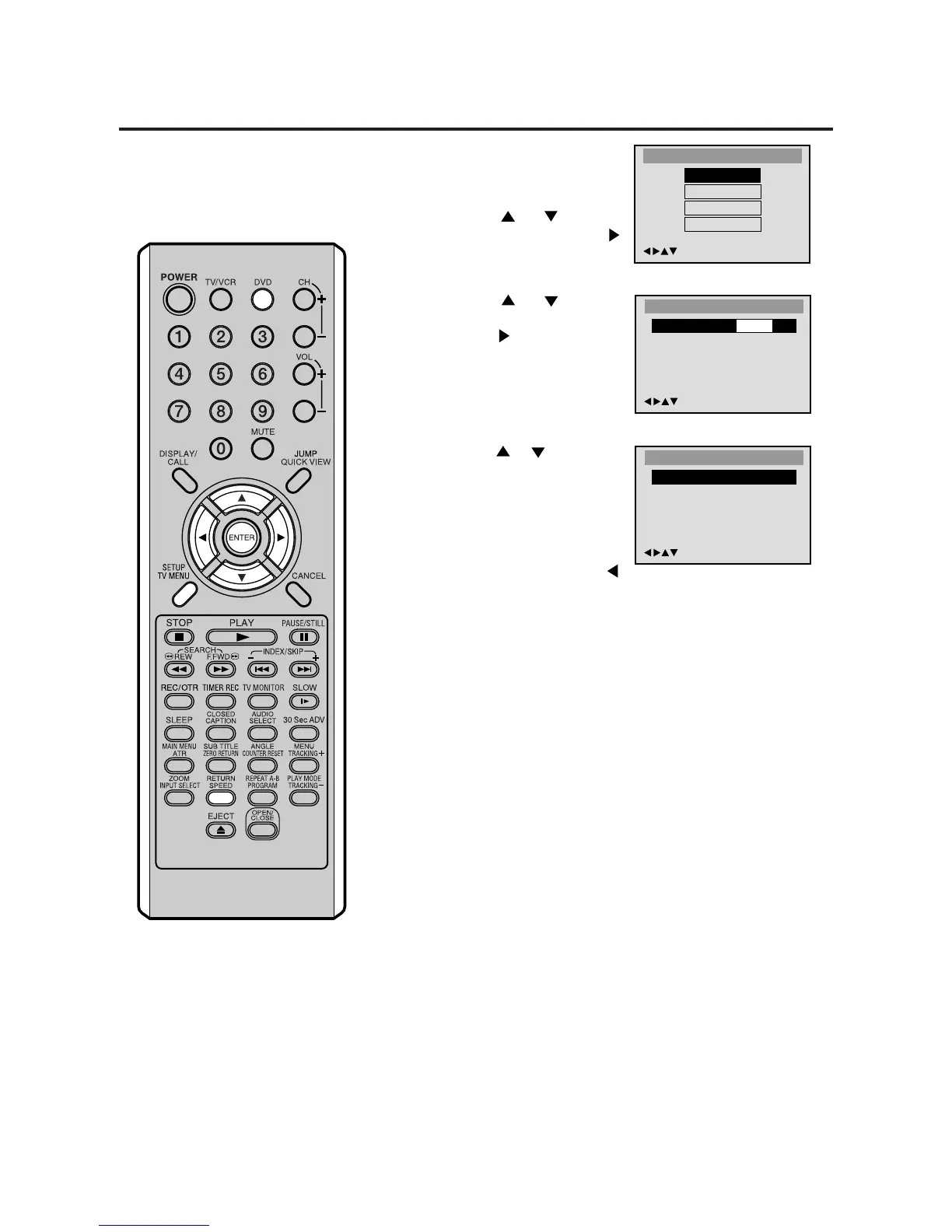
Press DVD to select DVD
mode.
Press SETUP in the stop
mode or No Disc.
Press or to select
“Language”, then press
or ENTER.
2
Press or to select
“OSD Language”, then
press
or ENTER.
3
Press or to select de-
sired language (e.g. Eng-
lish), then press ENTER.
The menu returns to “Lan-
guage” menu automatically.
• If you want to return to the
previous menu, press
or RETURN.
4
Repeat steps 2-3 for other “Language” setting.
Other Selection: (Menu/Audio/Subtitle)
If you want to select another language, enter the language
code (see the Language code list on page 58).
Off: (subtitle)
Subtitles do not appear.
5
Press SETUP to remove the Menu screen.
/Enter/Setup/Return
OSD Language
Francais
Espanol
English
/Enter/Setup/Return
Language
Menu English
Audio English
Subtitle English
OSD Language English
Setting language
You can change the default settings
to customize performance to your
preference.
NOTES:
• If the selected soundtrack language is
not recorded on the disc, the original
language will be heard.
• If the selected subtitle language is not
recorded on the disc, the first-priority
language is selected.
Main Menu
/Enter/Setup/Return
Language
Picture
Sound
Parental



 To Next Page