DCN: 140-01773-03 Page 4
INSTALLATION SETUP
Before operating the system, the HVAC System Type must be setup in
the Installer Settings/System Settings/Mechanical Settings Menu!
Default Settings: The HVAC System Type is default set for a
Gas/Electric system with Gas Heat Fan type. If this matches the HVAC
system the thermostat is connected to, then no further setup is required.
If the HVAC system has Electric heat or is a Heat Pump system, then the
Mechanical Settings must be changed to match. Go to the Installer
Settings Menu to complete the HVAC setup.
Installer Settings Menu
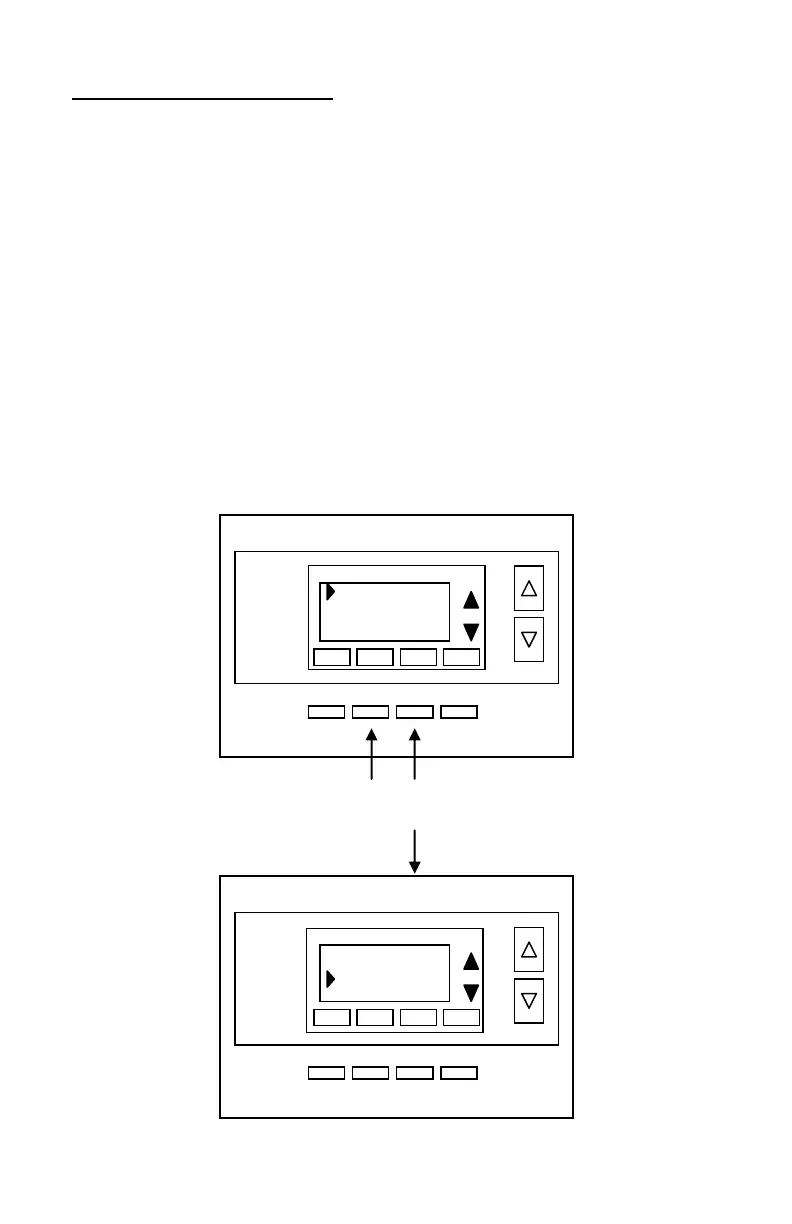
To change the HVAC setup, go to the Installer Settings Menu. This is a hidden menu
and it can be accessed by pressing the main menu button and when the main Menu
Selection screen appears, press and hold the middle two buttons for 5 seconds.
Thermostat Main Menu Selection Screen
Installer Settings Menu screen
Press and hold two middle buttons to enter the Installer Settings Menu
User Settings
Away Setpoints
ZWave Install
Thermostat Info
Display Lock N
Service Mode
System Settings
Max Heat SP 90


 To Next Page