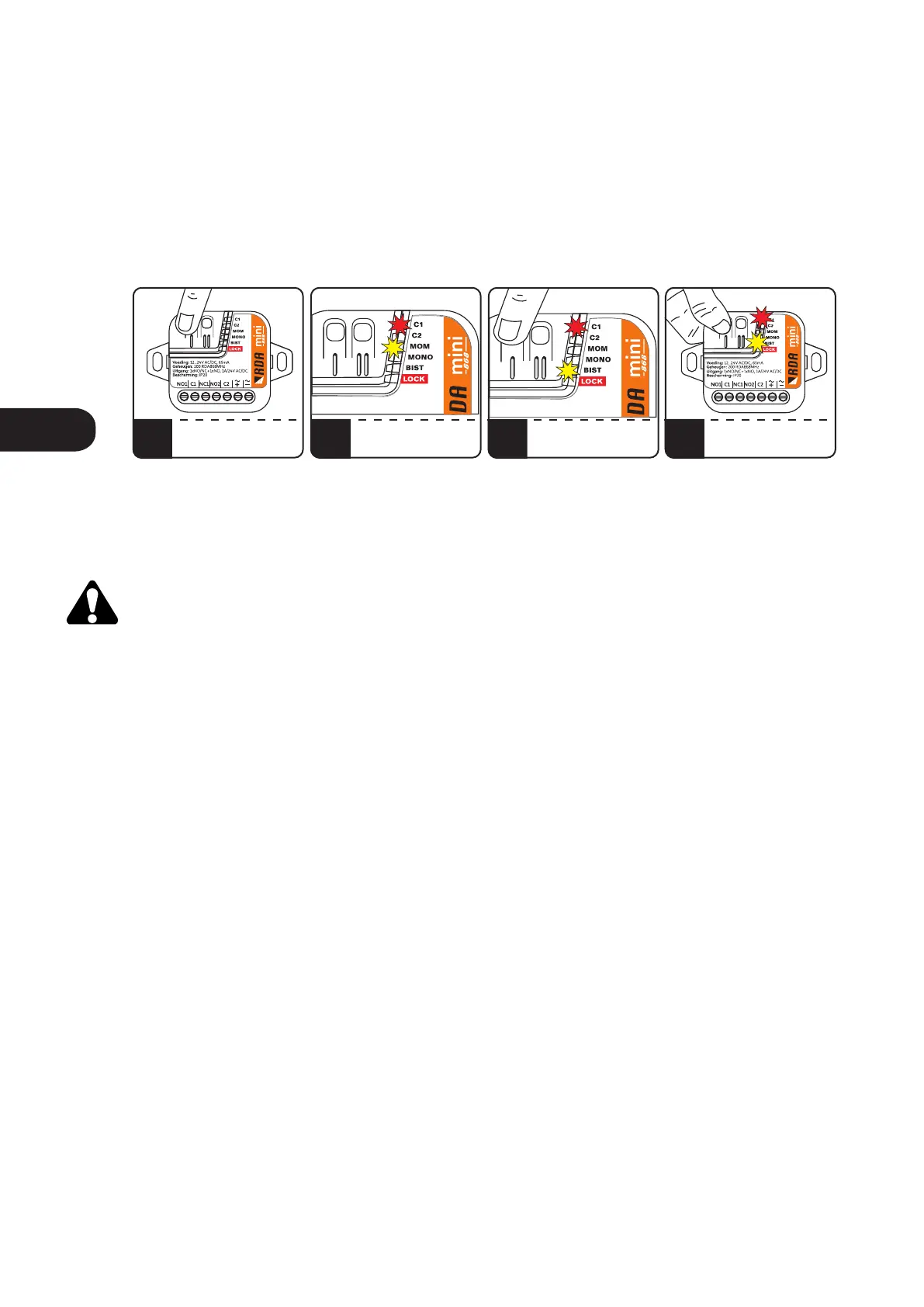
8. Setting the operating mode of the output channel to bistable or momentary.
To set the C1 / C2 channel mode, press and release C1 / C2, the red C1 / C2 LED will light and the yellow LED
will indicate the currently set MOM / MONO / BIST channel mode. By repeatedly pressing the C1 / C2
button, set the required operating mode. The yellow LED with the MOM description will set the
momentary mode, the LED with the BIST description - bistable mode. To confirm the selected operating
mode, press and hold the C1 / C2 button of the receiver. The C1 / C2 LED will blink and the C1 / C2 and MOM /
BIST LEDs will turn off. The operating mode will be saved.
Pressing the adjacent channel button will exit the programming mode without confirming the
changes.
1 2 3
PRESS C1/C2
C1/C2 + MOM/MONO/BIST
LIGHT ON
PRESS C1/C2 TO SET
MOM OR BIST MODE
3
TO CONFIRM
PRESS AND HOLD C1/C2
Fig.9 Setting bistable or momentary mode.
ENEN



 To Next Page