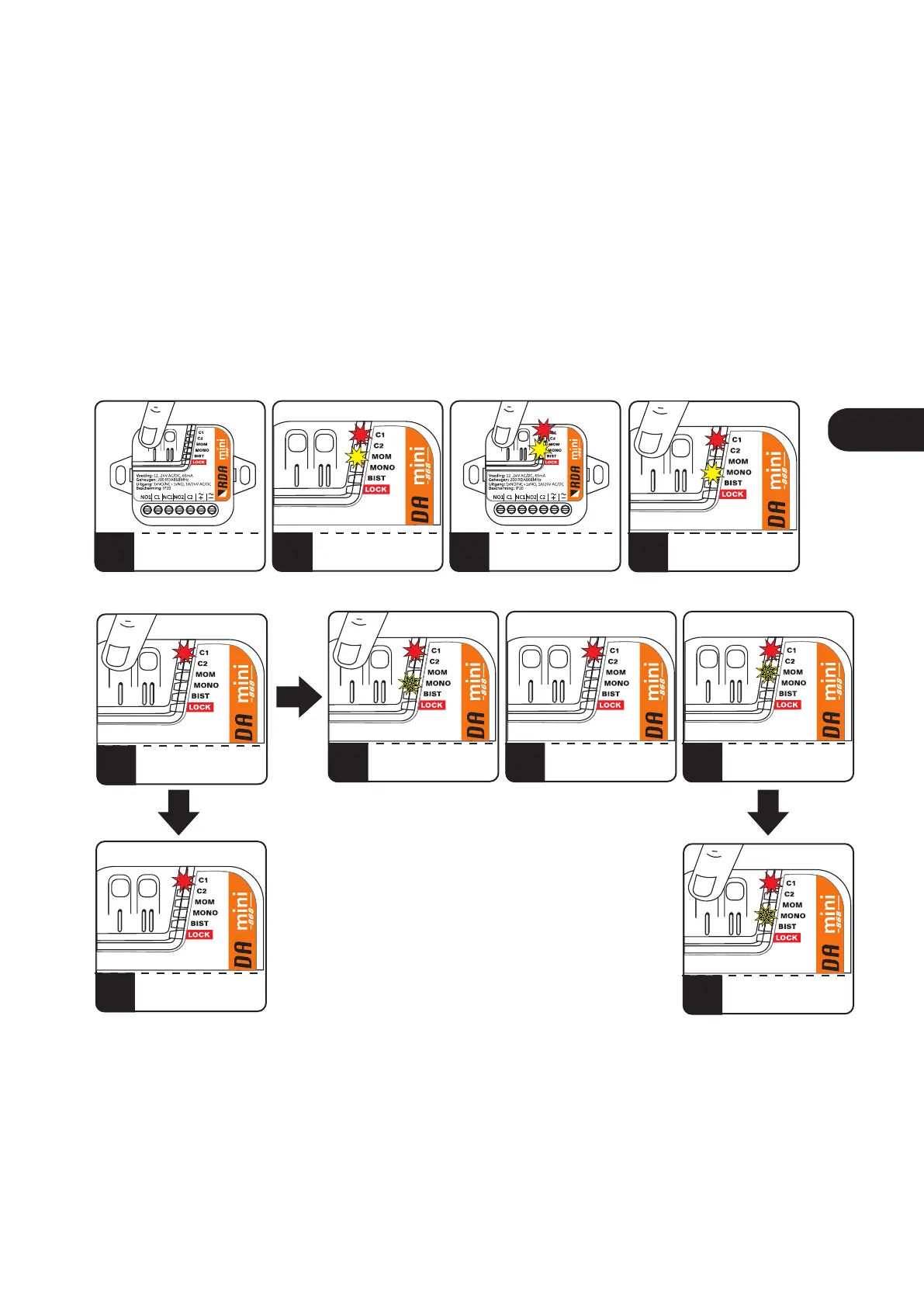
7. Setting the operating mode of the output channel to monostable.
In order to set the channel operating mode to monostable, press and release the button of the selected
channel C1 / C2. The red C1 / C2 diode will light up and the yellow LED will indicate the currently set
operating mode of the channel. By repeatedly pressing the C1 / C2 button, set the monostable mode,
signaled by a yellow LED with the description MONO. To confirm, press and hold the C1 / C2 button again.
The LED with the description MONO will go out and start flashing after a while. While holding down the C1 /
C2 button, count the desired number of blinks, and then release the C1 / C2 button. The counted number of
MONO diode pulses means the channel activation time in seconds or minutes when after releasing the
button, while the C1 / C2 diode is blinking, the C1 / C2 button is pressed for a moment. To set the ON time to
0.5 s, release the C1 / C2 button before the first flash of the yellow LED with MONO description.
1
5
2
6b
3
7
PRESS C1/C2
MONO LED WILL LIGHTS OFF
FOR A MOMENT...
C1/C2 AND CURRENTLY
SET MODE MOM/MONO/BIST
LIGHT ON
MONO LED WILL PULSE
COUNTING THE SECONDS
/MINUTES
PRESS SHORTLY C1/C2
TO LIGHT ON MONO LED
RELEASE C1/C2
AFTER COUNTING DOWN
DESIRED TIME IN SECONDS
8
MONO WILL PULSE
AND GOES OFF
TIME IN SECONDS SET
9
PRESSING C1/C2
WHEN MONO PULSE WILL
SET THE TIME IN MINUTES
6a
RELEASING C1/C2
AT THIS MOMENT
WILL SET THE TIME 0,5S
4
PRESS AND HOLD
C1/C2
Fig.8 Setting the monostable mode.
ENEN



 To Next Page