EasyManua.ls Logo

Ready Net AC1200M - Web Page Navigation and Controls

Ready Net AC1200M
29 pages
Print Icon
To Next Page IconTo Next Page
To Previous Page IconTo Previous Page
Loading...
Version 1.4 P a g e | 7
4.3 Web Page
S
S
u
u
b
b
-
-
n
n
a
a
v
v
i
i
g
g
a
a
t
t
i
i
o
o
n
n
b
b
a
a
r
r
s
s
w
w
i
i
l
l
l
l
a
a
p
p
p
p
e
e
a
a
r
r
o
o
n
n
t
t
h
h
e
e
l
l
i
i
n
n
e
e
b
b
e
e
l
l
o
o
w
w
t
t
h
h
e
e
t
t
o
o
p
p
n
n
a
a
v
v
i
i
g
g
a
a
t
t
i
i
o
o
n
n
b
b
a
a
r
r
.
.
C
C
l
l
i
i
c
c
k
k
o
o
n
n
t
t
h
h
e
e
s
s
u
u
b
b
-
-
n
n
a
a
v
v
i
i
g
g
a
a
t
t
i
i
o
o
n
n
b
b
a
a
r
r
s
s
t
t
o
o
c
c
h
h
o
o
o
o
s
s
e
e
a
a
c
c
o
o
n
n
f
f
i
i
g
g
u
u
r
r
a
a
t
t
i
i
o
o
n
n
p
p
a
a
g
g
e
e
.
.
T
T
h
h
e
e
w
w
e
e
b
b
p
p
a
a
g
g
e
e
w
w
i
i
l
l
l
l
l
l
o
o
g
g
o
o
u
u
t
t
a
a
f
f
t
t
e
e
r
r
5
5
m
m
i
i
n
n
u
u
t
t
e
e
s
s
o
o
f
f
n
n
o
o
a
a
c
c
t
t
i
i
v
v
i
i
t
t
y
y
.
.
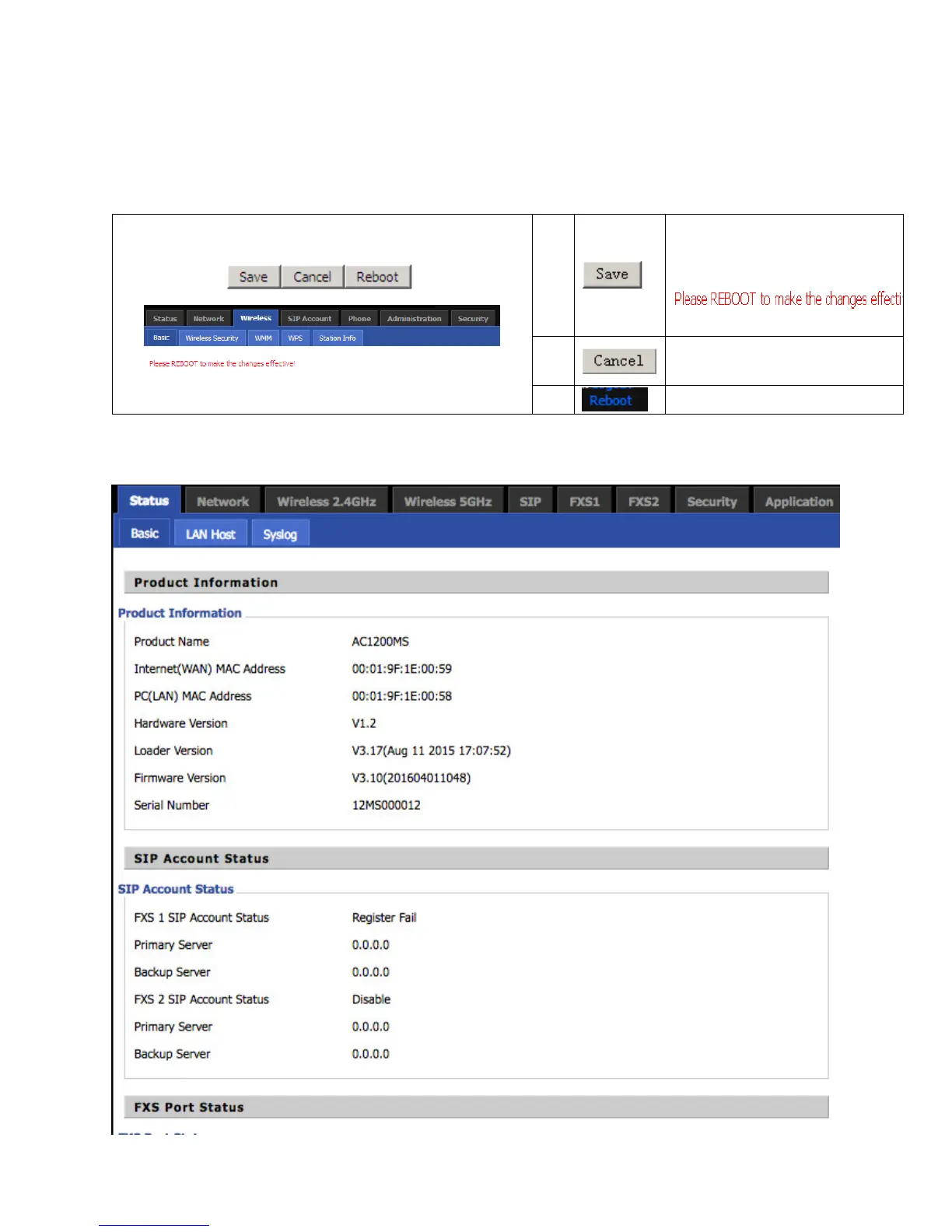
After every change, click this button
to apply the change.
After clicking Save, the red
will appear.
Click to cancel changes.
Click to reboot the router.
5 Status