Version 1.4 P a g e | 12
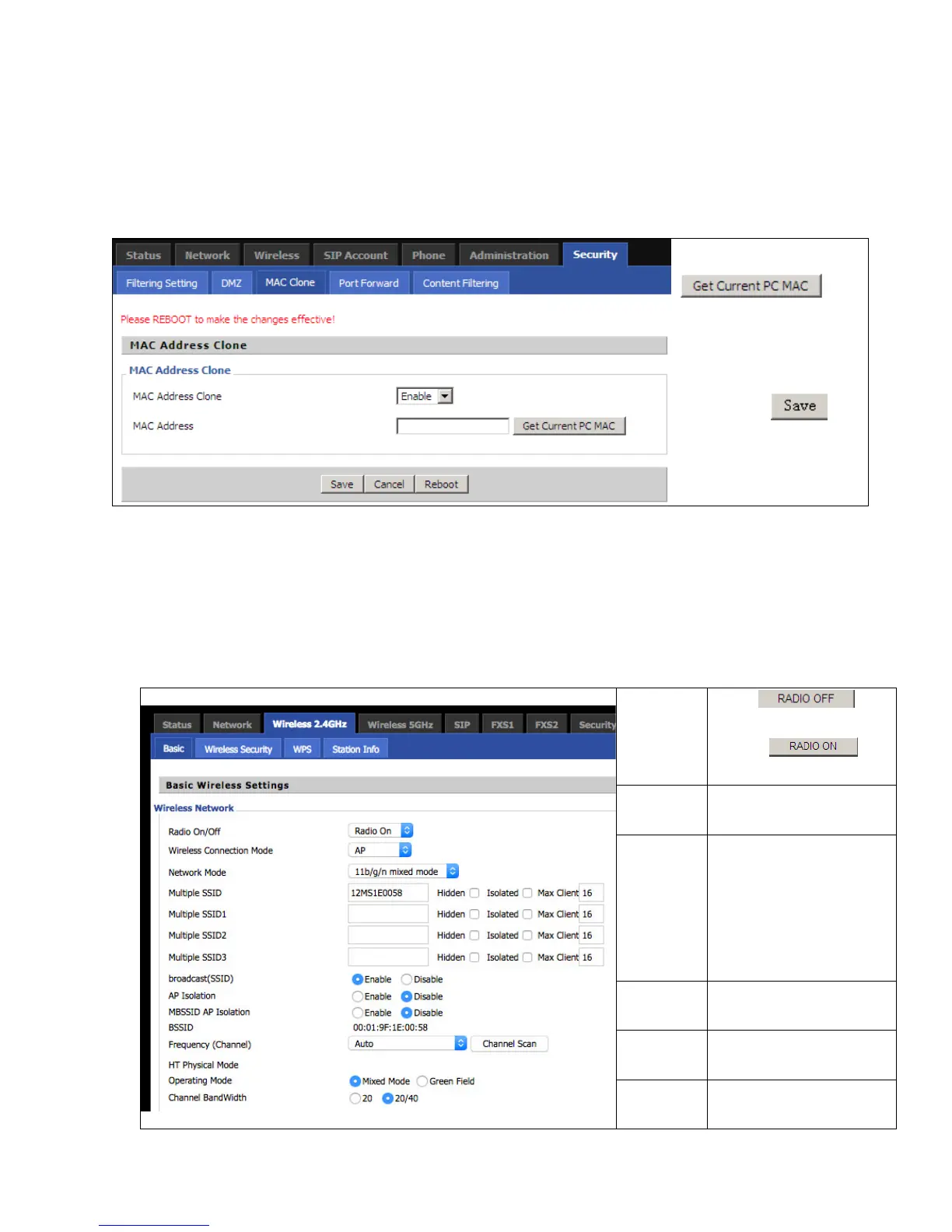
6.5 MAC Clone
S
S
o
o
m
m
e
e
I
I
S
S
P
P
s
s
w
w
i
i
l
l
l
l
r
r
e
e
q
q
u
u
i
i
r
r
e
e
y
y
o
o
u
u
t
t
o
o
r
r
e
e
g
g
i
i
s
s
t
t
e
e
r
r
y
y
o
o
u
u
r
r
M
M
A
A
C
C
a
a
d
d
d
d
r
r
e
e
s
s
s
s
.
.
I
I
f
f
y
y
o
o
u
u
d
d
o
o
n
n
o
o
t
t
w
w
i
i
s
s
h
h
t
t
o
o
r
r
e
e
-
-
r
r
e
e
g
g
i
i
s
s
t
t
e
e
r
r
y
y
o
o
u
u
r
r
M
M
A
A
C
C
a
a
d
d
d
d
r
r
e
e
s
s
s
s
,
,
y
y
o
o
u
u
c
c
a
a
n
n
h
h
a
a
v
v
e
e
t
t
h
h
e
e
r
r
o
o
u
u
t
t
e
e
r
r
c
c
l
l
o
o
n
n
e
e
t
t
h
h
e
e
M
M
A
A
C
C
a
a
d
d
d
d
r
r
e
e
s
s
s
s
t
t
h
h
a
a
t
t
i
i
s
s
r
r
e
e
g
g
i
i
s
s
t
t
e
e
r
r
e
e
d
d
w
w
i
i
t
t
h
h
y
y
o
o
u
u
r
r
I
I
S
S
P
P
.
.
T
T
o
o
u
u
s
s
e
e
t
t
h
h
e
e
C
C
l
l
o
o
n
n
e
e
A
A
d
d
d
d
r
r
e
e
s
s
s
s
b
b
u
u
t
t
t
t
o
o
n
n
,
,
t
t
h
h
e
e
c
c
o
o
m
m
p
p
u
u
t
t
e
e
r
r
v
v
i
i
e
e
w
w
i
i
n
n
g
g
t
t
h
h
e
e
W
W
e
e
b
b
-
-
b
b
a
a
s
s
e
e
u
u
t
t
i
i
l
l
i
i
t
t
y
y
s
s
c
c
r
r
e
e
e
e
n
n
w
w
i
i
l
l
l
l
h
h
a
a
v
v
e
e
t
t
h
h
e
e
M
M
A
A
C
C
a
a
d
d
d
d
r
r
e
e
s
s
s
s
a
a
u
u
t
t
o
o
m
m
a
a
t
t
i
i
c
c
a
a
l
l
l
l
y
y
e
e
n
n
t
t
e
e
r
r
e
e
d
d
i
i
n
n
t
t
h
h
e
e
C
C
l
l
o
o
n
n
e
e
W
W
A
A
N
N
M
M
A
A
C
C
f
f
i
i
e
e
l
l
d
d
.
.
Step 1. Press
to
clone the current PC or MAC
address to router’s Internet
port..
Step 2. Press to
save the changes.
Step 3. Press Reboot to
make changes effective.
7 2.4GHz and 5GHz Wireless Connection
7.1 Enable Wireless and Set the SSID
O
O
p
p
e
e
n
n
t
t
h
h
e
e
W
W
i
i
r
r
e
e
l
l
e
e
s
s
s
s
>
>
B
B
a
a
s
s
i
i
c
c
w
w
e
e
b
b
p
p
a
a
g
g
e
e
a
a
s
s
s
s
h
h
o
o
w
w
n
n
b
b
e
e
l
l
o
o
w
w
.
.
Radio
On/Off
Press to
disable.
Press to
enable.
Network
Mode
Choose one network mode
from the drop down list.
Network
Name
(SSSID)
The SSID can be any text,
number, or special
characters. The default
SSID is 1200MXXXXXX or
1200MSXXXXXX (last 6
digits of the LAN MAC).
Multiple
SSSD1-3
For adding additional
wireless networks.
Broadcast
(SSID)
Allows user to disable SSID
broadcast.
Frequency
For choosing channel
frequency.


 To Next Page