EasyManua.ls Logo

Real-El M-550 User Manual

Real-El M-550
9 pages
To Next Page IconTo Next Page
Page #1 background imageLoading...
Page #1 background image
M-550
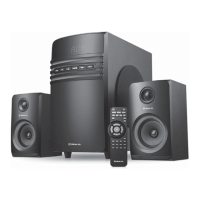
2.1 MULTIMEDIA
SPEAKER SYSTEM
OPERATION MANUAL

Questions and Answers:

Real-El M-550 Specifications

General IconGeneral
Type2.1
Frequency Response40Hz - 20kHz
Satellite Dimensions90 x 100 mm
Interface3.5mm Audio Jack
Power supply220 V
Impedance4 Ohm

Summary

Buyer Recommendations

Package Contents

Safety Precautions

Technical Description and Features

Subwoofer Controls and Connections

Front Panel Controls Overview

Details the LED display, mode selection, playback, volume, and USB port on the subwoofer's front panel.

Rear Panel Connections and Power

Explains audio inputs/outputs, FM antenna, bass control, power switch, and mains connection on the rear panel.

Remote Control Functions

Remote Control Buttons

Describes the functions of all buttons on the remote control for system operation.

Connecting and Operating the Speaker System

System Connection Diagram

Illustrates how to connect the speaker system to various audio devices and satellites.

Player Mode Operation

Details how to operate the system in Player mode using USB or SD card media.

Advanced Operation Modes

Bluetooth Mode

Instructions for connecting and using the speaker system via Bluetooth.

FM Radio Mode

Guide to tuning, scanning, and selecting stations in FM radio mode.

Line Input and Mute Modes

Explains how to use the AUX input and mute the sound system.

Troubleshooting and Specifications

Troubleshooting Common Issues

Provides solutions for common problems like no sound or power issues.

Technical Specifications

Lists detailed technical data, including output power, frequency response, and dimensions.

Related product manuals