CONTROLS AND FUNCTIONS
■ n m q ui
h I = n I , I
0 * 0 < J T O - c x J r I ^ ^
W '®' 'fll)'
m [ a ]
=4i=?=rt='.°=ft:?=rh=:=r=
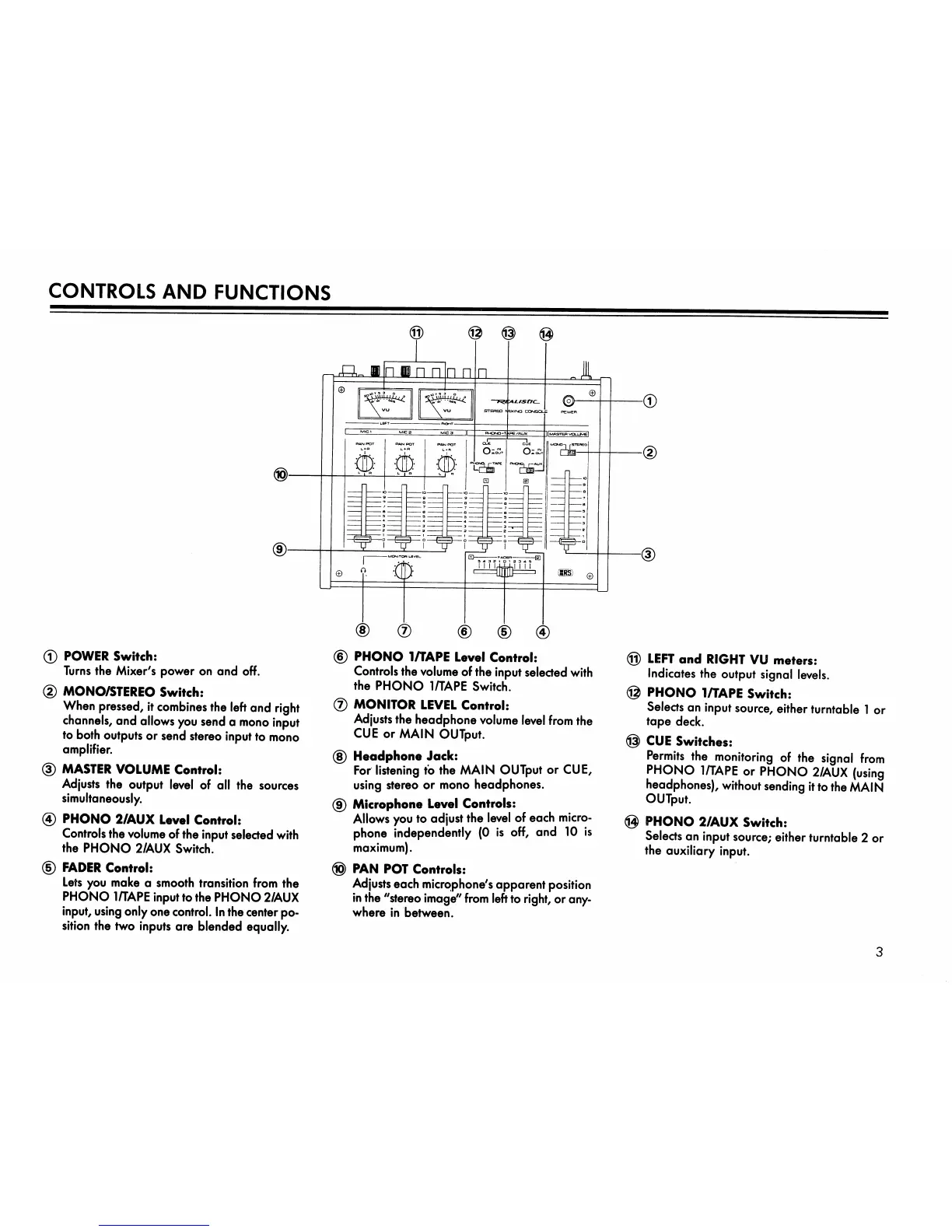
® POWER Switch:
Turns the Mixer's power on and off.
(2) MONO/STEREO Switch:
When pressed, it combines the left and right
channels, and allows you send a mono input
to both outputs or send stereo input to mono
amplifier.
(D MASTER VOLUME Control:
Adjusts the output level of all the sources
simultaneously.
0 PHONO 2/AUX Level Control:
Controls the volume of the input selected with
the PHONO 2/AUX Switch.
(5) FADER Control:
Lets you moke a smooth transition from the
PHONO 1/TAPE input to the PHONO 2/AUX
input, using only one control. In the center po
sition the two inputs are blended equally.
0 PHONO 1/TAPE Level Control:
Controls the volume of the input selected with
the PHONO 1/TAPE Switch.
® MONITOR LEVEL Control:
Adjusts the headphone volume level from the
CUE or MAIN OUTput.
0 Headphone Jock:
For listening to the MAIN OUTput or CUE,
using stereo or mono headphones.
0 Microphone Level Controls:
Allows you to adjust the level of each micro
phone independently (0 is off, and 10 is
maximum).
0 PAN POT Controls:
Adjusts each micro>phone's apparent position
in the "stereo image" from left to right, or any
where in between.
0 LEFT and RIGHT VU meters:
Indicates the output signal levels.
0 PHONO 1/TAPE Switch:
Selects an input source, either turntable 1 or
tope deck.
0 CUE Switches:
Permits the monitoring of the signal from
PHONO 1/TAPE or PHONO 2/AUX {using
headphones), without sending it to the MA\N
OUTput.
0 PHONO 2/AUX Switch:
Selects on input source; either turntable 2 or
the auxiliary input.
3



 To Next Page