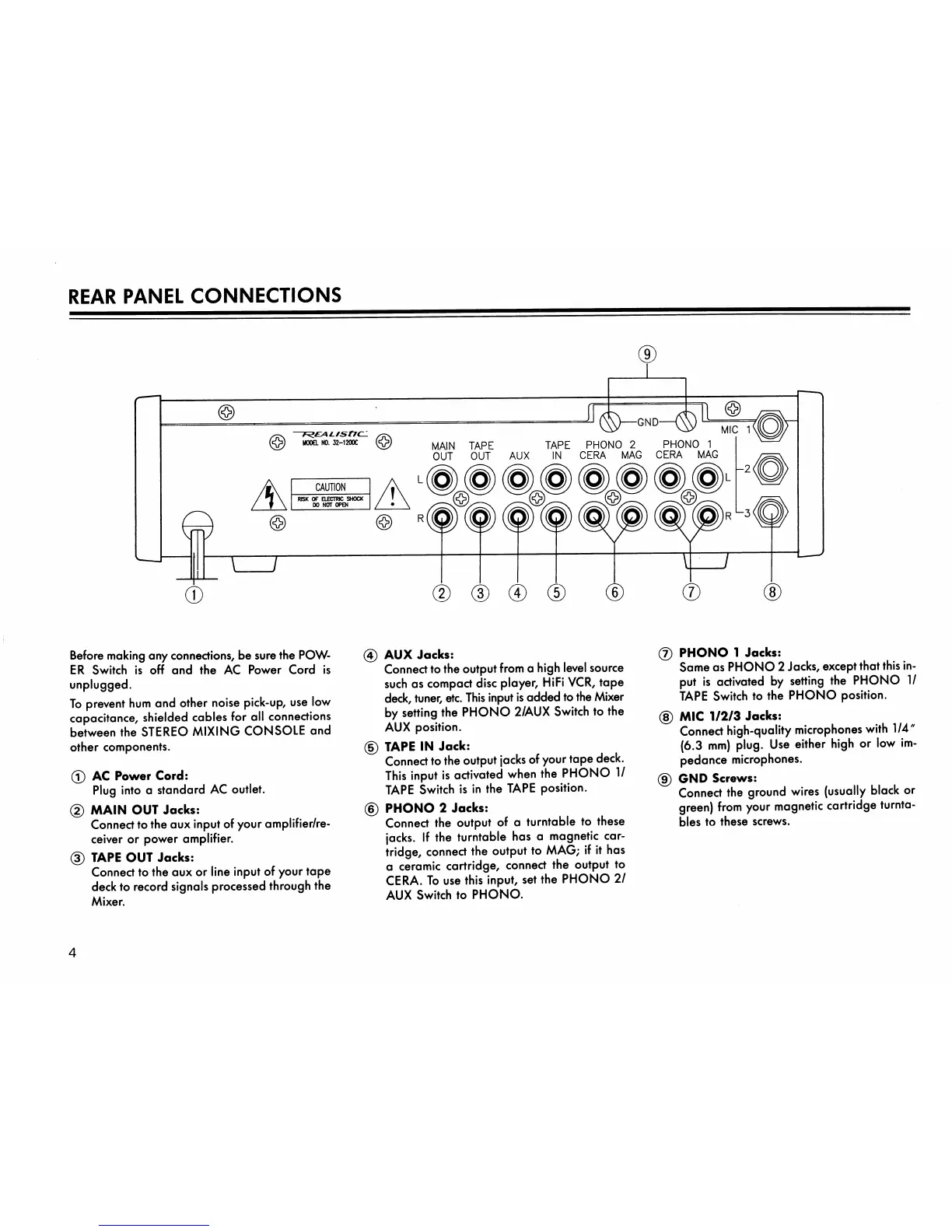
REAR PANEL CONNECTIONS
Before making any connections, be sure the POW
E R S w i t c h i s o ff a n d t h e A C P o w e r C o r d i s
unplugged.
To prevent hum and other noise pick-up, use low
capacitance, shielded cables for all connections
between the STEREO MIXING CONSOLE and
other components.
0 AC Power Cord:
Plug into a standard AC outlet.
(2) MAIN OUT Jocks:
Connect to the aux input of your amplifier/re
ceiver or power amplifier.
(D TAPE OUT Jocks:
Connect to the aux or line input of your tape
deck to record signals processed through the
Mixer.
0 AUX Jocks:
Connect to the output from a high level source
such as compact disc player, HiFi VCR, tape
deck, tuner, etc. This input is added to the Mixer
by setting the PHONO 2/AUX Switch to the
AUX position.
0 TAPE IN Jock:
Connect to the output jacks of your tape deck.
This input is activated when the PHONO 1/
TAPE Switch is in the TAPE position.
0 PHONO 2 Jocks:
Connect the output of a turntable to these
jacks. If the turntable has a magnetic car
tridge, connect the output to MAG; if it has
a ceramic cartridge, connect the output to
CERA. To use this input, set the PHONO 21
AUX Switch to PHONO.
0 PHONO 1 Jocks:
Same as PHONO 2 Jacks, except that this in
put is activated by setting the PHONO 1/
TAPE Switch to the PHONO position.
0 MIC 1/2/3 Jocks:
Connect high-quality microphones with 1/4"
(6.3 mm) plug. Use either high or low im
pedance microphones.
0 GND Screws:
Connect the ground wires (usually black or
green) from your magnetic cartridge turnta
bles to these screws.
4



 To Next Page