MAINTENANCE
to be on the left side of the mix). With these con
trols you con "seporote" o soloist or narrator from
the rest of the group "electronically."
FADER CONTROL
This control is used to moke a smooth transition
between the PHONO 1/TAPE and the PHONO 21
AUX input. Instead of moving two GLIDE-PATH®
controls to accomplish this, you con use just the
FADER. It is on almost fool-proof way to "cross
fade" from one source to another.
For example:
Begin with the FADER Control set to 5 on the left
side. In this position, source 1 is "on" and source
2 is "off". When you ore ready to switch to source
2 (you will probably want to CUE the source first),
slowly move the FADER to the right until you reach
5 on the right side. It's so simplel Remember, you
must pre-set the volume levels of source 1 and 2.
V O I C E O V E R
For proper blending of voice and music, you'll
wont to start with a microphone level that gives
a VU reading of -5 to -3. When talking over
music, the level control for the music source should
be reduced as you begin to speak and returned
to its original position during natural pauses and
when you hove finished speaking. Reduce the mu
sic level just enough for you to hear yourself in the
headphones or speakers (over the music). Don't
forget to move the level control for the microphone
to 0, when it is not in use.
Only the finest ports and craftsmanship have been
used in your Stereo Mixing Console. It should
require very little maintenance. If you do hove
problems, refer to the Troubleshooting chart below
for possible solutions.
Caution: Only a qualified service technician
should perform repairs on this unit!
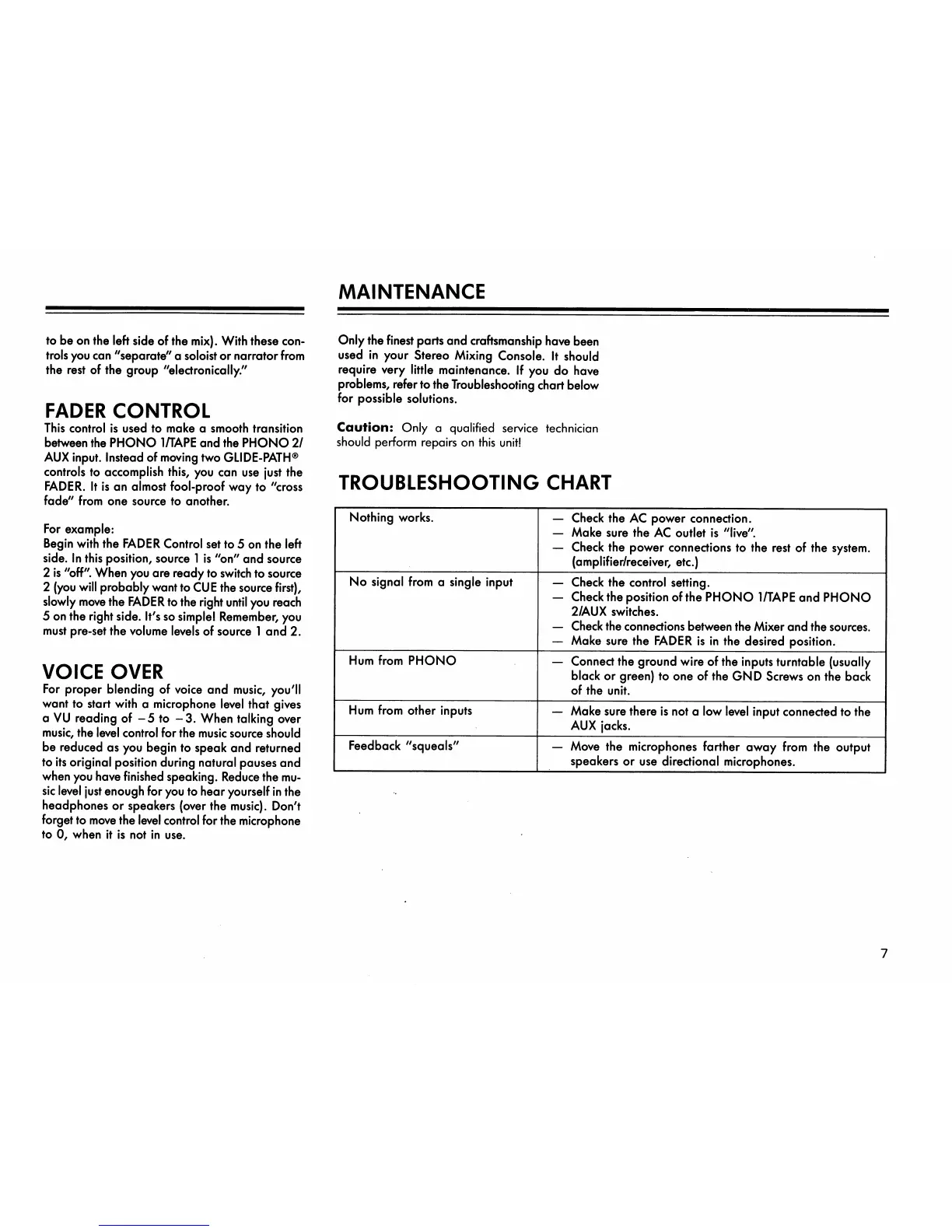
TROUBLESHOOTING CHART
Nothing works.
No signal from a single input
H u m f r o m P H O N O
Hum from other inputs
Feedback "squeals"
Check the AC power connection.
Moke sure the AC outlet is "live".
Check the power connections to the rest of the system.
(amplifier/receiver, etc.)
Check the control setting.
Check the position of the PHONO 1/TAPE and PHONO
2/ A U X switches.
Check the connections between the Mixer and the sources.
Moke sure the FADER is in the desired position.
Connect the ground wire of the inputs turntable (usually
black or green) to one of the GND Screws on the bock
of the unit.
Moke sure there is not a low level input connected to the
AUX jocks.
Move the microphones farther away from the output
speakers or use directional microphones.
7



 To Next Page
 Loading...