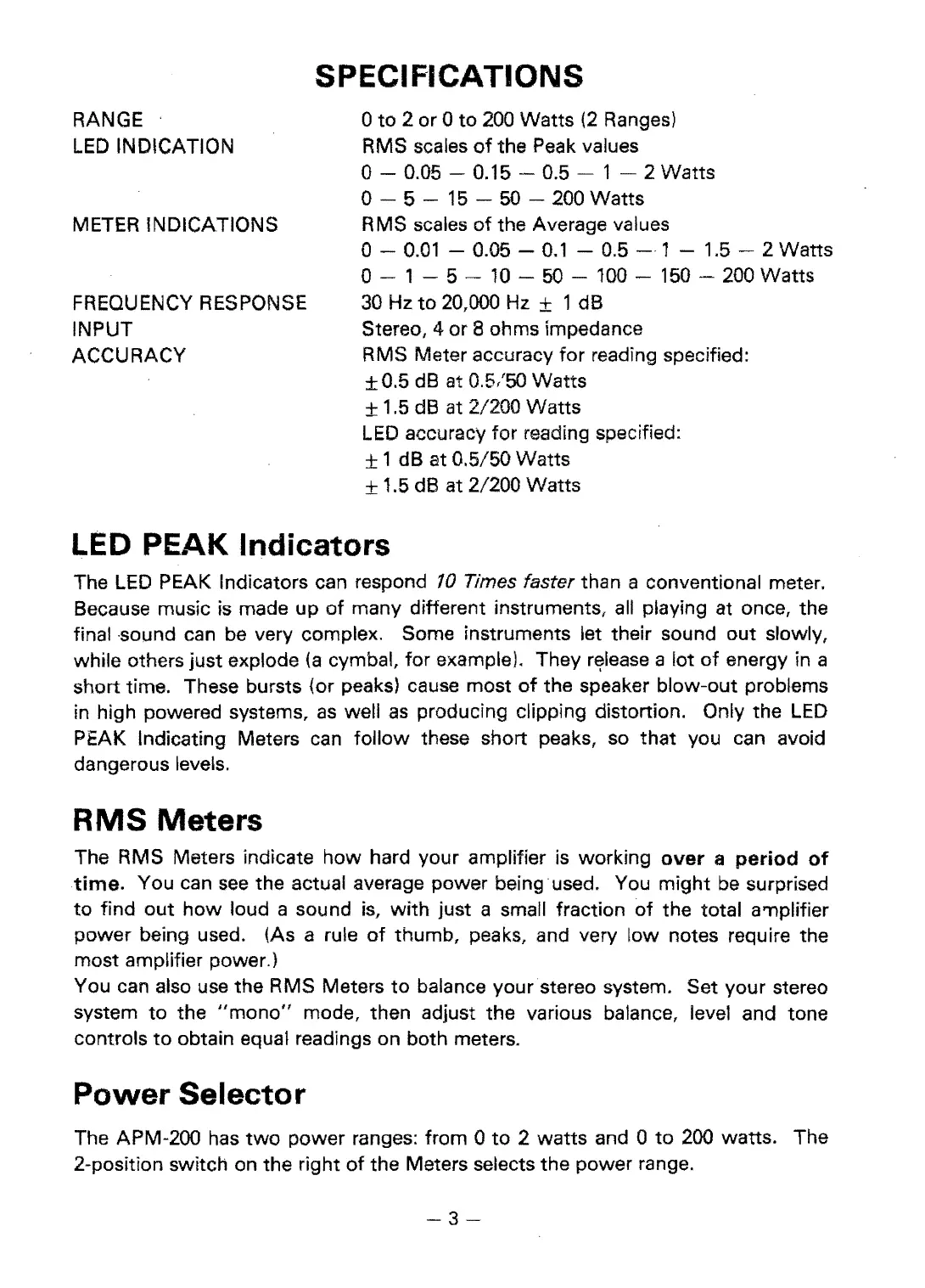
SPECIFICATIONS
RANGE
o
to
2 or 0
to
200
Watts
(2
Ranges)
LED
INDICATION
RMS scales
of
the Peak values
0-0.05
0.15 - 0.5 - 1 2 Watts
o- 5 -
15
- 50 - 200 Watts
METER INDICATIONS
RMS scales
of
the Average values
o-
0.01
- 0.05 -
0.1
- 0.5 - 1 - 1.5 - 2 Watts
o- 1 5 -
10
-
50
-
100 150
-
200
Watts
FREQUENCY RESPONSE
30
Hz
to
20,000 Hz ± 1 dB
INPUT
Stereo,
4 or 8 ohms impedance
ACCURACY
RMS Meter accuracy
for
reading specified:
±0.5
dB
at 0.5/50 Watts
± 1.5
dB
at 2/200 Watts
LED
accuracy for reading specified:
±1 dB at 0.5/50 Watts
± 1.5 dB at 2/200 Watts
LED PEAK Indicators
The
LED
PEAK Indicators can respond
10
Times faster than a conventional meter.
Because music
is
made up
of
many different instruments, all playing at once, the
final -sound can be very complex. Some instruments let their sound
out
slowly,
while others just explode
(a
cymbal, for example). They
r€(lease
a lot
of
energy in a
short time. These bursts (or peaks) cause most
of
the speaker blow-out problems
in high powered systems,
as
well
as
producing clipping distortion. Only the
LED
PEAK Indicating Meters
can
follow these short peaks,
so
that you can avoid
dangerous levels.
RMS
Meters
The RMS Meters indicate how hard your amplifier
is
working
over
a
period
of
time.
You can
see
the actual average power being used. You might
be
surprised
to
find
out
how
loud a sound
is,
with
just a small fraction
of
the total a'l1plifier
power being used. (As a rule
of
thumb, peaks, and very low notes require the
most amplifier power.)
You can also use the RMS Meters
to
balance your stereo system. Set your stereo
system
to
the
"mono"
mode, then adjust the various balance, level and tone
controls
to
obtain equal readings on both meters.
Power
Selector
The APM-200
has
two
power ranges: from 0
to
2
watts
and 0
to
200
warts. The
2-position switch on the right
of
the Meters selects the power range.
-3


 To Next Page
 Loading...