EasyManua.ls Logo

Realistic LAB-2100 - INSTALLATION; ELECTRICAL CONNECTIONS; Pickup Leads Connection; Ground Wire Connection

Realistic LAB-2100
10 pages
Print Icon
To Next Page IconTo Next Page
To Previous Page IconTo Previous Page
Loading...
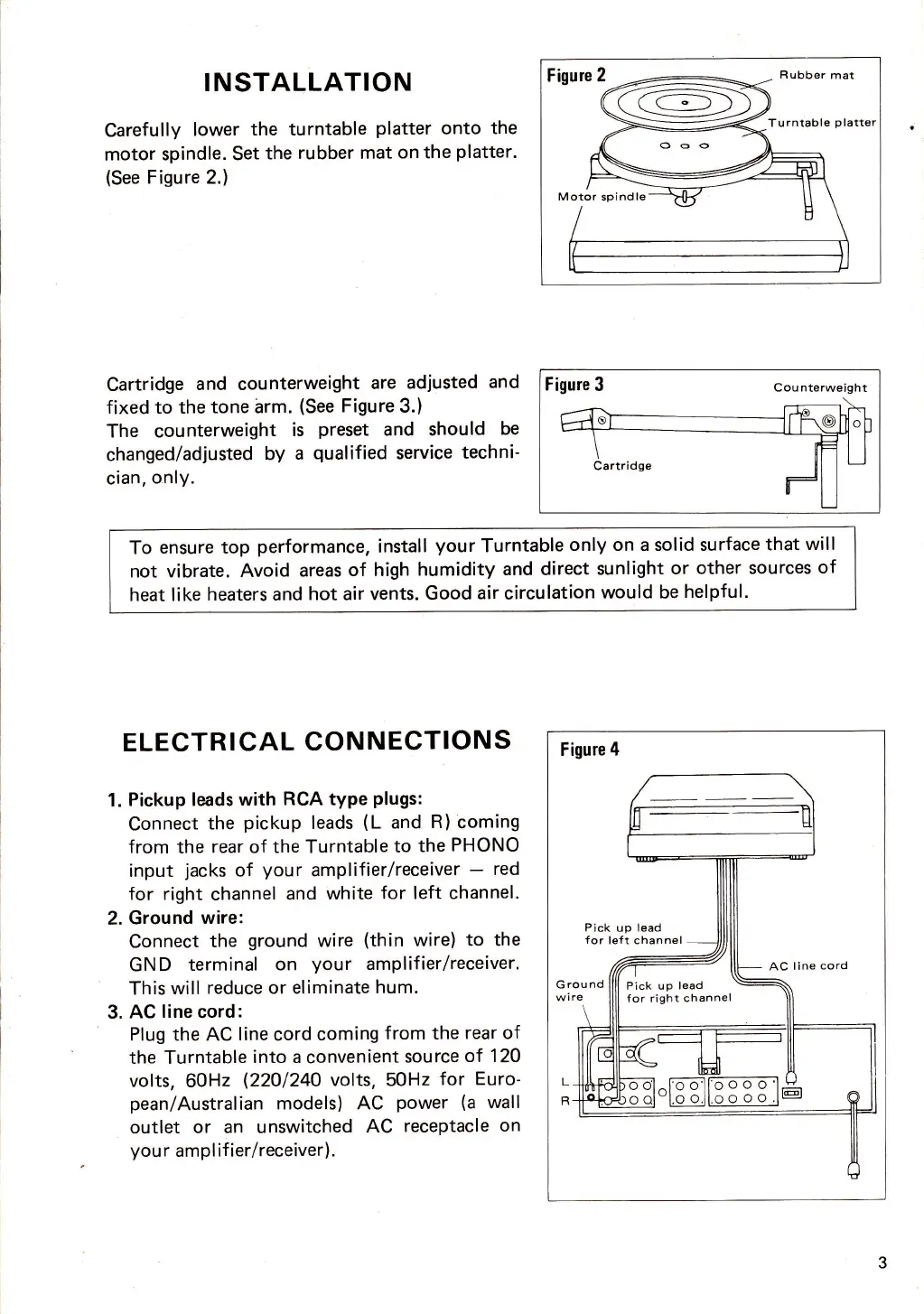
INSTALLATION
Carefully
lower
the turntable
platter
onto
the
motor
spindle. Set
the
rubber mat
on the
platter.
(See
Figure 2.)
Figure
3
Counterweight
To
ensure top
performance,
install
your
Turntable
only on
a
solid surface
that
will
not vibrate.
Avoid
areas
of high
humidity
and direct
sunlight
or other
sources
of
heat like
heaters and
hot air vents.
Good
air
circulation
would be
helpful.
Cartridge
and counterweight
are
adiusted
and
fixed
to
the
tone arm.
(See
Figure
3.)
The counterweight
is
preset
and should
be
changed/adjusted
by
a
qualified
service
techni-
cian,
only.
ELECTRICAL
CONNECTIONS
1.
Pickup leads
with
RCA type
plugs:
Connect
the
pickup
leads
(L
and
R)
coming
from
the
rear
of
the Turntable
to
the
PHONO
input
jacks
of
your
amplifier/receiver
-
red
for right
channel
and
white
for left channel.
2.
Ground
wire:
Connect
the
ground
wire
(thin
wire)
to the
GN
D terminal
on
your
amplif
ier/receiver.
This
will
reduce or eliminate
hum.
3.
AC
line
cord:
Plug the AC
line
cord
coming
from the
rear of
the Turntable
into a
convenient
source
of 12O
volts,
60Hz
(22O124O
volts, 50Hz
for
Euro-
pean/Australian
models) AC
power
(a
wall
outlet or an unswitched
AC
receptacle
on
you
r
ampl if ier/receiver).
Figure
4
Pick
up lead
for
left channel
Pick up
lead
for right
channel
Figure 2
R ubber
mat
= ==<
\S:-Z
Turntable
p
-
f,
ooo
)
\>:
----41
:-H
spindle

Related product manuals