EasyManua.ls Logo

Realistic LAB-2100 - OPERATION; Basic Operation Steps

Realistic LAB-2100
10 pages
Print Icon
To Next Page IconTo Next Page
To Previous Page IconTo Previous Page
Loading...
Figure
5
i
\
I
1
\
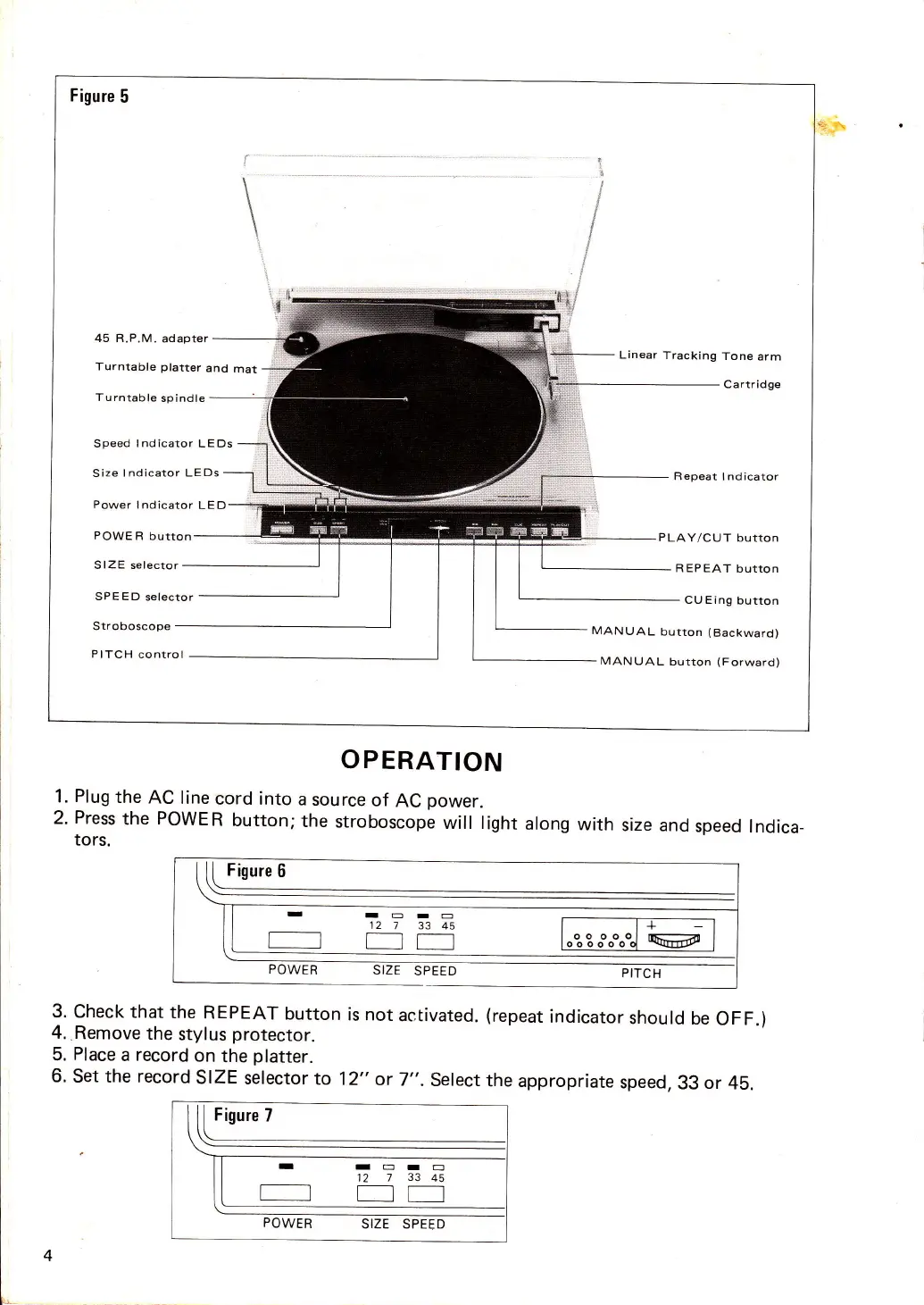
45 R.P.M.
Turntable
Turntable
ad apter
Linear
Tracking
Tone
arm
Ca rtr idge
platter
and
mat
spindle
Speed
Indicator
LEDs
Size
Indicator LEDs
Repeat
Indicator
Power
Indicator
LE D
POWE
R
button
PLAY/CUT
button
S
IZE
selector
REPEAT
button
SPEED
selector
CU Eing
button
Stroboscope
MANUAL
button
(Backward)
PITCH
control
MANUAL
button
(Forward)
1.
Plug
the
AC line
cord into
2.
Press
the
POWER
button;
tors.
t[Iryo _
POWER
SIZE
SPEED
3. Check
that
the REPEAT
button
is not
activated.
(repeat
indicator
should
be
OFF.)
4.,Remove
the
stylus
protector.
5.
Place
a
record
on
the
platter.
6.
Set the record
SIZE
selector
to
12"
or
7".
Select
the
appropriate
speed,
33
or
45.
Figure
7
rTEIE
12
7
3345
POWER
SIZE
SPEED
OPERATION
a
source
of
AC
power.
the
stroboscope
will light
along
with
size and
speed
Indica_
IEI-
127
3345
+
oo
oo(
oo
ooo
o

Related product manuals