EasyManua.ls Logo

Recon 200 Gen 2 - User Manual

Recon 200 Gen 2
8 pages
Print Icon
To Next Page IconTo Next Page
Loading...
PACKAGE CONTENTS
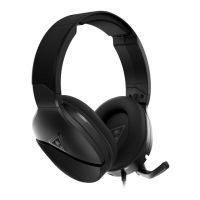
1. Recon 200 Gen 2 Headset (A)
2. USB-C Charging Cable (B)
HEADSET CONTROLS

Other manuals for Recon 200 Gen 2

Question and Answer IconNeed help?

Do you have a question about the Recon 200 Gen 2 and is the answer not in the manual?

Summary

Package Contents

Recon 200 Gen 2 Headset

Identifies the main headset unit included in the package.

USB-C Charging Cable

Specifies the charging cable provided with the headset.

Headset Controls Overview

Master Volume Control

Adjusts the overall audio volume level of the headset.

Mic Monitor Volume Control

Controls the volume of the microphone's feedback to the user.

Power LED Indicator Status

Displays the headset's power status and charging state.

USB-C Charging Port

The port used for charging the headset via a USB-C cable.

Microphone Mute Functionality

Mechanism to quickly mute or unmute the headset's microphone.

Xbox Setup Guide

Xbox Volume and Audio Configuration

Guides users on setting headset volume and chat mixer for optimal Xbox audio.

Xbox Surround Sound Configuration

Details on enabling Windows Sonic for Headphones on Xbox for immersive sound.

PlayStation Setup Guide

PlayStation Audio Output and Volume Settings

Instructions for configuring audio output and volume levels on PlayStation consoles.

Setup for PC, Mac, Mobile, Tablet, and Nintendo Switch

PC;MAC Connectivity and Setup

Guidance for connecting and setting up the headset on PC or Mac.

Mobile and Tablet Connectivity

Details on using the headset with mobile phones and tablets.

Nintendo Switch Connection

Instructions for connecting the headset to a Nintendo Switch.

Charging and Battery Information

Battery Life and Charging Recommendations

Information on the headset's battery life and regular charging recommendations.

Storage and Temperature Guidelines

Recommendations for charging before storage and optimal storage temperatures.

ProSpecs Glasses Friendly Design

Summary

Package Contents

Recon 200 Gen 2 Headset

Identifies the main headset unit included in the package.

USB-C Charging Cable

Specifies the charging cable provided with the headset.

Headset Controls Overview

Master Volume Control

Adjusts the overall audio volume level of the headset.

Mic Monitor Volume Control

Controls the volume of the microphone's feedback to the user.

Power LED Indicator Status

Displays the headset's power status and charging state.

USB-C Charging Port

The port used for charging the headset via a USB-C cable.

Microphone Mute Functionality

Mechanism to quickly mute or unmute the headset's microphone.

Xbox Setup Guide

Xbox Volume and Audio Configuration

Guides users on setting headset volume and chat mixer for optimal Xbox audio.

Xbox Surround Sound Configuration

Details on enabling Windows Sonic for Headphones on Xbox for immersive sound.

PlayStation Setup Guide

PlayStation Audio Output and Volume Settings

Instructions for configuring audio output and volume levels on PlayStation consoles.

Setup for PC, Mac, Mobile, Tablet, and Nintendo Switch

PC;MAC Connectivity and Setup

Guidance for connecting and setting up the headset on PC or Mac.

Mobile and Tablet Connectivity

Details on using the headset with mobile phones and tablets.

Nintendo Switch Connection

Instructions for connecting the headset to a Nintendo Switch.

Charging and Battery Information

Battery Life and Charging Recommendations

Information on the headset's battery life and regular charging recommendations.

Storage and Temperature Guidelines

Recommendations for charging before storage and optimal storage temperatures.

ProSpecs Glasses Friendly Design

Overview

The device described in the manual is the Recon 200 Gen 2 Headset, a gaming headset designed for use across multiple platforms including Xbox, PlayStation, PC/Mac, mobile devices, tablets, and Nintendo Switch. This headset offers amplified audio and is equipped with a rechargeable battery, providing up to 12 hours of use.

Function Description

The Recon 200 Gen 2 Headset is primarily designed to deliver an immersive audio experience for gaming. It features amplified sound, which enhances in-game audio, making details like footsteps or distant shots more discernible. The headset also includes a microphone for in-game communication, allowing users to coordinate with teammates or chat with friends. The microphone can be easily muted by flipping it up, and unmuted by flipping it down, providing quick control over communication.

The headset is powered by a rechargeable battery, which is essential for its amplified audio capabilities. Even if the battery dies, the headset can still be used for passive game audio, though the microphone's functionality may be limited without power. This ensures that users can continue to hear game audio even if they forget to charge the device.

Usage Features

The Recon 200 Gen 2 Headset offers a range of features designed to enhance the user experience across various gaming platforms.

  • Controls: The headset is equipped with several on-device controls for easy adjustment.
    • Master Volume: A dedicated dial allows users to adjust the overall volume of the game audio.
    • Mic Monitor Volume: Another dial controls the volume of the mic monitoring feature, which lets users hear their own voice through the headset, preventing them from shouting.
    • Mic Mute: As mentioned, the microphone can be muted by flipping it up, and unmuted by flipping it down.
  • Power LED Indicator: A Power LED provides visual feedback on the headset's status.
    • Solid Green: Indicates that the headset is on.
    • Red (USB Connected): Indicates that the headset is off but charging.
    • Amber (USB Connected): Indicates that the headset is on and charging.
  • Multi-Platform Compatibility: The headset is highly versatile and can be used with a wide array of devices.
    • Xbox Setup: For Xbox, the headset plugs directly into the controller. Users need to configure settings within the Xbox system, including setting Headset Volume to Maximum, Headset Chat Mixer to the Middle Setting, and Mic Monitor to Minimum. For surround sound, the Headset Format should be set to Windows Sonic For Headphones.
    • PlayStation Setup: On PlayStation, the headset also connects to the controller. Configuration involves navigating through the system settings to Sound > Audio Output > Output Device, selecting "Controller Headset," and then adjusting Volume Control (headphones) to Maximum. Microphone levels can also be adjusted here. The manual also suggests enabling 3D Audio Function for an enhanced experience.
    • PC/Mac Setup: For PC/Mac, the headset connects via its 3.5mm jack. If the PC uses separate jacks for headset audio and mic audio, a PC Splitter Cable is required.
    • Mobile/Tablet Setup: No additional setup is required for mobile or tablet use; the headset simply plugs into the device's 3.5mm jack.
    • Nintendo Switch Setup: The headset is supported through connection to the Nintendo Switch's 3.5mm headset jack, specifically when the Switch is in handheld mode (not docked mode).
  • ProSpecs Glasses Friendly Design: A notable comfort feature is the ProSpecs glasses-friendly technology. This design incorporates an advanced ear cushion and materials that allow gamers who wear glasses to use the headset comfortably without pressure or discomfort.

Maintenance Features

Proper maintenance ensures the longevity and optimal performance of the Recon 200 Gen 2 Headset.

  • Charging: The headset features a USB-C Charge Port for convenient charging. It is crucial to charge the headset regularly to ensure full functionality, especially for the amplified audio and microphone. The manual explicitly states that the Recon 200 Gen 2 provides 12 hours of amplified audio with its rechargeable battery and advises users to charge it regularly.
  • Storage: When storing the headset for an extended period (greater than 3 months), it is recommended to fully charge it beforehand. This helps maintain battery health. Additionally, the headset should never be stored in temperatures above 113°F (45°C), as extreme temperatures can damage the battery and other components.
  • Battery Life: While the headset can still provide passive game audio even if the battery dies, the microphone's functionality may be compromised without power. Therefore, keeping the headset charged is essential for enjoying all its features, particularly for communication.

Recon 200 Gen 2 Specifications

General IconGeneral
Speaker Frequency Response20Hz - 20kHz
Speaker Size40mm
Battery Life12 hours
CompatibilityPS5, PS4, Xbox Series X|S, Xbox One, Nintendo Switch, Mobile, PC
Connectivity TechnologyWired
Audio Output ModeStereo
Impedance32 ohms
PlatformMulti-platform
TypeOver-ear
ColorBlack
Connection3.5mm
MicrophoneOmni-Directional Flip-to-Mute Microphone

Videos

How To Connect Turtle Beach Recon 200 Gen 2 to XBOX

How To Connect Turtle Beach Recon 200 Gen 2 to PS4/PS5

How To Connect Turtle Beach Recon 200 Gen 2 to PC

Related product manuals