6
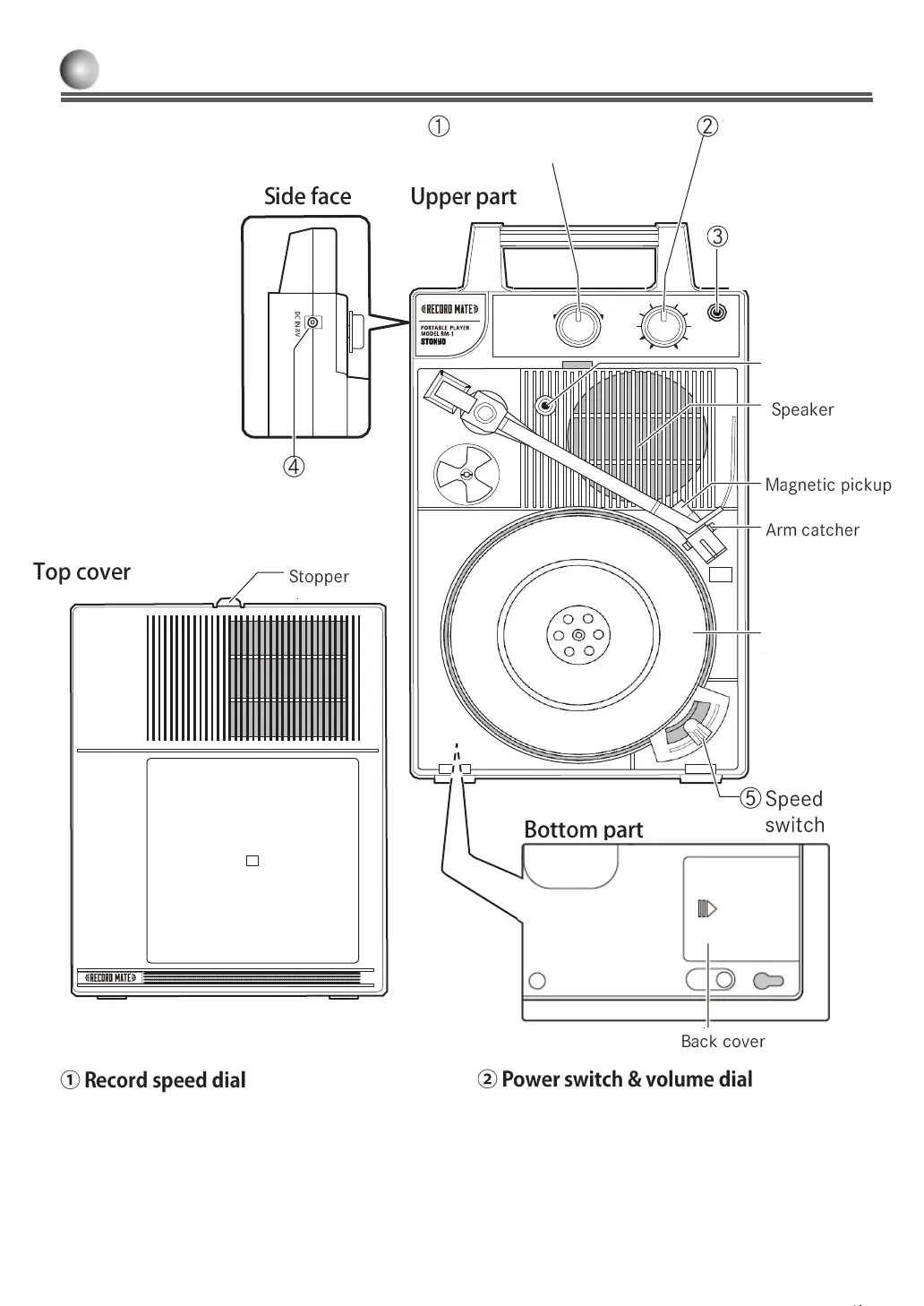
Part names
33
45
OFF
It is the dial to adjust rotation speed when playing a
record. Record rotation speed becomes constant at
the center of dial rotation. Turning the dial clockwise
increases speed and turning anti-clockwise
decreases speed. Range of change is about 5%.
②
ツマミを右に回すと、「カチッ」と音がして電源が
入 ります。 さらにツマミを右に回すと音量が大き
くな ります。ツマミを左に回すと音量が小さくなり
ます。
ツマミを左に回しきると、「カチッ」と音がして電
源が 切れます。
input terminal
Turntable
& recording
volume dial
Record speed dial
By turning the dial clockwise, it clicks, and the device
is turned on. Turning the dial clockwise increases
volume and turning anti-clockwise decreases volume.
When turned the dial fully anti-clockwise, it clicks,
and the device is turned off.
VOLUME
POWEROFF
HEADPHONE
SPEEDADJUST
SLOW FAST
MAX
MIN



 To Next Page