ATTENTION!
IN ORDER TO CONTROL THE SWING WITH THE REMOTE CONTROL, YOU MUST POINT THE
REMOTE CONTROL TO THE CONTROL PANEL!
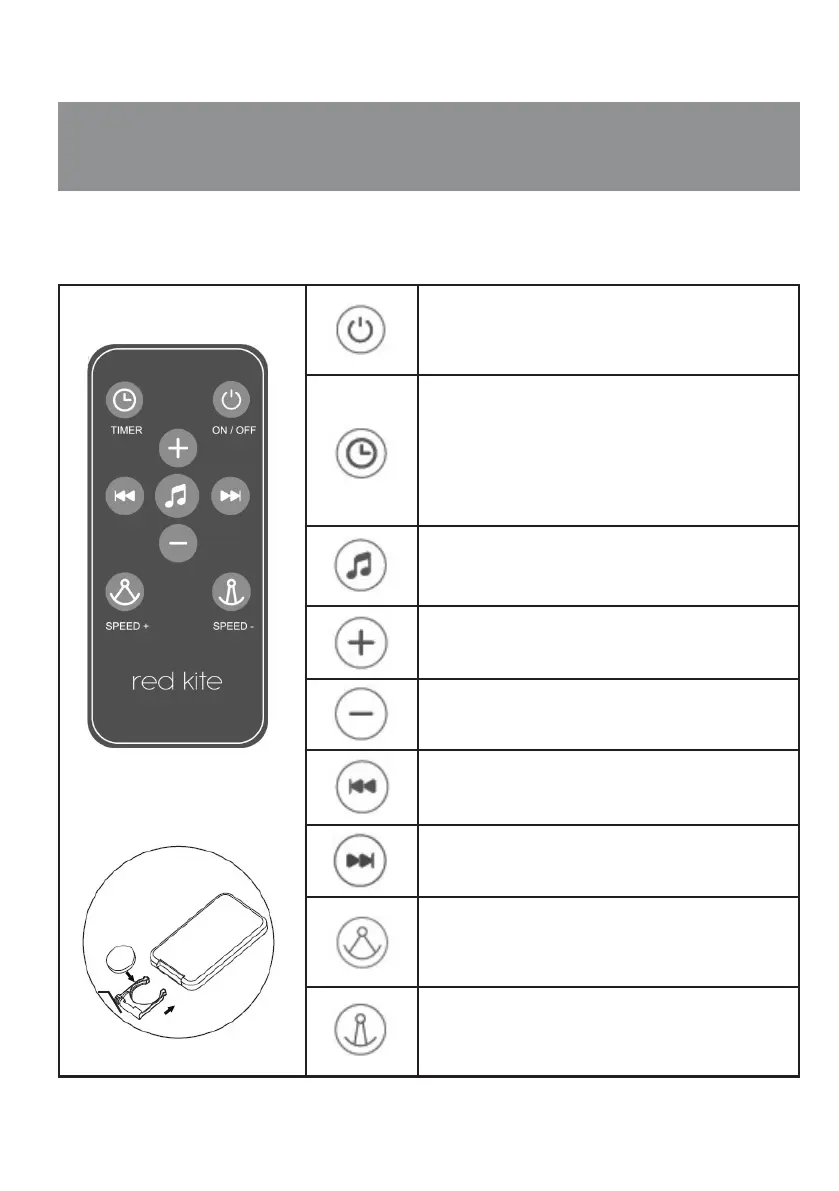
IMPORTANT: Pull the PVC tab at the end of the remote control before use to activate it.
BUTTON ON/OFF
Press the button to power on.
The button will be illuminated in white. Press the
button again to turn off the power.
TIMER BUTTON (CHOOSING SWING DURATION)
(5, 10, 15, 20, 25, 30,35 and 40 minutes) After the
swing function is activated, the timer button will light
at each pressing.
You can choose duration of 5 up to 40 minutes (5, 10,
15, 20, 25, 30, 35 and 40 minutes).
MELODIES BUTTON
Press the button in order to start or stop playing
melodies.
VOLUME CONTROL BUTTON
VOLUME CONTROL BUTTON
CHOOSING THE PREVIOUS MELODY
CHOOSING THE NEXT MELODY
INCREASING SWING SPEED Press the button when
power is on.
You can choose 8 swing speeds. When choosing "0"
the swing function is turned off.
DECREASING SWING SPEED
Press the button when the power is on.
You can choose 8 swing speed. When choosing "0"
the swing function is turned off.
1x battery
type button
CR2025 3V


 To Next Page