CONTROL PANEL AND MUSIC
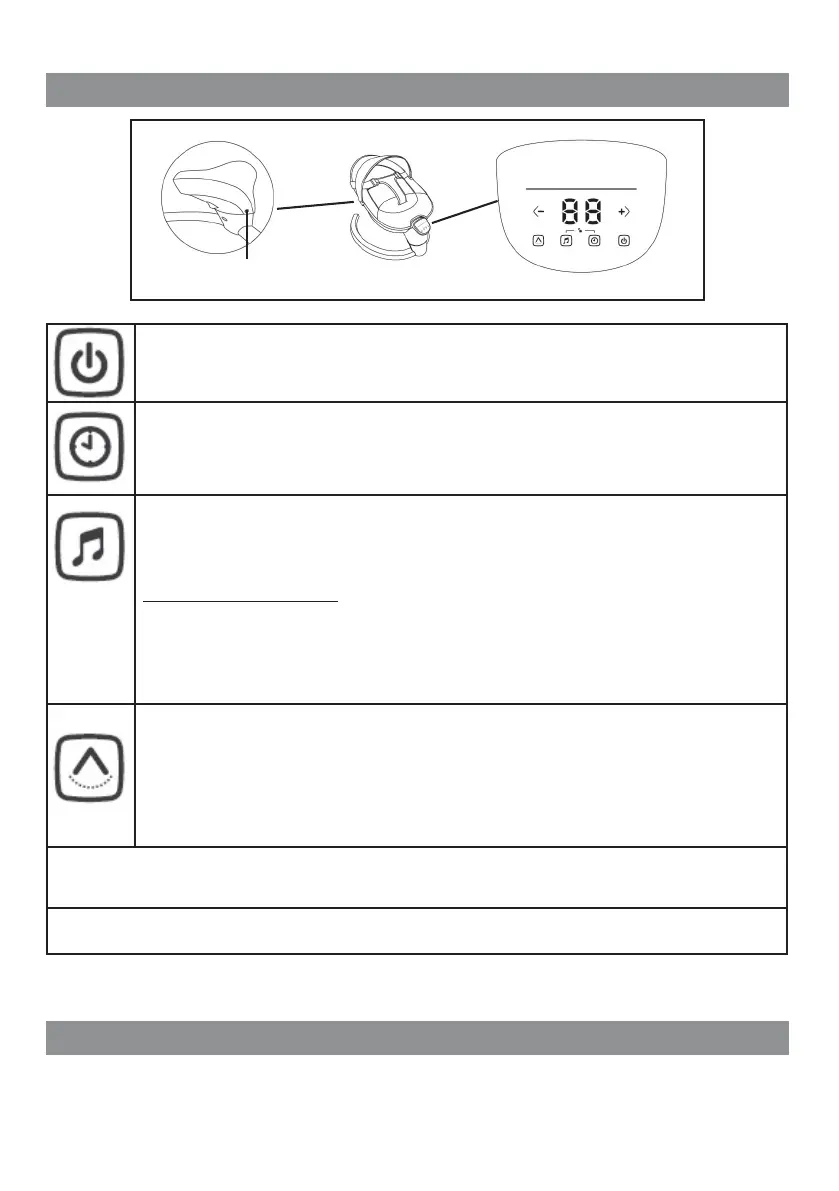
Power supply button
Press the switch to power on the swing.
The symbol shown here will be illuminated in white. Press again to power off.
Timer button (choosing the period for swing motion)
(5, 10, 15, 20, 25, 30,35 and 40 minutes)
When the music and swing functions are on, press the timer button.
The display will be activated. With buttons "+" and "-" choose the desired period from 5 up to
40 minutes - each 5 minutes (5, 10, 15, 20, 25, 30, 35 and 40 minutes).
Melodies button
Press the power button and then the melodies button. You can hear 9 melodies, which will change
automatically.
If you want to choose the next melody, press the button.
To turn off the melodies, press and hold the button.
Remembering the last melody:
Turn off the melodies. When you press the button again, you will
hear the last melody that was playing.
When melodies are turned on, the symbols of melodies and timer will light up one after another. If
you have to use the musical function, press the melodies button and then press it again to hear
the next melody.
To adjust the volume level, press "+" and "-". Volume may be adjusted in 8 levels. Level 1 – lowest,
and level 8 – loudest.
Swing speed button
Switch the power on, then press the swing speed button. The symbol shown here will illuminate in
white and the display will be activated. Press "+" and "-", to adjust the swing speed. There are 8
swing speeds. When you choose "0" the swing function is turned off.
If the timer, melodies and swing functions are on, their symbols will light up consequently. If you
want to adjust the swing speed, but the button does not light, press it and choose the desired
speed.
NOTE
If the control panel and music do not work for 1 minute, the system will lock automatically.
You must press simultaneously the melodies and timer buttons to unlock the system.
Power supply with adapter (Adapter in) - In AC 100-240V - 50/60Hz and out DC 6V/1A.
Insert the adapter in the control panel in, and the plug must be inserted in the wall outlet (230V)
.
REMOTE CONTROL
CAUTION! TO BE MANAGED ONLY BY AN ADULT!
CAUTION! REMOTE CONTROL DEVICE IS NOT A TOY!
Adapter in


 To Next Page
 Loading...