6
Drawing No. LP1159 Effective 06 2020
Note: All Red Lion devices connect A to A and B to B. Refer to
www.redlion.net for additional information.
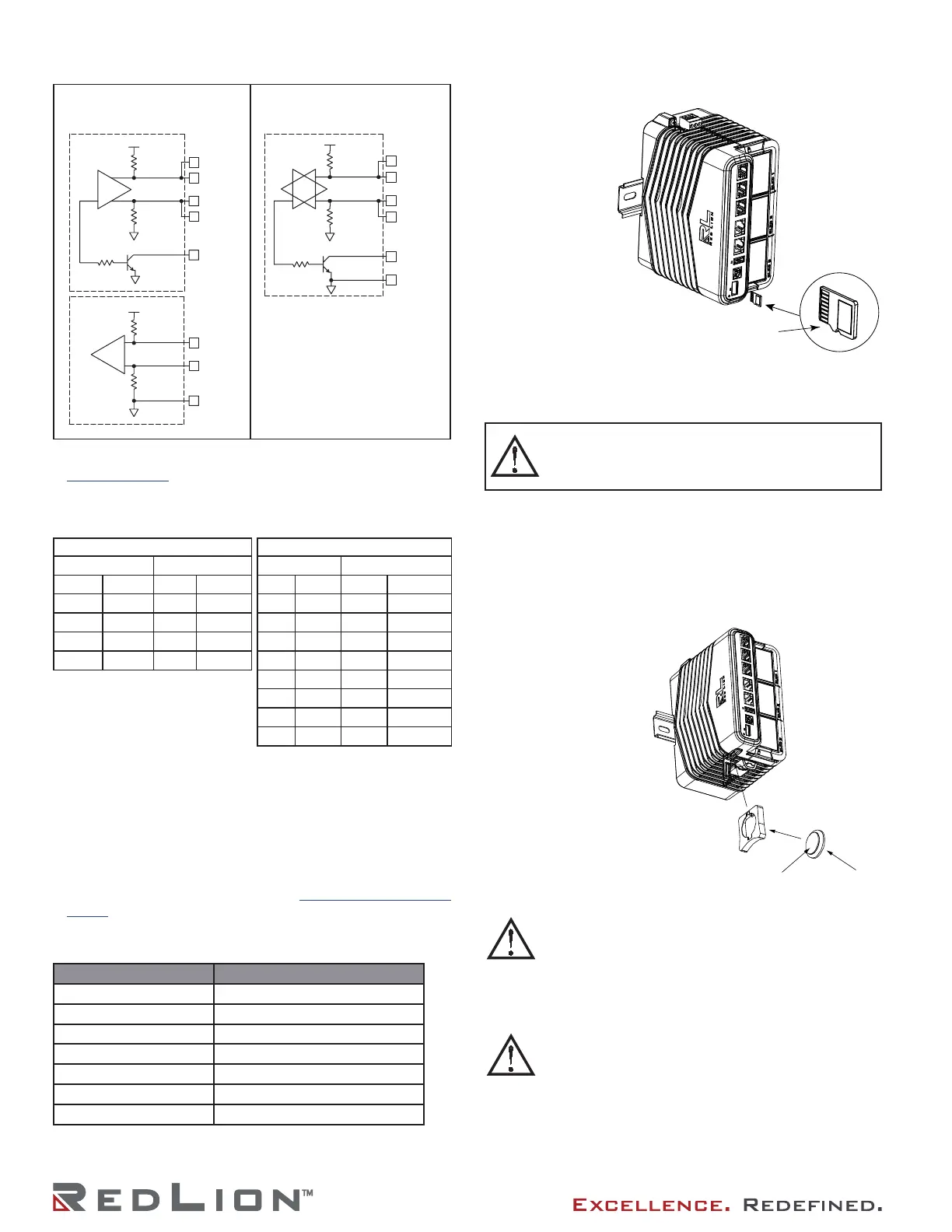
Examples of RS485 2-Wire Connections
DH485 COMMUNICATIONS
The DA70A’s RS485/422 COMMS port can also be used for
Allen Bradley DH485 communications.
WARNING: DO NOT use a standard DH485 cable to connect
this port to Allen Bradley equipment. A cable and wiring
diagram are available from Red Lion at www.redlion.net/cables-
drivers.
STATUS RING LED
LED COLOR/STATE MEANING
Pulsating white PXE starting up
Steady dim white PXE running with Crimson stopped
Steady pale green PXE running with Crimson running
Steady pale red Accepted alarms present
Pulsating red Active Alarms present
Pulsating red and green Identify command received
Flashing red and white C3.2 crashed and restarting
INSTALL THE microSD CARD
Insert the microSD card
into the slot on the
front of the Controller
with the card oriented
as shown. The card
is inserted properly
when the card
clicks into place in
the card holder. To
remove the microSD
card, push in slightly on
the card.
DA70A GATEWAY BATTERY & TIME KEEPING
A battery is used to keep time when the unit is without power.
The battery of a DA70A Gateway unit does not affect the unit’s
memory, all configurations and data is stored in non-volatile
memory.
Changing the Battery
To change the battery of a DA70A Gateway, first remove
power to the unit. Insert a small
screwdriver into the slot
provided on the battery
holder and pry the
battery holder out of
the unit. Remove the
old battery from the
holder and replace it
with a new battery.
To maintain UL rating, battery
must be replaced with one listed in
the Specifications.
TX
5V
8
1
7
2
TxB
TxA
130K
130K
5
TxEN (OC)
RX
130K
5V
130K
RxB
4
RxA
3
COMM
6
TxEN (OC)
TX/RX
130K
5
TxA
2
8
130K
5V
7
1
TxB
6 COMM
RS485/422 4-WIRE
CONNECTIONS
RS485 2-WIRE CONNECTIONS
DA70A to Red Lion RJ11
DA70A : RJ45 RLC : RJ11
Pin # Name Pin # Name
5 TxEN 2 TxEN
6 COMM 3 COMM
1 TxB 5 B-
2 TxA 4 A+
DA70A to Modular Controller
DA70A Modular Controller
Pin # Name Pin # Name
1, 4 TxB 1, 4 TxB
4, 1 RxB 4, 1 RxB
2, 3 TxA 2, 3 TxA
3, 2 RxA 3, 2 RxA
5 TxEN 5 TxEN
6 COMM 6 COMM
7 TxB 7 TxB
8 TxA 8 TxA
WARNING - Explosion Hazard - The area must be known
to be non-hazardous before servicing/ replacing the unit
and before installing or removing I/O wiring and battery.
Not hot swappable.
Note: Battery orientation
MUST MATCH as shown.
CAUTION: Lithium battery. Danger of explosion if battery
is incorrectly replaced. Replace only with the same or
equivalent type recommended by the manufacturer.
ATTENTION: Pile au lithium. Danger d’explosion si la
batterie est mal remplacée. Remplacez-la uniquement
par une pile du même type ou d’un type équivalent
recommandé par le fabricant.
Please note that the old battery must be disposed of in a
manner that complies with your local waste regulations.
The battery must not be disposed of in fire, or in a manner
whereby it may be damaged and its contents could come
into contact with human skin.
Veuillez noter que la vieille pile doit être éliminée
conformément à la réglementation locale en matière de
déchets. La pile ne doit pas être jetée au feu, ni d’une
manière qui pourrait l’endommager et son contenu
pourrait entrer en contact avec la peau humaine.
Note: Removal of the
microSD while power is
applied may result in
corruption or loss of data.


 To Next Page
 Loading...