EasyManua.ls Logo

red lion KADET 2 G307K2 - User Manual

red lion KADET 2 G307K2
5 pages
Print Icon
To Next Page IconTo Next Page
Loading...
Phone +1 (717) 767-6511 Bulletin No. G307K2-F
Fax +1 (717) 764-0839 Drawing No. LP0889
www.redlion.net Released 2015-11-23
-1-
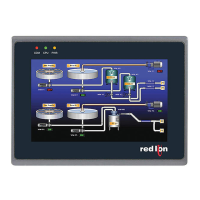
MODELG307K2‐KADET2OPERAT ORINTERFA CEWITH7"TFTDISPLAY
CONFIGURED USING CRIMSON
®
3 SOFTWARE
THREE SERIAL COMMUNICATIONS PORTS
(1 RS-232 AND 2 RS-232/422/485 PORTS)
10 BASE-T/100 BASE-TX ETHERNET PORT COMMUNICATES
WITH UP TO FOUR PROTOCOLS SIMULTANEOUSLY
UNIT’S CONFIGURATION IS STORED IN NON-VOLATILE FLASH
MEMORY
SD CARD SOCKET FOR LOADING DATABASE IN FIELD
7-INCH TFT LCD 32k COLOR 800 X 480 PIXEL DISPLAY
NEMA 4/IP65 FRONT PANEL
THREE FRONT PANEL LED INDICATORS
POWER UNIT FROM 24 ±20% VDC
RESISTIVE ANALOG TOUCHSCREEN
GENERALDESCRIPTION
The G307K2 is the perfect solution for applications that require the
operator to monitor and control more than just a single device. With three
serial ports and an Ethernet port, the 7" Kadet 2 can connect to multiple
serial and Ethernet devices simultaneously, including PLCs, motor
drives, bar code scanners, etc.
The G307K2 performs the functions of a multiple protocol converter,
using three high-speed RS-232/422/485 communications ports and a 10
Base-T Ethernet port. The Ethernet port supports up to four protocols
simultaneously, allowing dissimilar Ethernet based products to
communicate with one another.
The SD card slot can be used to load the unit's configuration file,
allowing configuration changes to be made and saved to the card for
later transfer.
The G3 Kadet 2 range of HMIs is programmed with Red Lion's free
Crimson 3 software. Crimson offers easy to use drag and drop
communications configuration, while the embedded image library allows
the programmer to create intuitive screens and prompts for the operator.
SAFETYSUMMARY
All safety related regulations, local codes and instructions that appear
in the manual or on equipment must be observed to ensure personal
safety and to prevent damage to either the instrument or equipment
connected to it. If equipment is used in a manner not specified by the
manufacturer, the protection provided by the equipment may be
impaired.
Do not use the controller to directly command motors, valves, or other
actuators not equipped with safeguards. To do so can be potentially
harmful to persons or equipment in the event of a fault to the unit.
CONTENTSOFPACKAGE
- G307K2 Operator Interface.
- Hardware packet for mounting unit into panel.
- Terminal block for connecting power.
- Spare fuse.
ORDERINGINFORMATION
1
Contact your Red Lion distributor or visit our website for selection of SD
cards, adapters and cables.
Note: If replacing Model G306K000, see Tech Note TNG3K6.
MODEL NO. DESCRIPTION PART NUMBER
G307K2 7" TFT Operator Interface G307K200
SD
SD Card
1
SDxxxxxx
CBL
Communications Cables and Adaptor
1
CBLxxxxx
G3FILM Protective Film G3FILM7K
C
US LISTED
U
L
R
IND. CONT. EQ.
22SV
CAUTION: Risk Of Danger.
Read complete instructions prior to
installation and operation of the unit.
CAUTION: Risk of electric shock.
Question and Answer IconNeed help?

Do you have a question about the red lion KADET 2 G307K2 and is the answer not in the manual?

Summary

General Description

Key Features

Highlights configuration, communication ports, display, and input methods.

Power Requirements

Power Supply Specifications

Details required voltage, current, fuse type, and power connection.

Battery Information

Specifies battery type and typical lifespan.

LCD Display Specifications

Lists size, type, colors, resolution, brightness, and backlight details.

Touchscreen and Memory

Details touchscreen type and on-board/external memory capacity.

Communication Ports

Lists serial and Ethernet port types and their capabilities.

Environmental Conditions

Specifies operating temperature, humidity, and vibration limits.

Certifications and Compliances

Lists safety (UL, IP) and EMC compliance standards.

Connections and Construction

Describes terminal block, wire gauge, connector types, and enclosure rating.

Weight and Dimensions

Provides unit weight and physical dimensions, including mounting details.

Installation and Powering

Mounting Instructions

Guides on panel mounting, clamp usage, and sealing requirements.

Connecting Power

Power Supply Guidelines

Advises on wire gauge, routing, and using Class 2/SELV power supplies.

Communicating with the G307 K2

Serial and Ethernet Ports

Explains use of DB9 serial ports and RJ45 Ethernet for communication.

Programming Port Considerations

Notes on using the programming port and halting downloads.

PC Connection

Downloading Configuration

Describes how to download configuration files via PC connection.

Device Communications

Adapters and Cables

Information on available adapters for direct connection via Red Lion cables.

Setting the Switches

Switch Operation Modes

Explains normal mode and procedure for clearing the database.

Software and Unit Operation

Crimson Software

Details availability and acquisition of Crimson programming software.

Front Panel LEDs

Describes the status indications for COM, CPU, and PWR LEDs.

Touchscreen Operation

Explains user input via touchscreen and audible feedback.

Troubleshooting

Crimson Software Version

Notes required software version and wiring differences for new models.

Technical Support

Provides contact information for Red Lion technical support.

Battery Replacement

Battery Maintenance

Instructions for replacing the RTC lithium battery and setting the time.

Safety Precautions

Warnings about static discharge, handling components, and battery disposal.

Overview

The Red Lion G307K2 Kadet 2 Operator Interface is a 7-inch TFT display designed for monitoring and controlling multiple devices in industrial applications. It serves as a versatile solution for operators needing to interact with various systems, including PLCs, motor drives, and bar code scanners.

Function Description

The G307K2 acts as a multi-protocol converter, facilitating communication between dissimilar Ethernet-based products. It is equipped with three high-speed serial communication ports (one RS-232 and two RS-232/422/485 ports) and a 10 Base-T Ethernet port. The Ethernet port supports up to four protocols simultaneously, enabling broad compatibility. The unit's configuration is stored in non-volatile Flash memory, ensuring data retention even without power.

Important Technical Specifications

  • Display: 7-inch TFT LCD with 32k colors and an 800 x 480 pixel resolution. The display has a brightness of 375 cd/m² and an LED backlight with a typical life of 30,000 hours.
  • Touchscreen: Four-wire resistive analog for user input.
  • Processor & Software: Configured using Crimson® 3 software, which offers an easy-to-use drag-and-drop interface for communication configuration and an embedded image library for creating intuitive screens.
  • Memory: 128 Mbyte of non-volatile Flash memory for user data. It also features an SD card socket that accepts standard capacity cards up to 2 Gbyte, allowing for field loading of configuration databases.
  • Communication Ports:
    • Three Serial Ports: One RS-232 port and two RS-232/422/485 ports. Each port's format and baud rates are individually software programmable up to 115,200 baud.
    • Ethernet Port: 10/100 Mbps, supporting up to four protocols simultaneously.
  • Power Requirements: 24 VDC ±20% (Class 2 or SELV rated power supply). Maximum power consumption is 250 mA @ 24 VDC. It uses a fast-blow 800 mA, 5x20 mm fuse.
  • Environmental Conditions:
    • Operating Temperature Range: 0 to 45°C.
    • Operating and Storage Humidity: 10-90% relative humidity (non-condensing) from -20 to 60°C.
    • Vibration: Operational 10 to 25 Hz, in X, Y, Z direction, 30 minutes, 2 g.
  • Certifications and Compliances: UL Listed (File #E302106, UL508), UL Type 4 Indoor Use Only Enclosure rating (Face only), UL50, IP65 Enclosure rating (Face only), IEC 529.
  • Construction: Plastic enclosure with a NEMA 4/IP65 front panel when properly installed.
  • Weight: 30 oz. (850 g).

Usage Features

  • Ease of Programming: Programmed with Red Lion's free Crimson 3 software, which simplifies communication configuration and screen design through a drag-and-drop interface and an embedded image library.
  • Field Configuration Loading: The SD card slot allows for easy loading of configuration files in the field, facilitating updates and transfers.
  • Multi-Device Connectivity: With its multiple serial and Ethernet ports, the G307K2 can connect to and manage a wide array of industrial devices simultaneously.
  • Front Panel Indicators: Three front panel LED indicators provide visual feedback on the unit's status:
    • RED (COM) flashing indicates communications are active.
    • GREEN (CPU) steady indicates the CPU is functioning.
    • ORANGE (PWR) steady indicates power is applied.
  • Touchscreen Operation: The resistive analog touchscreen provides user input, producing an audible tone (beep) when an active cell is touched. It is fully functional upon initialization and can be operated with gloved hands.
  • Mounting: Designed for panel mounting into enclosures with a depth of 4". It requires 1" clearance around the sides for mounting hardware and 2.5" along the bottom edge if using Red Lion communication cables.
  • Switch Settings: Includes switches for normal mode operation and for displaying the Clear Database prompt, allowing users to clear the database or continue in normal mode. Switch 4 must remain in the ON position at all times.

Maintenance Features

  • Battery Replacement: The unit uses one CR2032 coin-type lithium battery to maintain the Real-Time Clock (RTC) and for proper Ethernet download operation. To replace the battery, power and cabling must be removed, the rear cover detached, the old battery replaced with a new one, and then the unit reassembled. Used batteries must be disposed of according to local waste regulations.
  • Troubleshooting: Requires Crimson 3 Software build 619.004 or later for programming. Users converting existing databases from original Kadet models should be aware of potential wiring differences and programming port availability issues, with Red Lion providing Tech Notes on their website for assistance. Technical support is available via phone, fax, and email.
  • Safety Precautions: Users are advised to observe all safety regulations, local codes, and instructions. The unit should not be used to directly command motors, valves, or other actuators without safeguards. When handling the operator interface without the rear cover, static charges should be discharged by touching a grounded bare metal object. The circuit board contains static-sensitive components, and care should be taken to avoid touching surface areas to prevent contamination.

red lion KADET 2 G307K2 Specifications

General IconGeneral
Brandred lion
ModelKADET 2 G307K2
CategoryRecording Equipment
LanguageEnglish

Related product manuals