BPMBPM
OKOK PULLPULL PUSHPUSH
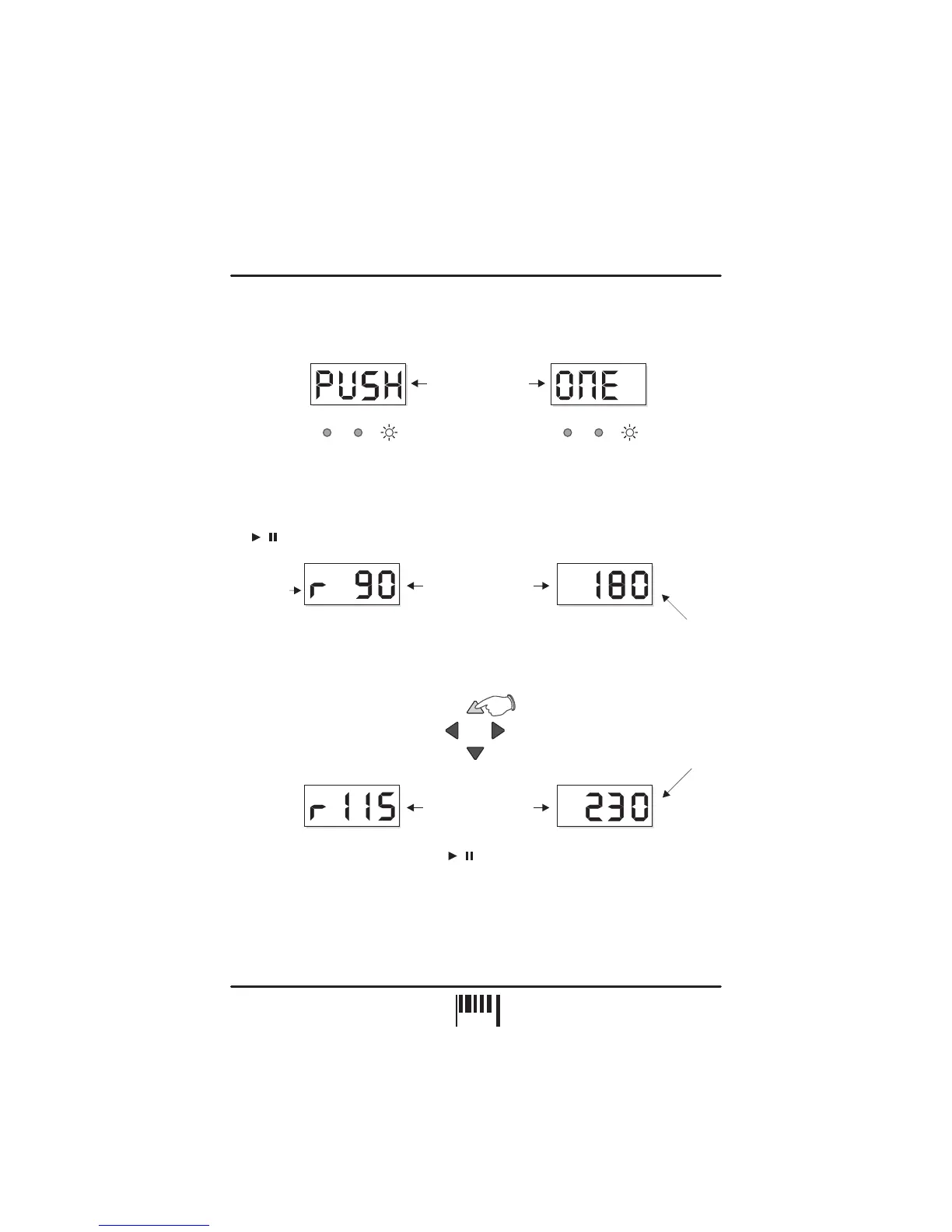
Display alternates
between
LGH / BAR POS
LGH / BAR POS
Further fine adjustments can be made beyond the ‘PUSH ½ beat’ point (display reads from
‘+13’ up to ‘+23’) until the synchronisation is pushed forwards by one complete beat
(maximum PUSH adjustment). For this setting the display will show the following:
BPM RANGE
This is where you set the working range of the MICRO SYNC’s BPM engine. There are three
operating bands, each specifically designed to complement different styles of music from slow
ballads to the fastest ‘Speed Garage’. This setting can only be accessed when the BPM
engine is in the ‘Idle’ condition (four centre bars). To check the setting in idle mode, press
the button once, the display will alternate between:
SETTING RANGE = LOW (60 to 120BPM), MED (90 to 180BPM), HIGH (115 to 230BPM)
To change the BPM range, use the NUDGE control ‘BPM +/UP’ or ‘BPM -/DOWN’ buttons, as
in the following example:
To exit ‘BPM edit’ mode, simply press the button again. The MICRO SYNC will now
return to ‘Idle’ mode.
NOTE 1: BPM’s outside of the selected range limit cannot be analysed. Always check the
general tempo of the music you are playing falls well within the selected BPM range. For most
applications we recommend the MID BPM range of 90-180BPM.
NOTE 2: This setting is not memorised. Each time the MICRO SYNC’s power is turned on, the
default setting (90-180 BPM) will be restored.
‘r’ = range
BPM
BPM
BPM
BPM
Display alternates
between
Display alternates
between
Default setting = MED(90-180 BPM)
New setting = HI (115-230 BPM)
LGH/BAR
LGH/BAR
LGH/BAR
LGH/BAR
POS
POS
POS
POS
NUDGE
PULL
BPM
-/DOWN
BPM
+/UP
PUSH
/
/
OPERATION
11
PAGE


 To Next Page