4
5. REMOTE CONTROL
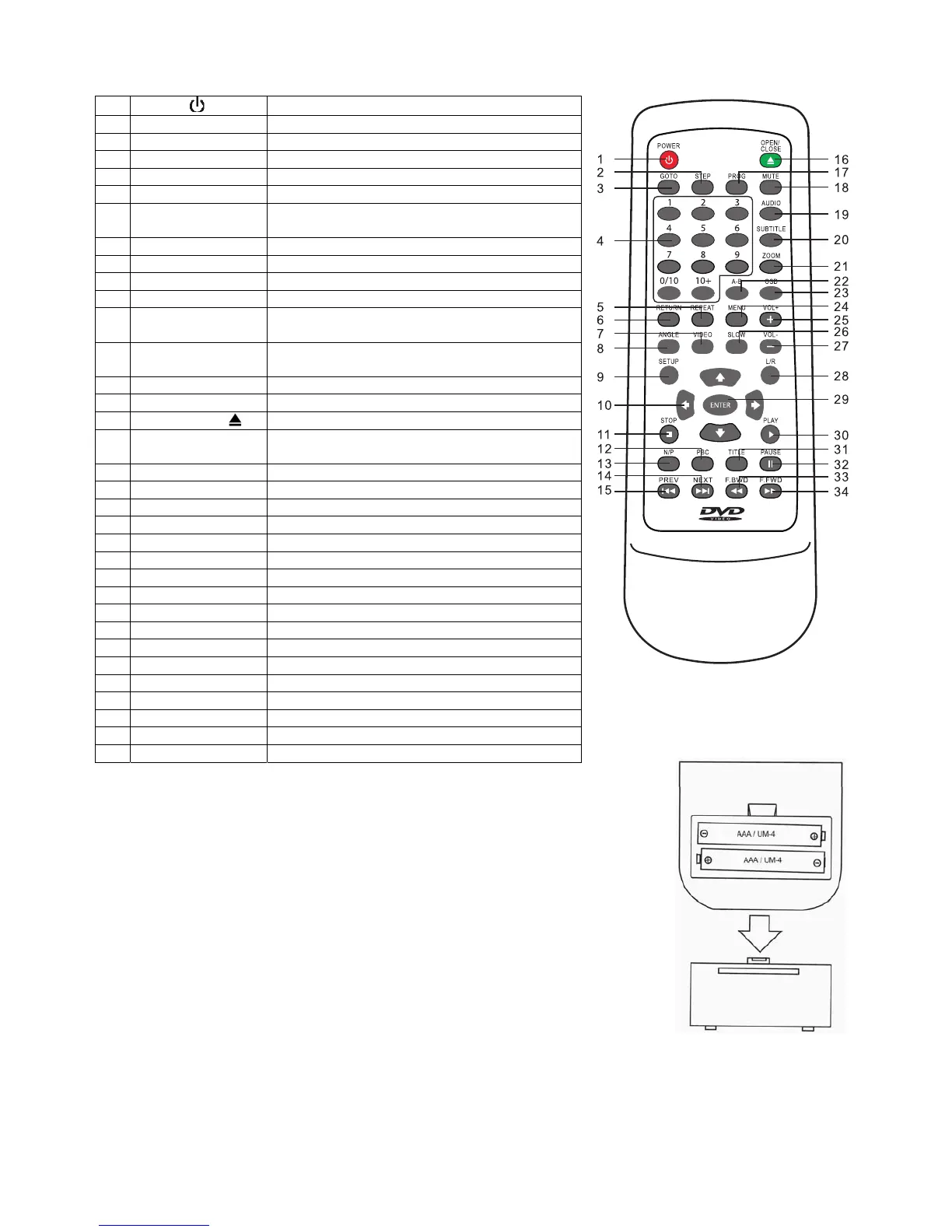
5.1 Remote Control - functions
1
Power (
)
ON / Standby function
2 Step Frame advance
3 Goto Goes to a specific play time / point on a DVD
4 0 – 9 Number entry buttons
5 Repeat Accesses the repeat play mode
6 Return Returns to the disc menu
7 Video Changes video output mode between
CVBS/RGB
8 Angle Accesses different camera angles
9 Set up Accesses and exits the main setup menu
10
Í Ð Î Ï
Navigates left, down, right and up the menus
11 Stop () Stops play
12 PBC Selects PBC control on/ off (VCD play mode
only)
13 N/P Switches between NTSC, PAL and AUTO TV
type
14 Next () Advances to the next chapter or track
15 Prev () Returns to the previous chapter or track
16 Open / close ( ) Open and closes the disc tray
17 Prog Permits programming of a sequence of DVD
chapters to be played
18 Mute Cuts and restores the volume
19 Audio Selects the audio language
20 Subtitle Select and turns the subtitles on and off
21 Zoom Accesses the zoom feature (if available)
22 A-B Accesses the A-B repeat play mode
23 OSD Provides play status
24 Menu Accesses the menu of the disc
25 Vol + Increases volume
26 Slow Searches slowly through the disc
27 Vol - Decreases volume
28 L/R Selects mono or stereo sound (not DVDs)
29 Enter Selects item highlighted in menu
30 Play () Starts playing a disc.
31 Title Accesses the title menu of the DVD
32 Pause () Pauses a disc.
33 F. Bwd () Searches fast backward through the disc
34 F. Fwd () Searches fast forward through the disc
5.2 Remote control - installing the batteries
5.2.1 Open the battery compartment cover on the reverse of the remote
control.
5.2.2 Insert 2 x AAA 1.5V alkaline batteries in accordance with the diagram
in the battery compartment. Take care to observe the correct polarity
(+ and -) and refit the cover.
5.2.3 Do not expose the battery or the installed battery to excessive heat
(e.g. fire, sunshine or position close to radiators etc.).
Note
• Dispose of batteries responsibly at local authority household waste recycling facility.
• DO NOT dispose of batteries in a fire as the batteries may explode.
• Only use ‘AAA’ 1.5V batteries in this appliance.
• Be sure to insert correctly taking care to observe the correct polarity (+ and -).
• Use only batteries of the same or equivalent type as recommended.
• Do not recharge non-rechargeable batteries.
• If rechargeable batteries are used with this product they must be removed before being recharged.
• Never mix old and new batteries (replace all batteries at the same time).
• Never try to dismantle batteries.
• Do not short-circuit the supply terminals.
• Always remove exhausted or dead batteries from the product; do not dispose of in fire.
• Remove batteries from the product before extended storage.


 To Next Page
 Loading...