39
< Timer >
1 - 2
8
7
6
5
1 ON
12-MENU ENTRIES AND OPERATION
Technical Dept. - All rights reserved - Reproduction is prohibited
CONFIGURATION OF PROGRAMMED MODE (TIMER) - Main menu
The current time and date must be congured to ensure correct operation of the timer.
There are six congurable TIMERS; for each one, the user can select a start and stop time and the days of the week when it is in use.
When one or more programs are active, the status of the boiler and the TIMER "n" alternate on the display. "n" is the number of timer
programs in use, separated by dashes.
Example:
TIMER 1 Timer 1 program active.
TIMER 1-4 Timer 1 and 4 programs active.
TIMER 1-2-3-4-5-6 All timer programs active.
EXAMPLE OF PROGRAMMING
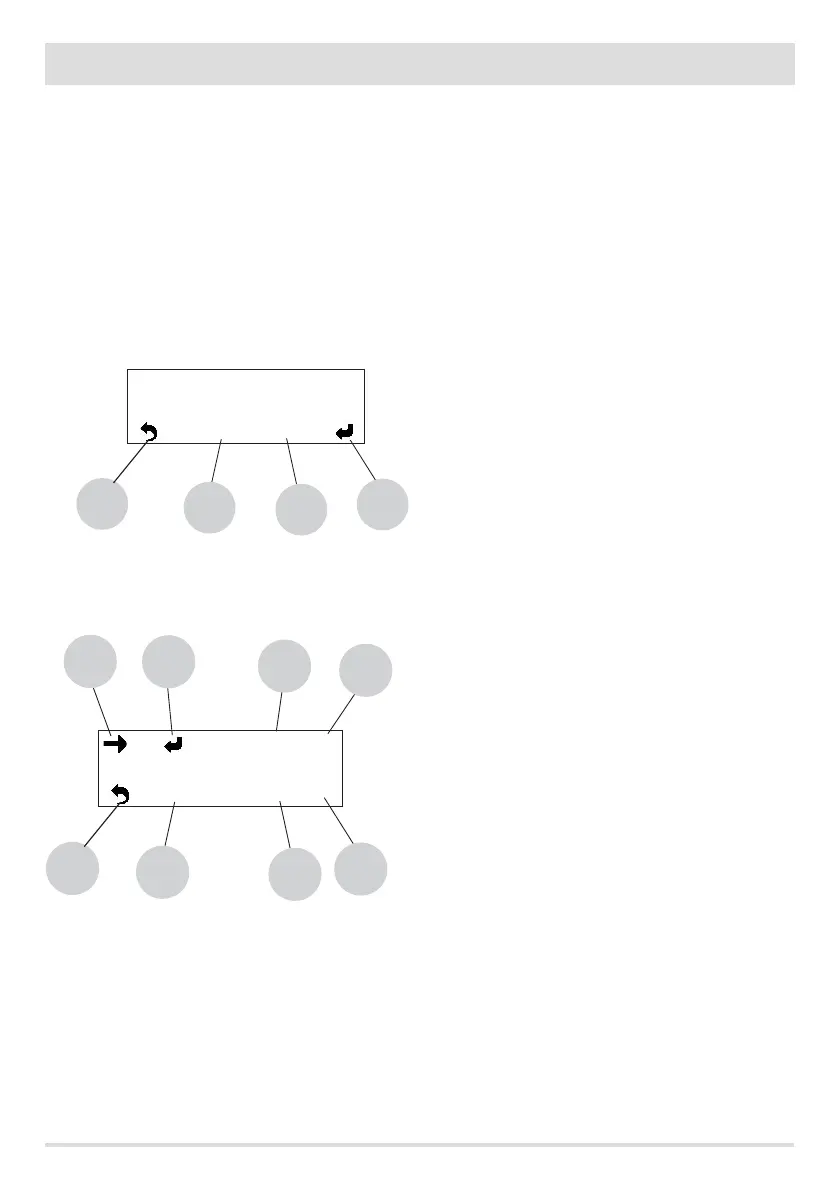
With the boiler on or o:
• key 6 to change the timer's status (ON-OFF)
• key 7 to change the active timer
• key 8 to go back to the main screen
• key 1 to scroll through the days, the selected one will be ashing
• key 2 to activate or deactivate the selected day
• key 3 to increase the start hour
• key 4 to increase the start minute
• key 5 to increase the end minute
• key 6 to increase the end hour
• key 7 to change the active timer
• key 8 to go back to the main screen
Mo Tu We Th Fr Sa Su
8
7
6
5
20 : 30 da
23 : 40 a
1
1
2
3
4



 To Next Page