40
8
7
6
20 : 30
< Sleep >
8
7
OFF
< Sleep >
12-MENU ENTRIES AND OPERATION
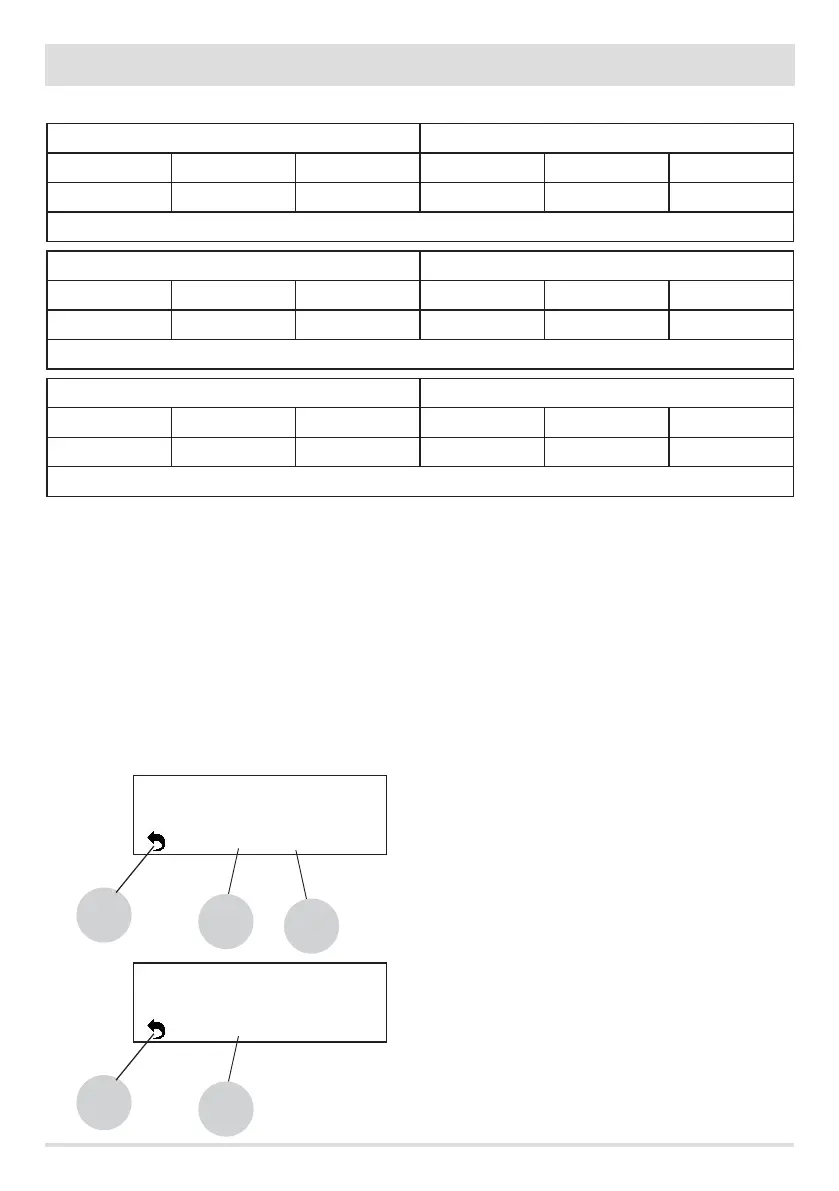
EXAMPLES OF PROGRAMMING
P1 P2
on o day on o day
08:00 12:00 mon 11:00 14:00 mon
Boiler on between 08:00 and 14:00
P1 P2
on o day on o day
08:00 11:00 mon 11:00 14:00 mon
Boiler on between 08:00 and 14:00
P1 P2
on o day on o day
17:00 24:00 mon 00:00 06:00 tue
Boiler on between 17:00 on Monday to 06:00 on Tuesday
NOTES ON USE OF THE TIMER
• Start-up with the timer always takes place with the last temperature.
• The start time can be between 00:00 and 23:50
• If the stop time has not yet been saved, the program proposes a start time at +10 minutes.
• If a timer program turns o the boiler at 24:00 on one day and another program starts it up at 00:00 on the next day: the boiler
remains on.
• A program has a start-up and/or shut-down time that overlap the times of another program: if the boiler is already on, the start has
no eect while OFF turns o the boiler.
• When the boiler is on and the timer is active, pressing the OFF key turns o the boiler; the boiler then restarts automatically at the
next time of the timer.
• When the boiler is o and the timer is active, pressing the ON key turns on the boiler; the boiler then stops automatically at the next
time of the timer.
Sleep setting
Sleep may be activated only when the boiler is on and
allows you to quickly set a time for the product to turn o.
With keys 1 and 4 in the menu, select the SLEEP control.
If Sleep is active on the panel, the time is displayed
(image above), otherwise, the message OFF appears
(image below).
• key 6 to increase the minutes
• key 7 to increase the hour
• key 8 to go back to the main screen
The panel suggests a shut-down time of 10 minutes after
the current time.
If the SLEEP function is active with the TIMER active, the
former has priority, therefore the boiler will not turn o
at the time set in the timer program but at the time set
by the sleep function, even if it comes after the time set
by the timer.


 To Next Page