15
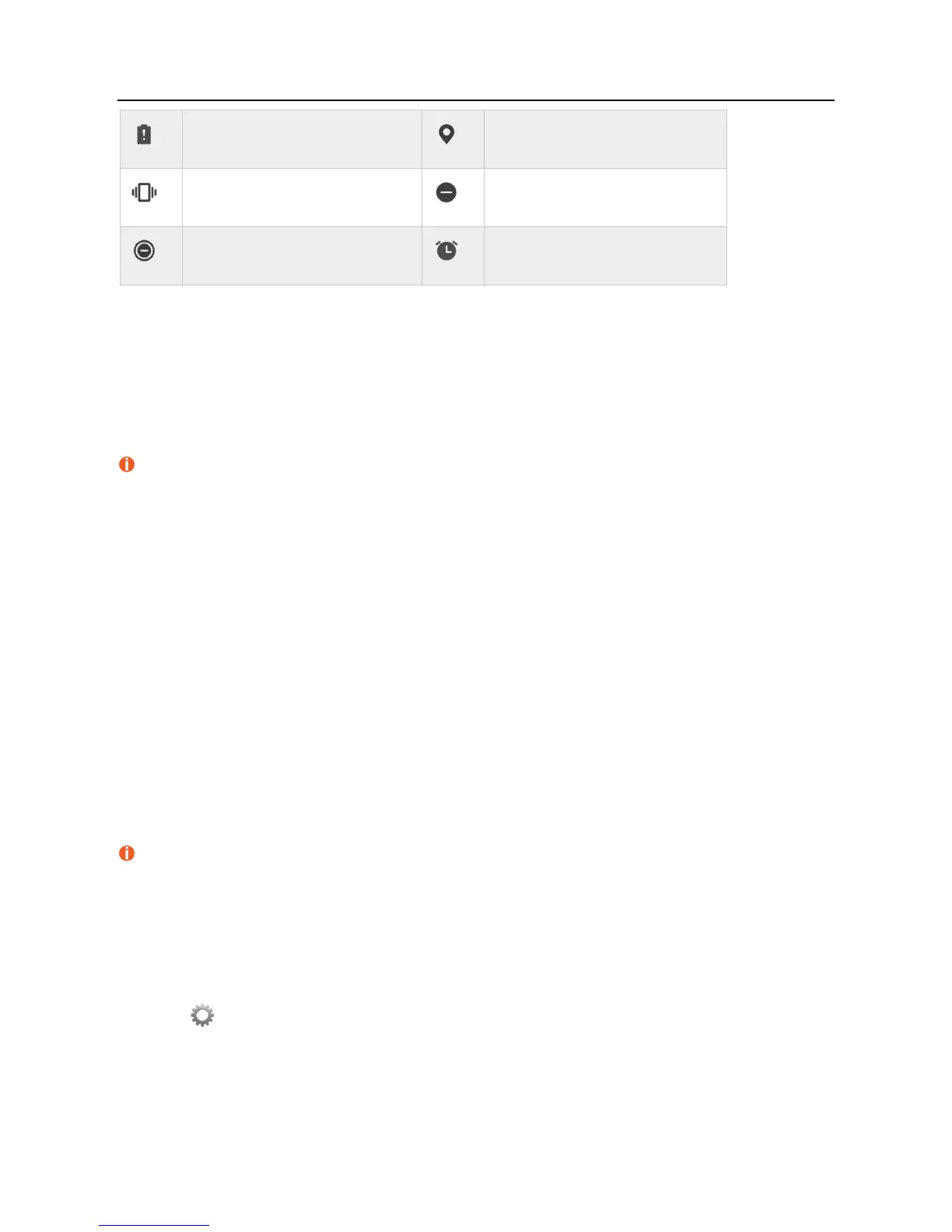
Battery low
Receiving location data from GPS
Vibration mode enabled
Do not disturb mode enabled
Total silence mode enabled
Alarm clock enabled
Managing Apps
Downloading apps
To protect your phone, please download apps from the Google Play Store on your phone. Downloading apps from other sources may cause
unforeseeable damage to your phone.
You can download apps from the Google Play Store. Please visit play.google.com/store/apps to learn how to download and install apps.
Removing apps
Touch and hold an icon on the home screen until the phone vibrates, and then drag it to REMOVE at the top of the screen.
Apps removed from the home screen can be found in app list.
Deleting apps
Touch and hold an icon on the home screen until the phone vibrates, and then drag it to UNINSTALL at the top of the screen.
Pre-loaded apps cannot be deleted.
Managing permissions
1. From the home screen, swipe up to access app list.
2. Touch Settings.
3. Touch Apps & notifications > App permissions.



 To Next Page