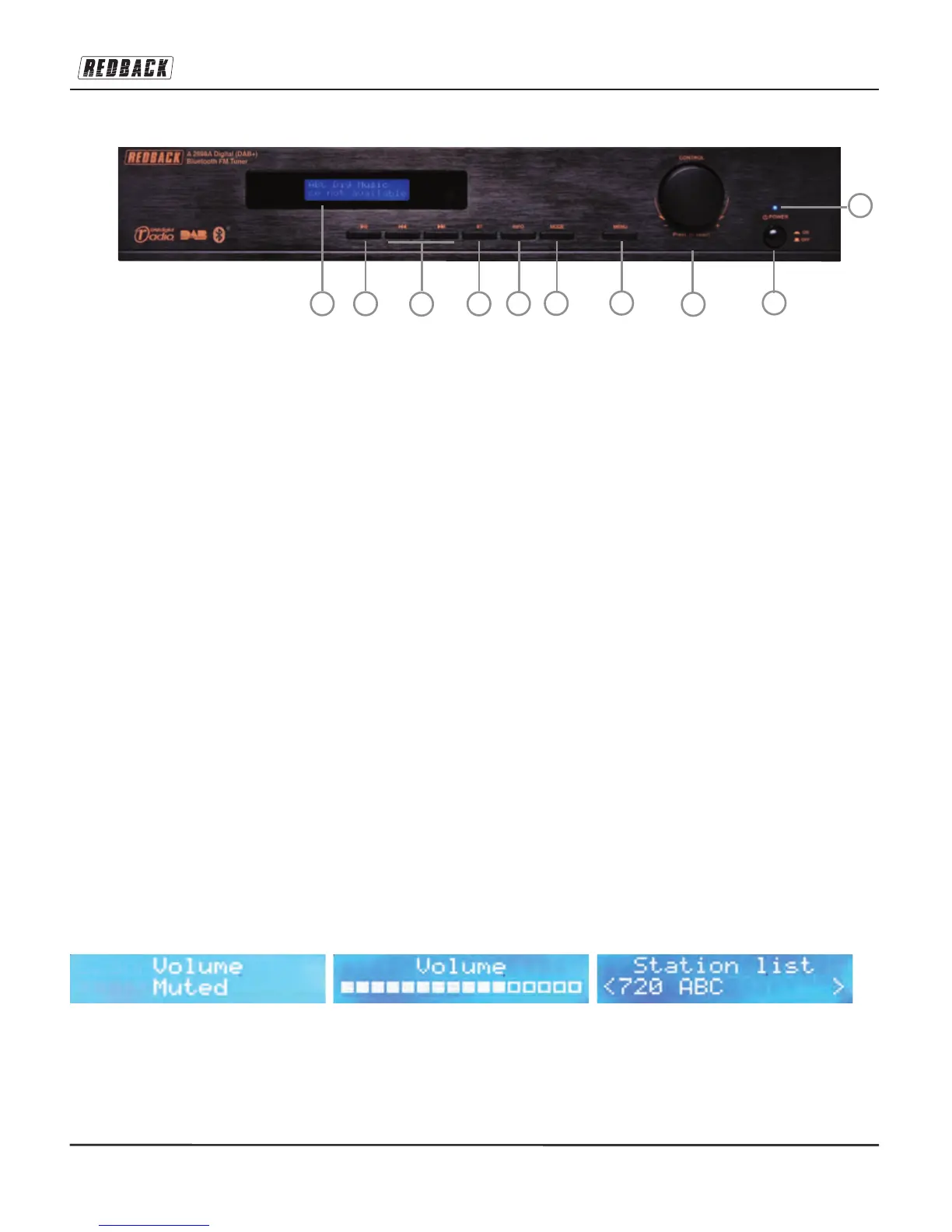
FRONT PANEL:
1. Display: Indicates the mode in which the device is operating (DAB+/FM bands and Bluetooth mode) and
other details pertaining to functions in that mode i.e. station name or frequency, track info, dynamic text
(RDS / DLS), program memory number, menus and sub-menus.
2. >||: Play/Pause button to control playback in Bluetooth mode.
3. |<< & >>|: Press to skip to tracks or to tune station frequencies. See detailed descriptions for the same but-
tons described under the Remote Control heading.
4. BT: Press to select Bluetooth mode and make the unit’s Bluetooth module discoverable and searching.
Press again to select an already paired device. To get back to DAB+ / FM, just press MODE.
5. INFO: This changes what information is displayed on line two of the LCD display in DAB+ and FM and
Bluetooth modes. See section on LCD Display Information for more details.
6. MODE: Press this to switch between DAB digital radio and FM analogue radio. It is also used to leave
Bluetooth mode.
7. MENU: Press to call menu items onto the LCD display, and turn the control knob to scroll through the menu
items. Press the jog-wheel to select which setting you wish to change. Factory Reset is available from the
SYSTEM sub-menu. See full explanation below.
8. CONTROL: When in DAB+ or FM or BT modes, turn knob clockwise or anticlockwise to adjust volume
level. When in MENU status, turn knob clockwise or anticlockwise to scroll through the menu items. Press
the jog-wheel to select a menu item (same as ENTER on the remote control). Also press to select a DAB+
station that has been tuned using the tuning buttons, since there is no auto select for DAB+ stations on this
device.
Press and hold the control knob and the A 2698A will switch into’standby mode’ (same as button 3 on the
remote control.) When in standby mode press the control knob again to power on the device.
9. POWER: Press to turn mains power on or off. Switches the mains power on or off to internal components.
10.LED indicator: Glows blue when switched on, and red when in standby mode. Press STANDBY button on
remote control to switch on again.
A 2698A Digital (DAB+) Bluetooth FM Tuner


 To Next Page