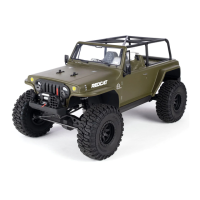
The Redcat Ascent 18 is a 1/18 scale crawler, an RC vehicle designed for off-road driving and navigating challenging terrain. It comes assembled with electronics, a 2.4GHz radio system, a 2S LiPo battery with a JST connector, and a USB charge cable. To operate the vehicle, four AA batteries are required for the transmitter.
Function Description:
The Ascent 18 is an RC crawler, meaning its primary function is to traverse obstacles and uneven surfaces at relatively low speeds, emphasizing control and articulation over raw speed. The 2.4GHz radio system provides reliable control, and the included LiPo battery powers the vehicle's motor and electronics. The vehicle is designed for enthusiasts aged 14 and older, with a strong emphasis on safe operation and proper maintenance.
Important Technical Specifications:
Transmitter (R3C Radio):
- Number of Channels: 4
- Use: Surface use only
- RF: 2.4GHz ISM
- Maximum Power: <20dBm (e.i.r.p.) (EU)
- 2.4GHz Protocol: 2A-BS (Automatic Frequency Hopping Digital System)
- Distance: >300m (Ground Distance w/o Interference)
- Channel Resolution: 1024
- Input Power: (4x) 1.5AA batteries
- Low Voltage Alarm: <4.2V
- Antenna: Built-in
- Temperature Range: -10°C to +60°C
- Humidity Range: 20%~95%
- Dimensions: 16019397mm
- Weight: 220g
- Certifications: CE, FCC ID: N4ZG4P00, IC: 24025-RTX4C00
Receiver/ESC (R3C-ER 2-in-1 ESC/RX):
- Number of Channels: 3
- Compatible Models: 1:18 Crawler
- RF: 2.4GHz ISM
- 2.4GHz Protocol: 2A-BS
- Distance: ≥ 300m (Ground Distance w/o Interference)
- Input Power: 2S LiPo
- BEC Output: 5V/1A
- Data Interface: PWM
- Cont. / Peak Current: 10A/40A
- Applicable Motors: 180 Brushed Motor
- Temperature Range: -10°C to +60°C
- Humidity Range: 20%~95%
- Weight: 9.8g
- Dimensions: 382513mm
- Certifications: CE, FCC ID: 2A2UNR3A00
Battery:
- Type: 750mAh 2S LiPo Battery Pack (RER31100)
Motor:
- Type: 180 Motor (RER30068)
Servo:
- Type: Hexfly HX-M4K 4kg coreless metal gear micro servo (RER21791)
Usage Features:
Startup and Shutdown:
- Transmitter Batteries: Insert four AA batteries into the controller, aligning polarity correctly.
- Body Access: Turn the rear 1/4 body fastener, tilt the body forward, and unclip the front hinge to access the electronics.
- Battery Connection: Strap in a fully charged 2S LiPo battery pack and plug it into the ESC.
- Power Sequence: Turn on the radio first, then the ESC.
- Shutdown Sequence: Unplug the battery from the receiver, then turn off the transmitter.
Radio Adjustments:
- Servo Reverse (ST.REV / TH.REV): Switches on the transmitter reverse the direction of movement for steering (CH1) and throttle (CH2). Useful if the vehicle steers or moves opposite to controller input.
- Steering Trim (ST.TRIM): Adjusts the neutral position of the steering.
- Throttle Trim (TH.TRIM): Adjusts the neutral position of the throttle.
- Steering D/R (ST.D/R): Adjusts the maximum steering travel (0-120%).
- Calibration: A function to correct mechanical deviations of the throttle trigger and steering wheel. Involves holding the steering wheel and throttle trigger at max travel while powering on the transmitter, then moving them through their full range.
- Mode Switching: Allows multiplexing ST.TRIM and ST.D/R buttons for CH1, CH2, CH3, and CH4 adjustments by quickly pressing the BIND button twice.
- Beginner Mode: Limits throttle output to 50% and sets a specific channel range. Activated by holding the CH4 button and turning the steering wheel counterclockwise while powering on the transmitter.
Failsafe:
- Function: Protects the model and surroundings if the connection between the receiver and transmitter is lost.
- Default: CH2 (throttle) is set to braking. Other channels maintain their last output.
- Setting: With both transmitter and ESC ON, hold the control at the desired failsafe position, then press and hold the BIND button for 3 seconds.
Protection Features:
- Low Voltage Protection: Cuts off power to all channels when battery voltage drops below a safe operating range.
- Overheating Protection: Cuts off power to CH2 (motor) if the receiver/ESC overheats. Power resumes once cooled.
- Drive Train Blockage Protection: Cuts off power to the motor if a blockage is detected to prevent damage.
Maintenance Features:
Pre-Run Inspection:
- Always perform a pre-run inspection to ensure no damage and that all screws and wheel nuts are secure. Repair or replace damaged parts before use.
Battery Care:
- Never leave the battery connected when not in use.
- Store batteries according to manufacturer instructions.
- Never leave a battery unattended while charging.
- Never charge batteries inside the RC vehicle.
- Use a LiPo-specific charger and a LiPo safe charging pouch for LiPo batteries.
- Discontinue use and properly dispose of any damaged or swollen LiPo batteries.
Electronics Care:
- Allow the vehicle to cool down between runs to prevent overheating of electronics, which can shorten their lifespan.
- Keep the receiver's antenna at least 1cm away from conductive materials (carbon or metal) to ensure optimal signal strength.
- Avoid installing the receiver near the motor or other sources of electrical noise.
Troubleshooting:
The manual provides a detailed troubleshooting guide for common issues such as:
- ESC not powering on.
- Vehicle running backward.
- Vehicle moving without throttle input.
- Motor stopping suddenly.
- Receiver/ESC powered on but not working (slow or quick blinking LED).
- Clicking noise while steering.
- Vehicle not steering or moving.
- Vehicle turning automatically.
- Incorrect steering direction.
Solutions often involve checking battery charge, verifying radio settings (reverse switches, trims, calibration), ensuring proper connections, and inspecting servo components.
Exploded Views and Parts List:
The manual includes comprehensive exploded views for various assemblies (Transmission/Transfer Case, Portal Gear, Front Axle, Rear Axle, Chassis, Front Axle to Chassis & Shock, Rear Axle to Chassis, Transmission to Chassis, Battery Tray & Skid Plates, Battery Strap, Receiver/ESC & Wheels/Tires, Body Assembly, Body Installation). These diagrams are accompanied by a detailed parts list with part numbers (e.g., RER28661, RER11378) for easy identification and ordering of spare and hop-up parts.
Hop Up Parts:
A dedicated section lists available hop-up parts, including various aluminum and brass components for improved durability and performance, such as portal boxes, diff covers, links, wheel hexes, shock bodies, and steel transmission gear sets.
Important Links:
The manual directs users to the Redcat Racing website for the full-length manual, ESC guide, radio guide, exploded views, parts lists, and a specific manual for electric vehicles.


 To Next Page
 General