WWW.REEBOKFITNESS.COM 23
22 FR20 BIKE
FR20
ENG
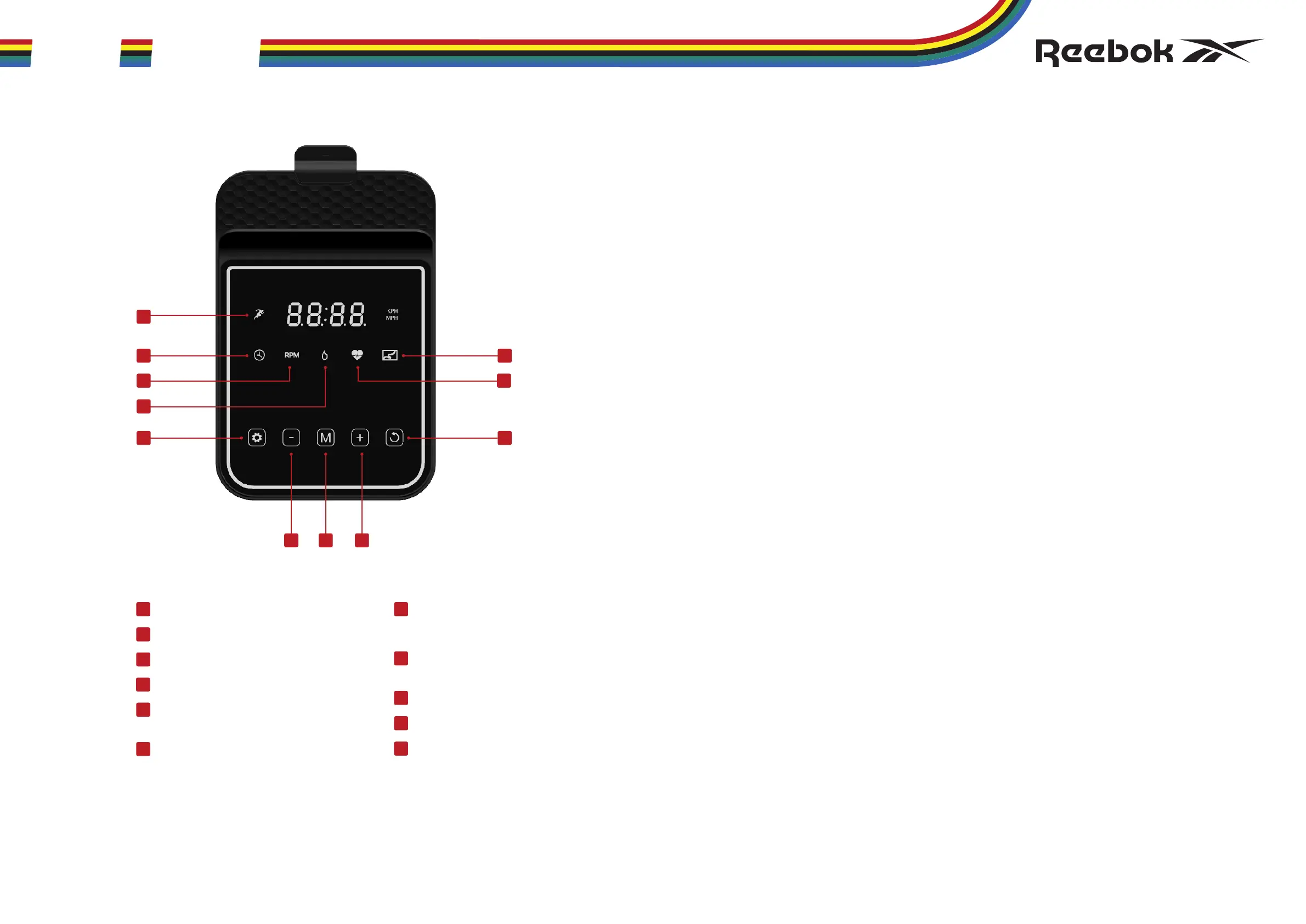
SPEED
TIME
RPM
CALORIES
SET
Set parameter or confirm selection.
(-) DOWN
Adjust function value down.
MODE
Select or switch values
of each function.
(+) UP
Adjust function value up.
DISTANCE
HEART RATE
RESET
Revert and reset the values,
or hold to restart.
1
3
2
8
6
7
4
5
10
9
11
CONSOLE FR20
2
5
9
11
1
4
3
6 7 8
10
QUICK START
When console is powered on, the user can start tracking workout
immediately by pedalling.
MANUAL MODE H1 H4
(H1) TIME
• In main menu, press M (MODE) to select H1
• Press SET to highlight TIME
• Press +/- to adjust values
• Start workout by pedalling
• Hold RESET to quit
• If the value is set above zero, start workout by pedalling,
and the value will count down
• When completed, the console will display "End" and beep
H2 CALORIES
• In main menu, press M (MODE) to select H2
• Press SET to highlight CALORIES
• Press +/- to adjust values
• Start workout by pedalling
• Hold RESET to quit
• If the value is set above zero, start workout by pedalling,
and the value will count down
• When completed, the console will display "End" and beep
H3 DISTANCE
• In main menu, press M (MODE) to select H3
• Press SET to highlight DISTANCE
• Press +/- to adjust values
• Start workout by pedalling
• Hold RESET to quit
• If the value is set above zero, start workout by pedalling,
and the value will count down
• When completed, the console will display "End" and beep
H4 HEART RATE RECOVERY
• In main menu, press M (MODE) to select H4
• Press SET and enter H4
• Place both hands on the pulse sensors, the console will count
down for 60 seconds and display the HEART RATE and the RECOVERY
level F1-F6.
• Press RESET to exit
F1 EXCELLENT F4 FAIR
F2 VERY GOOD F5 BELOW AVERAGE
F3 GOOD F6 POOR
NOTE: Do not remove your hands from pulse sensors or the reading will not
be given during testing. The pulse monitor is a guide for reference only and
not for medical use or monitoring.
POWER SAVE FUNCTION
This product is fitted with a power saving mode which will activate if the
machine is inactive for a period of 4 minutes. To restart the machine simply
press any key or pedal.
MPH TO KPH CONVERSION
In main menue, press and hold the +/- keys for 3 seconds to convert KPH
to MPH/MPH to KPH.
NOTE
1. Keep the console far away from humid and corrosive environment.
2. Non-professional personnel do not disassemble and change.
COMPUTER PROGRAMS
FR20 BIKE_NOM_(RVFR-10200BK) PRINT MANUAL V11 26.06.23.indd 22-23FR20 BIKE_NOM_(RVFR-10200BK) PRINT MANUAL V11 26.06.23.indd 22-23 28/06/2023 09:5528/06/2023 09:55


 To Next Page
 Loading...