BATTERY REPLACEMENT
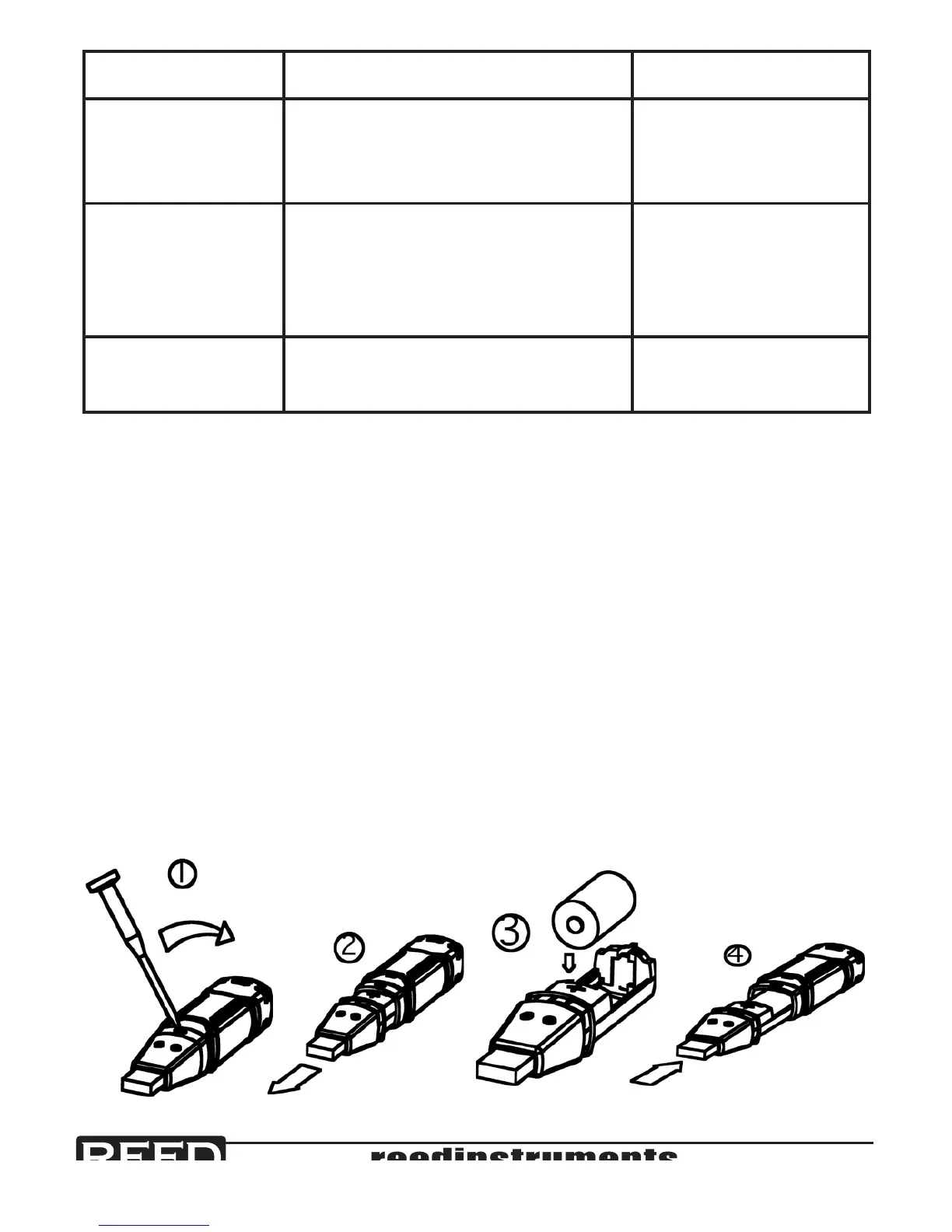
Only use 3.6V lithium batteries. Before replacing the battery, remove the
data logger from the PC. Follow steps 1 through 4 below:
1. Use a pointed object (eg. a small screwdriver) to open the casing.
Lever the casing off in the direction of the arrow.
2. Pull the data logger from the casing.
3. Replace/insert the battery into the battery compartment observing
the right polarity. The two displays briey light up for control purposes
(alternating green/yellow/green).
4. Slide the data logger back into the casing until it snaps into place.
Now the data logger is ready for programming.
Function Range Accuracy
Relative
Humidity
0 to 20% & 80 to 100%
20 to 40% & 60 to 80%
40 to 60%
±5.0%
±3.5%
±3.0%
Temperature -40 to -10°C & +40 to +70°C
10 to +40°C
-40 to +14°F & 104 to 158°F
+14 to +104°F
±2°C
±1°C
±3.6°F
±1.8°F
Dew point
Temperature
-40 to 70°C (-40 to 158°F) ±2.0°C (±4.0°F)


 To Next Page