REENCLE PRIME - USER MANUAL
10
ENGLISH
OPEN
POWER
DR Y
PURIFY
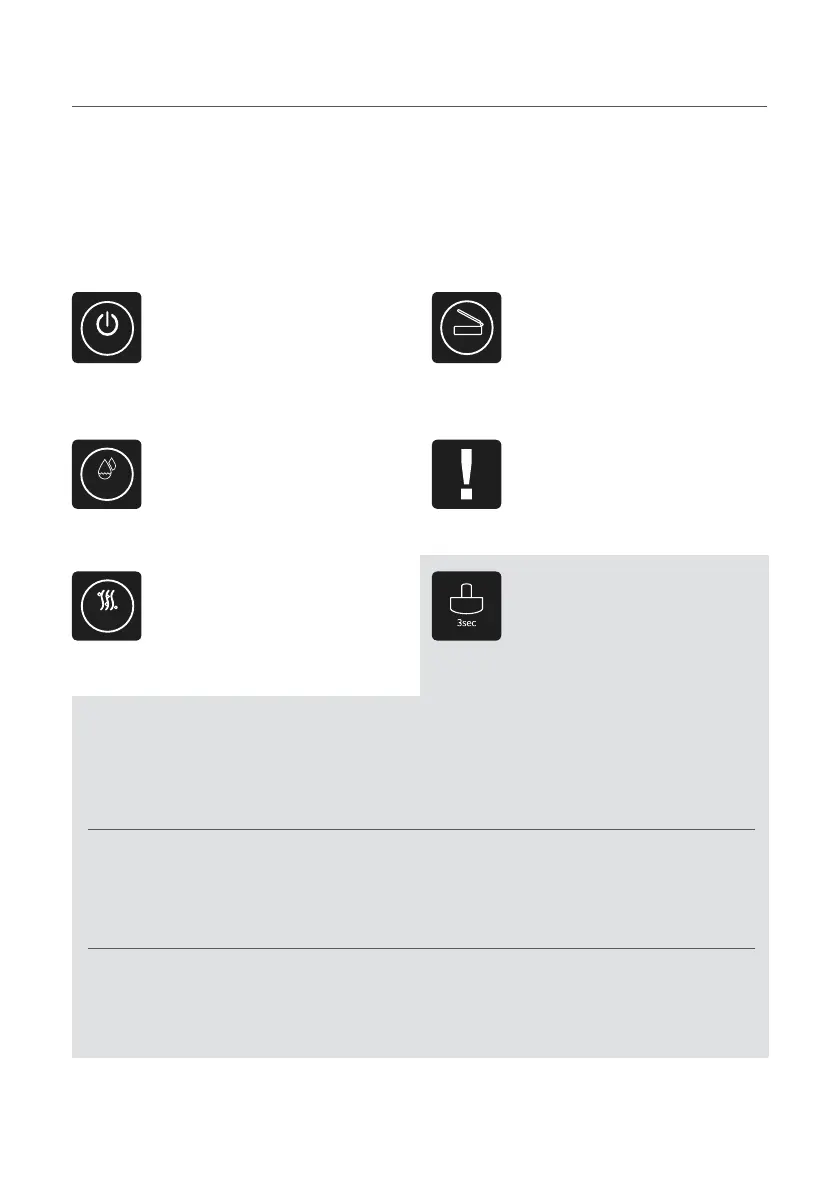
Control buttons
Reencle Prime’s touch controls are located on the
top of the receptacle. Functions are as follows:
Power Open
Press the power button to turn on and
o the device.
Always keep the power turned on. Reencle
is equipped with an automatic sleep mode.
In case of a service or repair, power o rst,
and then unplug the device.
Press this button to open the small
cover of Reencle to deposit food
waste.
Dry Check
Press this button when the internal
contents of the stirring tank become
boggy with too much water.
Indicates product errors in the
product or buttons through ickering
LED with alarm sounds.
Purify Lock
Press this button when you notice a
bad odor to help reduce the smell.
The open button includes a lock
feature. How to opperate the lock
button:
1st click
2nd click
3rd click
Press and hold the lock button for three seconds for the rst time:
A red LED will ash around the lower sensor. This indicates that the automatic sensor
is now locked and will not automatically open the small lid. Do open the small lid in
this setting, press the “Open” button.
Press and hold the lock button for three seconds for a second time:
A red LED will remain on the lower automatic sensor, and red LED will turn on around
the “Open” button. In this setting, neither the automatic sensor nor the “Open” but-
ton will open the small lid.
Press and hold the lock button for three seconds for a third time:
The red lights around the automatic sensor and the “Open” button will turn o, and
both the automatic sensor and “Open” button will be unlocked and functional again.


 To Next Page