11
REENCLE PRIME - USER MANUAL ENGLISH
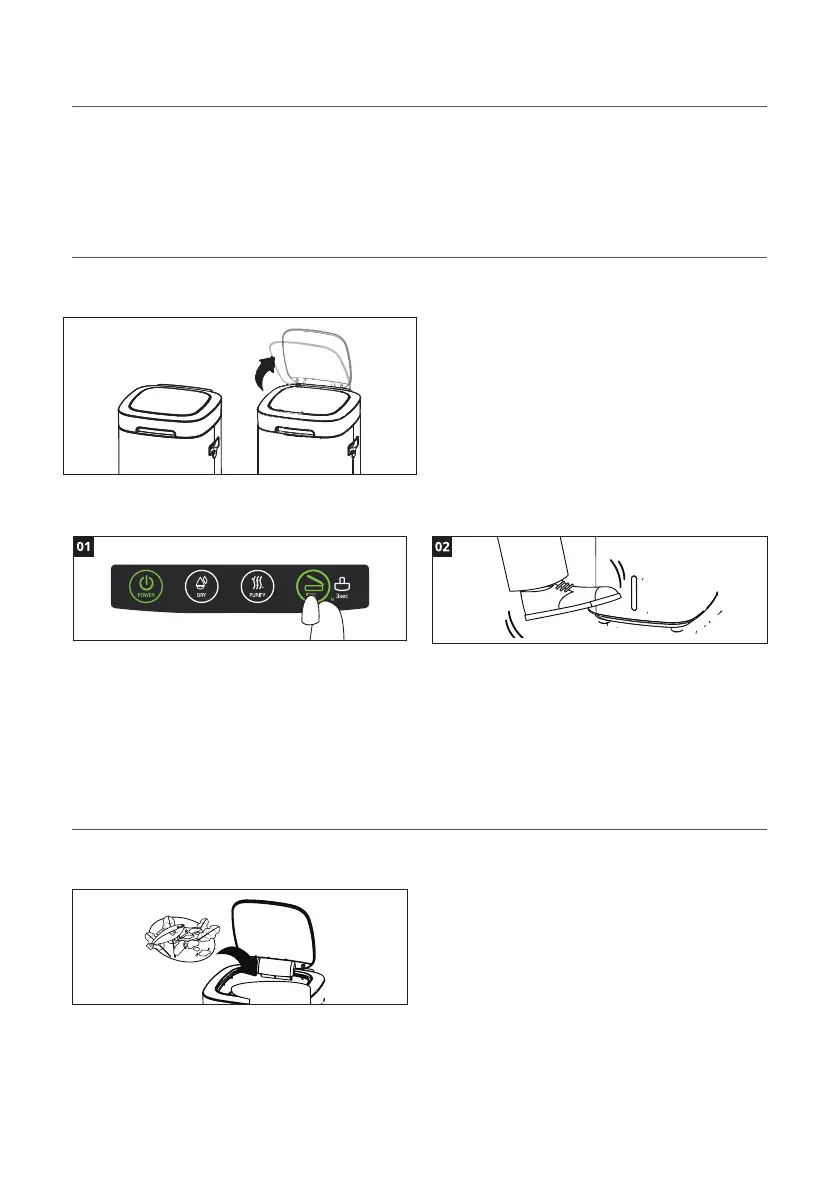
01 Open the small lid
01 Add food scraps to Reencle Prime
Open the small lid to add food scraps to Reencle
Prime stirring tank.
When the small lid is open, the stirring rod will
temporarily stio. It will begin automatically stirring
again when the lid closes.
Add food waste to Reencle Prime periodically. For
larger items (e. g. banana peels, stems), chop into
smaller pieces. This will prevent issues with the sti-
rring rod and help food scraps break down faster.
Refer to page 13 for acceptable and prohibited
food waste.
You can open the small lid in two ways:
Open button: press the “Open” button to open or
close the small lid.
Automatic sensor: approach the front of Reencle
Prime slowly and cover the sensor with your foot
(it will detect 12-inches away). Hold your foot in
front of the sensor for 2-3 seconds and the lid will
automatically open.
When the sensor is operating, a green light will ash on the
front sensor. Depending on the lighting conditions of the
installation environment, the sensing speed may dier.
05. Ongoing Use & Operations
Note: Reencle Prime must be plugged in and powered on for touch button operations to function.


 To Next Page