19
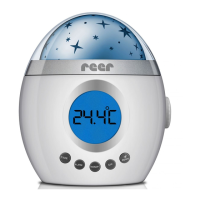
Room temperature display
TEMP
UP
UP
Display in
°Fahrenheit
Display in
°Celsius
Star projection*
* The starry sky changes from colour combinations of red, green and blue.
1
1
1
2
2
2
3
3
3
LIGHT
ON/OFF
LOCK LOCK
Switching the starry
sky on and o
Start: Colour change
Lock desired
colour
Reactivate
colour change
Activating the alarm function
Alarm activated;
a bell symbol appears
on the display
Alarm deactivated; the
bell symbol disappears
from the display
UP
UP
ALARM
Sounds and melodies
Turn melodies and
tones on and o
Simulation of
heartbeats
Setting the
volume
Adjust volume on the device
and on the nightlight
Selecting from the
dierent tones
Play music
Automatic shut-o function
1 2 3 4
SOUND
ON/OFF
SELECT
Connect the nightlight to the
device via a Line-in cable
Turn on speakers
1 2 3
You can also use the nightlight as a speaker unit for external data carriers, e.g. mobile telephones,
MP3-players or PCs.
SOUND
ON/OFF
+
The automatic shut-o function switches thenightlight
(music and starry sky) o after the desired
time (15 min., 30 min. or 60 min.).
GB
18


 To Next Page
 Loading...