24
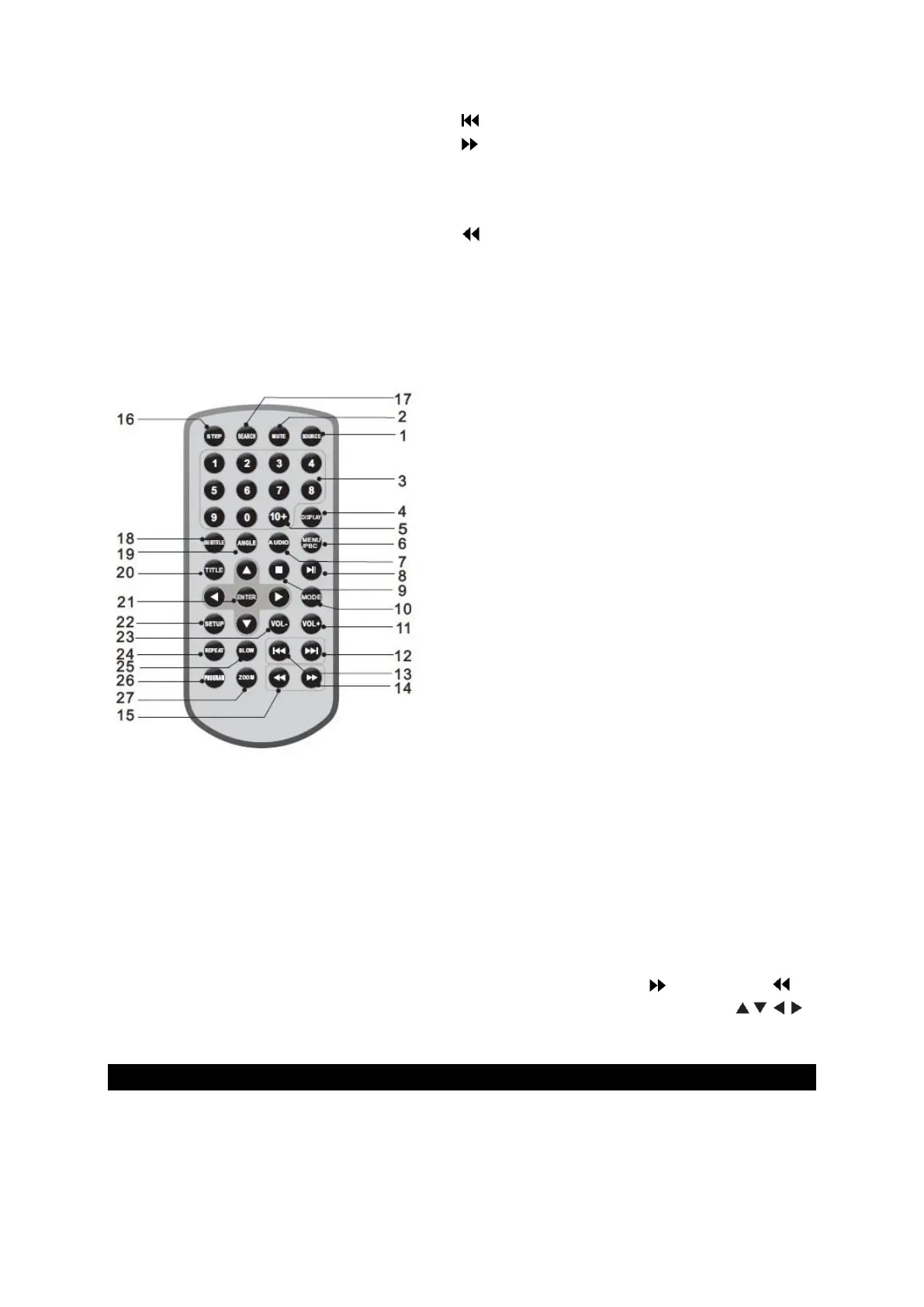
13. Selects the previous title or chapter.
14. This allows you to fast-forward the
playback. (2x > 4x > 8x > 16 > 32 > Play). When
you press the Play button, playback starts at
normal speed.
15. : This allows you to rewind the playback.
(2x > 4x > 8x > 16 > 32 > Play). When you
press the Play button, the playback starts at
normal speed.
16. STEP: Single frame playback in DVD mode.
17. SEARCH: Direct search for playback point, title
or chapter in DVD mode.
18. SUBTITEL (Untertitel): DVD: Select between
the available subtitle languages by pressing
the key several times.
19. ANGLE: Use the button to change the viewing
angle on DVDs that support this function.
20. TITLE: Back to the DVD title menu.
21. ENTER: Confirmation of the menu selection.
22. SETUP: Open or close the settings menu.
23. VOL-: Lower the volume.
24. REPEAT: Press the REPEAT button to select
the type of repeat.
DVD modes: Chapter, Title, Off.
VCD Modes: Single, All, Off.
CD/MP3 Modes: Single, Folder, Off..
25. SLOW: Slow motion (1/2, 1/4, 1/8, 1/16 and
normal).
26. PROGRAM: DVD/VCD: Here you can save your
favourites. Press the programme key to open
the Favourites menu. Now you can directly
save the number of your favourite and the
playback option with the number fields. To
return to normal playback mode, press the
PROGRAM key again to exit the menu.
27. ZOOM: Each time you press ZOOM, the TV
display changes as follows: 2x size, 3x size, 4x
size, 1/2, 1/3, 1/4.
JPEG: Press ZOOM, then to enlarge or to
reduce the picture. Use the buttons
to move around the picture.
SETTING SETUP MENU
Press the "SETUP" key to open the main menu. Use the direction keys to select the desired
menu item. After completing the setting, press the "SETUP" key to close the menu.


 To Next Page