EasyManua.ls Logo

Rega NAIA - NAIA PSU Features and Settings; Adjusting PSU Speed Settings; Returning PSU to Factory Settings; NAIA PSU Safety Warnings

Rega NAIA
68 pages
Print Icon
To Next Page IconTo Next Page
To Previous Page IconTo Previous Page
Loading...
9
Introduction - NAIA PSU


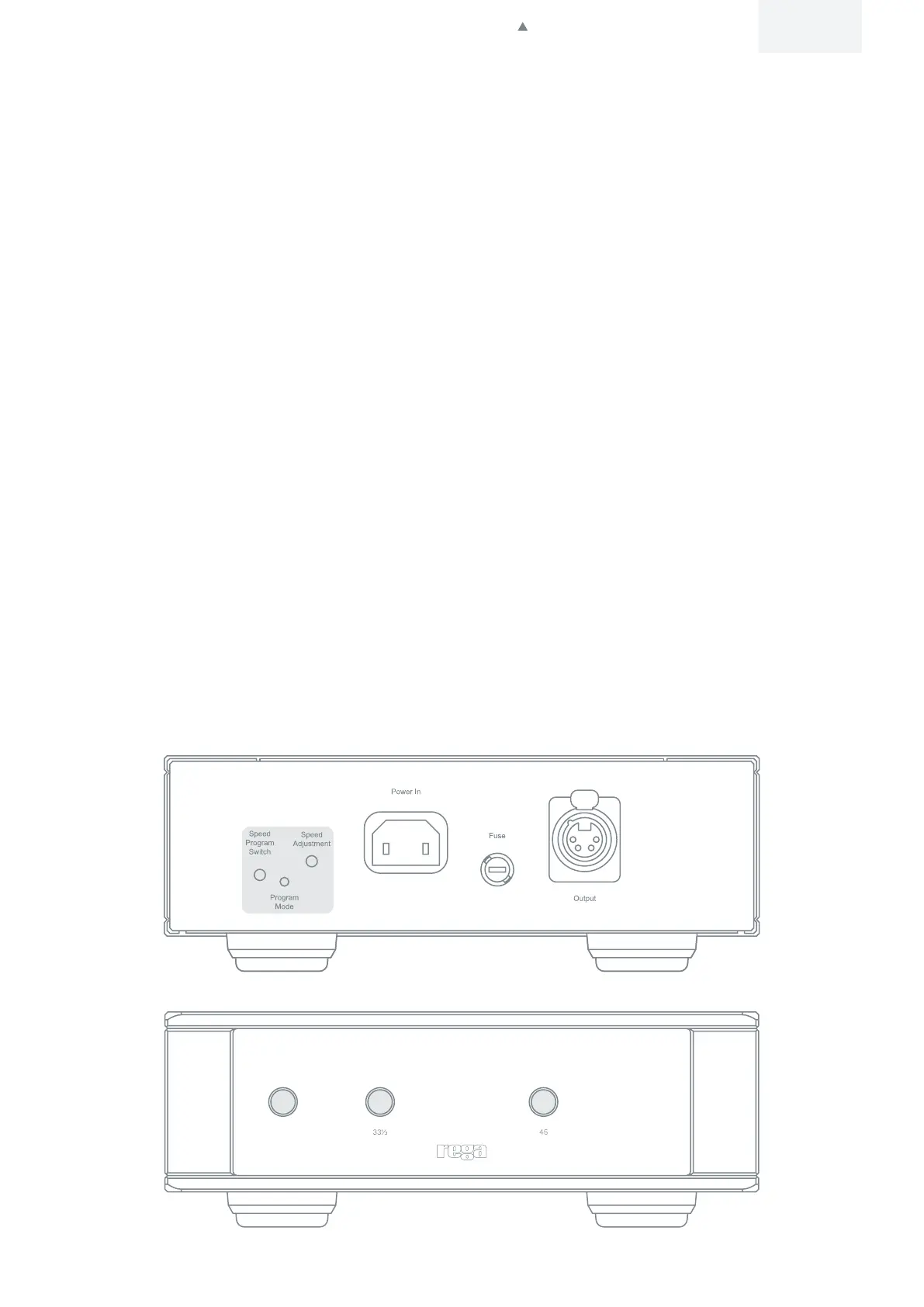
Speed adjustment (factory set - only adjust if necessary)

Speed Program Switch – This enables the set speed mode.
Program Mode LED
Speed Adjustment – This encoder is used to adjust the speed. The step size of the speed control is 0.01 rpm.
Returning the NAIA PSU to factory settings

you.
1. 
2. 
LED is illuminated.
 Whilst illuminated, press the ‘Speed Program Switch’ button once again to fully factory reset and return to ‘run mode’.
Note:
result in lower performance and minor variations in speed stability.
Warnings

Do not operate the power supply without the turntable connected.

Do not open the case covers. There are no user serviceable parts inside.
English
Click to return to top


Related product manuals