EasyManua.ls Logo

Regal-Beloit Genteq Evergreen VS - User Manual

Regal-Beloit Genteq Evergreen VS
12 pages
Print Icon
To Next Page IconTo Next Page
Loading...
1
F O R M
Evergreen
®
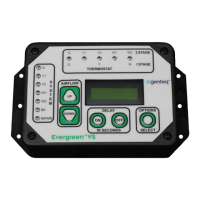
VS User Interface
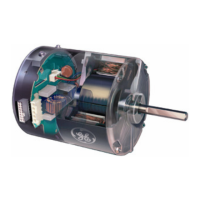
Evergreen VS Motor
Installation Guide
G0075E
Revised
January 2020
Regal Beloit America, Inc.
1325 Heil Quaker Blvd.
LaVergne, TN 37086
Customer Service: 800 672 6495
thedealertoolbox.com
www.regalbeloit.com
CAUTION indicates a hazardous situation that, if not avoided,
could result in minor or moderate injury.
Periodic inspections should be performed. Failure to perform
proper maintenance could result in premature product failure, in
addition to minor or moderate injury.
Installation and service of this Evergreen VS user interface and
motor should be performed only by trained service technicians
familiar with these products.
This Evergreen VS user interface and motor should be
installed in accordance with accepted practices and installation
instructions, and in compliance with all national and local codes.
WARNING indicates a hazardous situation that, if not avoided, could
result in death or serious injury.
Read and follow all instructions carefully.
Disconnect and lock out the main power from the unit being
serviced before installing the Evergreen VS user interface and
motor. It is also a good practice to confirm that the power is
disconnected with a voltmeter.
Do not operate equipment without guards in place.
Improper installation, adjustment, alteration, service,
maintenance, or use could cause explosion, fire, electrical shock,
or other conditions. Consult a qualified installer, service agency,
or your distributor or branch for information or assistance.
The qualified installer or agency must use the supplied or
recommended parts when installing or servicing this product.
After installing the Evergreen VS user interface and motor, it is
the responsibility of the installing technician to verify the HVAC
system matches the manufacturer’s requirements for proper
operation, capacity, efficiency and safety. This includes but is not
limited to measuring the airflow and adjusting the Evergreen
VS user interface airflow and delay setting in each mode of
operation.
Evergreen
®
VS Motor
Table of Contents
1. Introduction
2. Evergreen VS Product Line Applications
and How to ID Genteq ECM Motors
3. Model 2.0, Genteq Models 2.3 and Eon
®
Applications
and Removal and Installation of the Motor
4-5. Installation of the Evergreen VS User Interface (UI)
6. Evergreen VS User Interface (UI) Overview
7. Sequence of Operation
8. Commissioning
9. Airflow and Delay Adjustments
10-11. Options Menu
12. Evergreen VS User Interface (UI) Specifications
and Evergreen VS Motor Specifications
and Technical Support and Warranty
Page
Evergreen
®
VS User Interface
©2019, 2020 Regal Beloit Corporation, All Rights Reserved. MCIM20008E • Form# G0075E
INTRODUCTION
The Evergreen VS motor is designed to replace Genteq constant airflow (variable speed) ECM motors. This includes ECM indoor
blower motors made by Regal and its predecessor manufacturer and sold under other Regal and predecessor manufacturer brands.
The Evergreen VS motor is a constant airflow (variable speed) motor. It will operate in constant airflow mode when it is receiving digital
serial interface (DSI) and constant torque mode when it is receiving pulse width modulation (PWM) communication.
Question and Answer IconNeed help?

Do you have a question about the Regal-Beloit Genteq Evergreen VS and is the answer not in the manual?

Summary

Safety Information

Warnings and Cautions

Highlights hazardous situations that could result in death, injury, or property damage if not avoided.

Introduction

Product Overview

Describes the Evergreen VS motor as a replacement for Genteq constant airflow ECM motors.

Product Applications and Identification

Evergreen VS Product Line

Details how the Evergreen VS motor replaces Genteq constant airflow motors.

How to Identify Genteq ECM Motors

Provides methods to identify Genteq ECM motors using model name, number, or control code.

Motor Replacement Procedures

Applications for Replacement

Lists applications for replacing Genteq ECM models 2.0, 2.3, and Eon motors with Evergreen VS.

Motor Removal and Installation

Step-by-step guide for removing the old motor and installing the new Evergreen VS motor.

User Interface Installation and Connections

Installing the User Interface (UI)

Instructions on mounting and orienting the UI for proper access and connections.

Connecting UI to Motor and HVAC System

Details wiring connections for the UI, new motor, and HVAC thermostat.

Wiring Diagrams

Thermostat Wiring Connections

Illustrates how to connect thermostat wires for single and two-stage HVAC systems.

User Interface Overview

UI Components and Functions

Explains the purpose of the Thermostat LED, System LED, Airflow, Delay, and Options buttons.

Operation Logic

Sequence of Operation

Describes how the UI responds to thermostat demands and system inputs.

2 nd Stage and Continuous Fan Operation

Details transitions for 2nd stage demands and continuous fan operation.

Commissioning and Lockout

Commissioning Process

Confirms wiring and adjusts UI settings for various HVAC system modes.

User Interface Lockout

Explains how to unlock the UI if buttons become unresponsive due to inactivity.

Airflow and Delay Adjustments

Airflow Adjustments

How to increase or decrease the % airflow value to meet HVAC requirements.

Delay Adjustments

How to adjust ON and OFF delay values for specific system needs.

Default Settings

Lists factory default airflow, ON/OFF delay, and time delay values.

Advanced Options Menu

Accessing the Options Menu

Instructions on how to enter and navigate the UI options menu.

Capturing PWM Signals

Teaches the UI PWM values for 2nd stage airflow transitions.

Timed W2;Y2 Settings

Configures automatic 2nd stage transition timing for single-stage thermostats.

Unlocking Airflow Adjustments

How to unlock W1/Y1 airflow adjustments for independent configuration.

Options Menu Continued

Motor Output Type

Sets the display indicator for motor output (RPM or airflow).

Diagnostics Test

Performs a go/no-go test to verify motor operational status.

Restore Factory Defaults

Resets all UI values to their original factory default settings.

Exit Options Menu

Procedure to safely exit the advanced options menu.

Specifications and Support

Evergreen VS User Interface (UI) Specifications

Lists dimensions, voltage, and ambient ratings for the UI.

Evergreen VS Motor Specifications

Details voltage, HP, communication, rotation, and physical specs of the motor.

Technical Support

Provides contact information and website for technical assistance.

Terms & Conditions and Warranty

Outlines sales terms, conditions, and the limited warranty for the product.

Regal-Beloit Genteq Evergreen VS Specifications

General IconGeneral
BrandRegal-Beloit
ModelGenteq Evergreen VS
CategoryEngine
LanguageEnglish

Related product manuals