CHAPTER 6
6-44
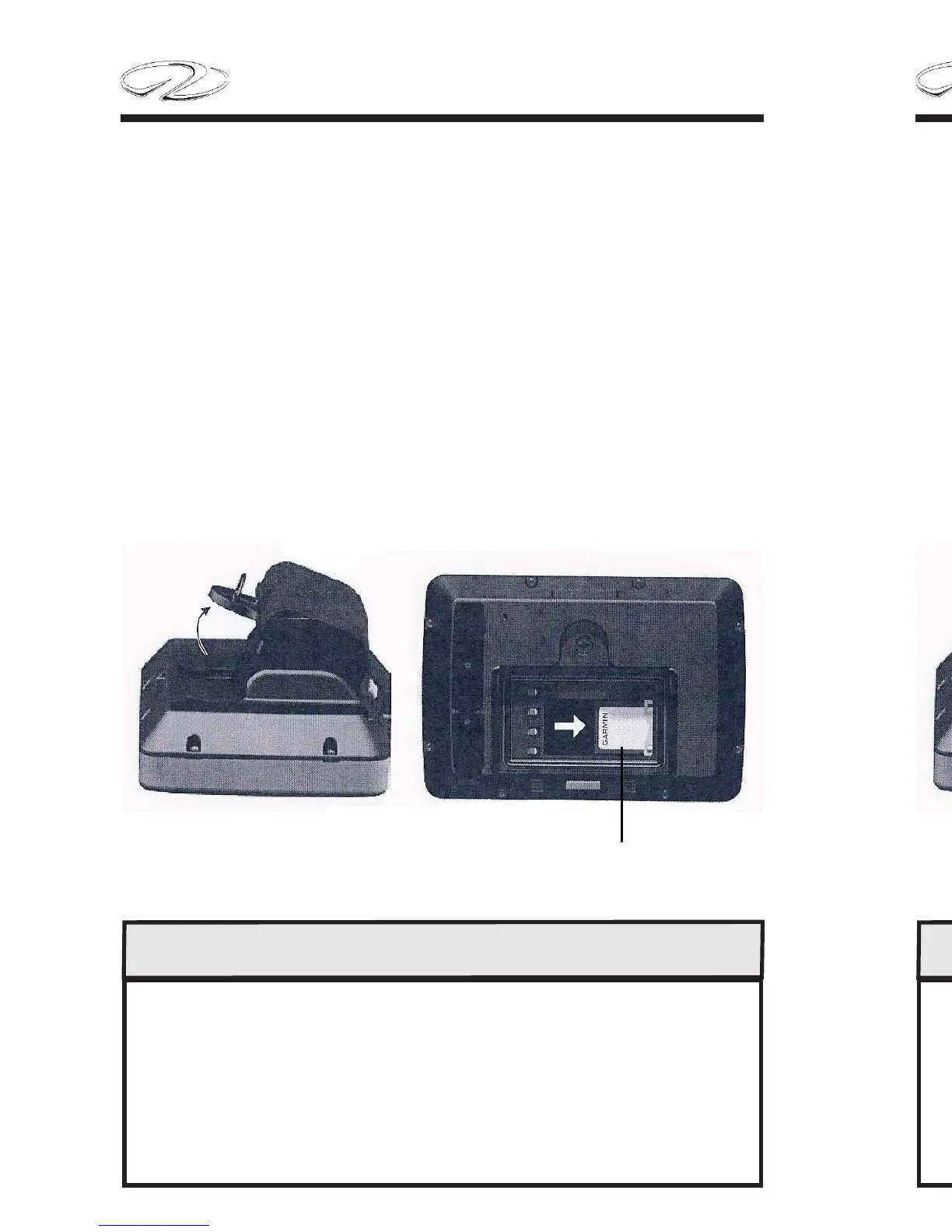
To Install SD Card:
1. R
emove the battery. The SD card slot is in the bottom of the battery
compartment, on the opposite side from the battery contacts.
2. Place a SD card into the opening with the label showing, with the
SD card contacts facing away from the battery contacts.
3. Slide the SD card into the SD slot, and press until it clicks softly
and locks in place.
4. Insert the battery pack.
SD CARD
CHART PLOTTER CHART PLOTTER
REARREAR
TO HELP AVOID THEFT AND/OR UV BATTERY DAMAGE
REMOVE THE CHART PLOTTER UNIT
FROM ON BOARD THE VESSEL.
STORE IN A COOL, DRY ENVIRONMENT.
DO NOT STORE CHART PLOTTER
IN THE BOAT OR AUTO GLOVE COMPARTMENT.
CHAPTER 6
6-44
To Install SD Card:
1. R
emove the battery. The SD card slot is in the bottom of the battery
compartment, on the opposite side from the battery contacts.
2. Place a SD card into the opening with the label showing, with the
SD card contacts facing away from the battery contacts.
3. Slide the SD card into the SD slot, and press until it clicks softly
and locks in place.
4. Insert the battery pack.
SD CARD
CHART PLOTTER CHART PLOTTER
REARREAR
TO HELP AVOID THEFT AND/OR UV BATTERY DAMAGE
REMOVE THE CHART PLOTTER UNIT
FROM ON BOARD THE VESSEL.
STORE IN A COOL, DRY ENVIRONMENT.
DO NOT STORE CHART PLOTTER
IN THE BOAT OR AUTO GLOVE COMPARTMENT.


 To Next Page