155
Monitor Panel Option
The monitor panel is found at the head upper cabi-
netry. It is a multi-function component but also of-
fers a check for the potable water and waste tanks.
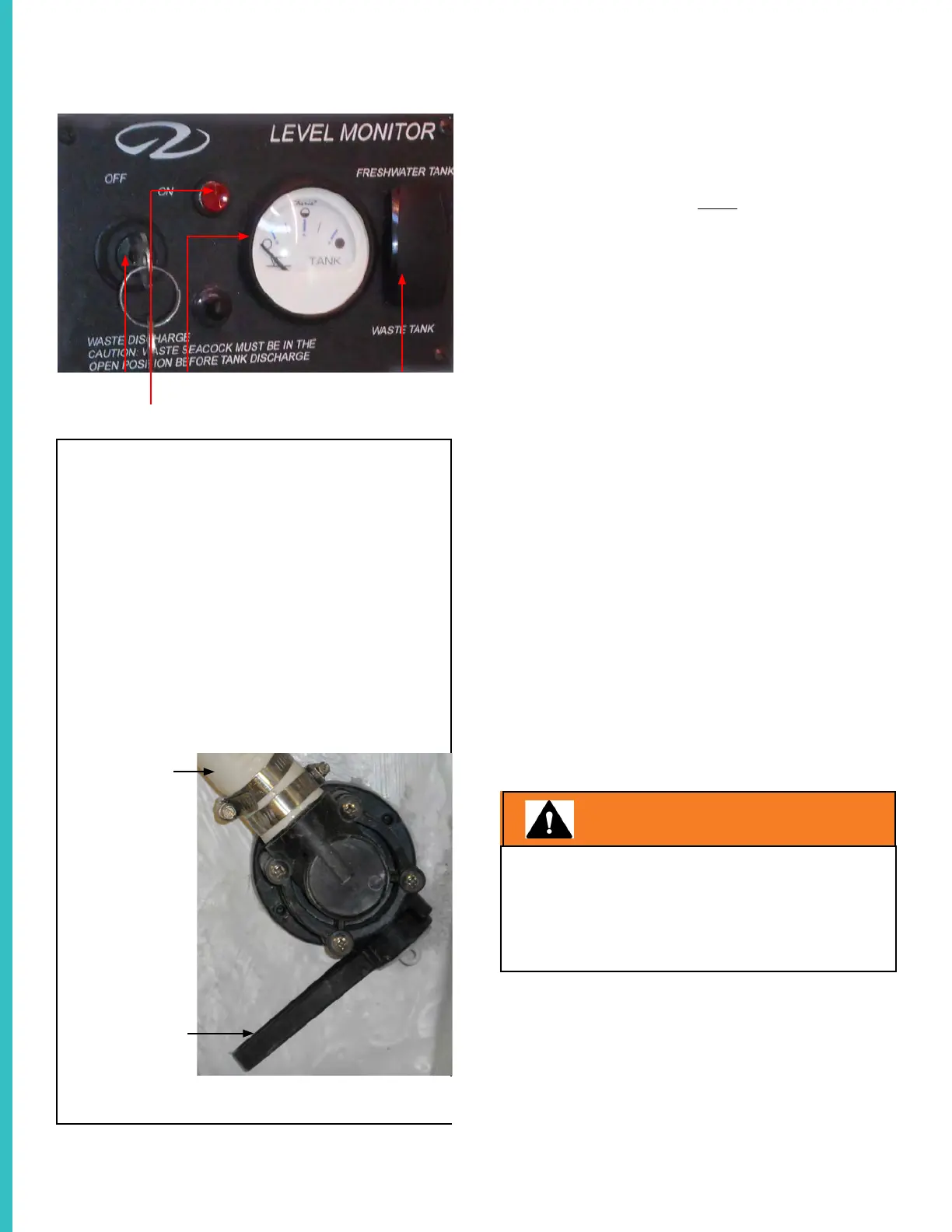
To check the waste tank black water level press
the lower part of the momentary switch shown in
the above photo and check the gauge.
It will help you determine when to pump out the
waste tank. The top segment of the switch mea-
sures the fresh water tank level. Check water and
waste tank levels before each cruise.
MOMENTARY SWITCHGAUGE
PUMP-OUT BUTTON
KEY
Operation
As an option the vessel may be outfitted with an
overboard discharge system including macerator.
Waste will exit the hull through the macerator sea
cock when turned to the open position.
To pump overboard notice there is a key switch and
red button on the monitor panel. Turn the key to the
“on” position. Next, press the red button and hold
it as the macerator pumps the waste through the
hull bottom sea cock. Check the waste portion of
the monitor panel as the gauge should show empty.
The reset breaker on the monitor panel protects the
power to the gauge. The macerator grinds up the
waste and sends it through the hull bottom via the
open macerator sea cock. See the photo.
NOTE: The macerator seacock shown may not look
identical to the one installed on your vessel.
In general when a seacock handle is in line (straight
up) is is in the open or “on” position. When the
handle is at 90 degrees to a straight up position is
is considered closed or “off”.
WARNING
ALWAYS CHECK WITH LOCAL, STATE AND
COUNTRY WASTE DUMPING REGULATIONS/
AUTHORITIES
BEFORE ATTEMPTING TO PUMP WASTE
OVERBOARD!
SEA COCK IN
CLOSED
POSITION
HOSE FROM
MACERATOR
MACERATOR SEACOCK AT
HULL BOTTOM



 To Next Page