48
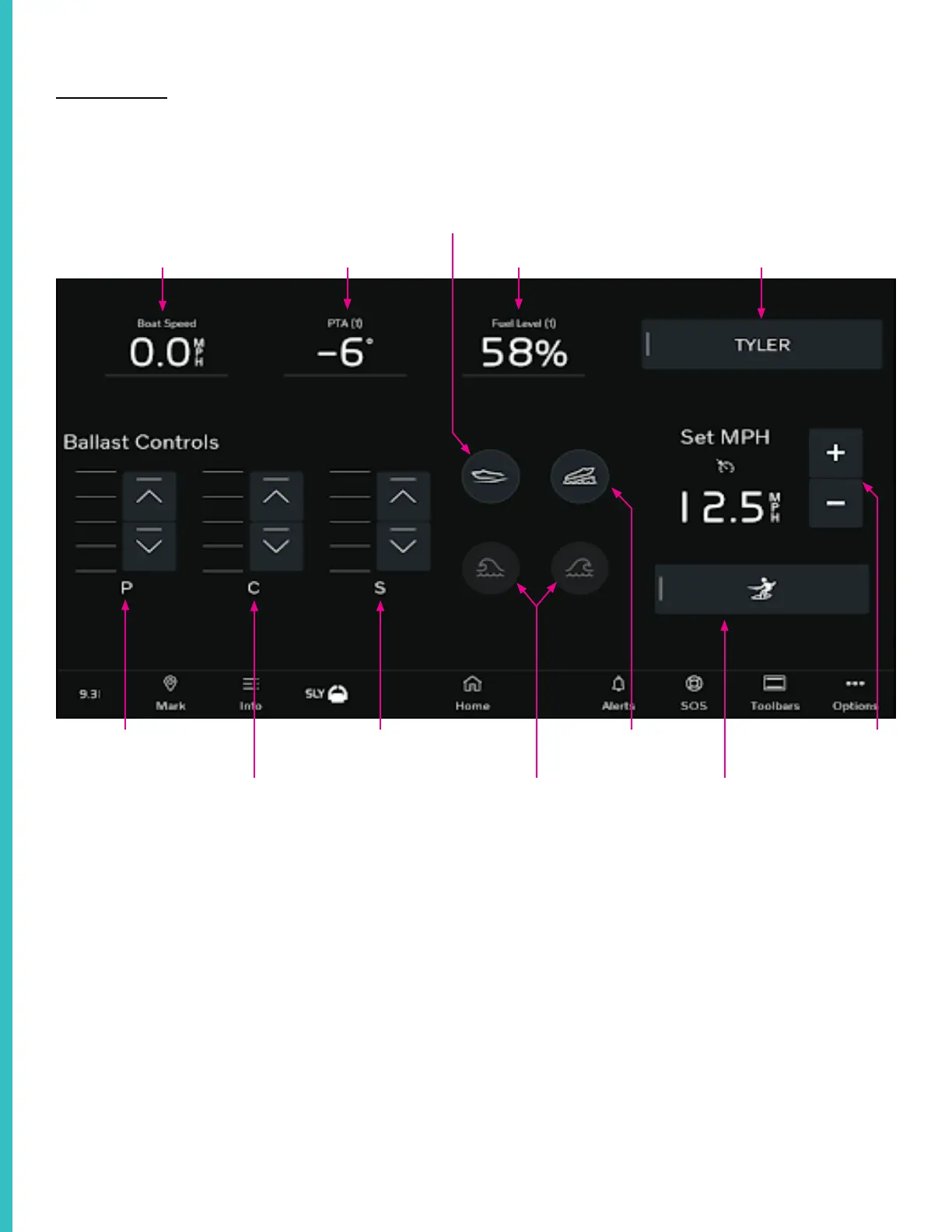
Ballast Control
Each ballast control is marked with “P” “C” or
“S” for port ballast, center ballast, and starboard
ballast respectively.
First, tap the “Surf Control Mode’’ icon to engage
control. To fill a ballast bag, tap the ‘up’ arrow.
The columns next to the arrows indicate the amount
of water in each ballast and increase as you fill the
bag. Tap the ‘down’ arrow to empty the bag.
You can control the amount of water in each
ballast by tapping the ballast control while filling or
draining to stop the process.
The Surf System is controlled from the plotters. This section outlines the suggested order of operations The Surf System is controlled from the plotters. This section outlines the suggested order of operations
when customizing your wake, but the Surf System can be operated in any order. when customizing your wake, but the Surf System can be operated in any order.
Note: Some items are optional and may not be included in your vessel.
SPEEDOMETER
POWER TRIM ASSIST FUEL LEVEL
RIDER PROFILE
SPEED CONTROL
SURF CONTROL MODE
TRAILERING MODE
SURF LEFT/RIGHT
PORT BALLAST
CENTER BALLAST
STARBOARD BALLAST
QUICK LAUNCH
ControlControl



 To Next Page