58
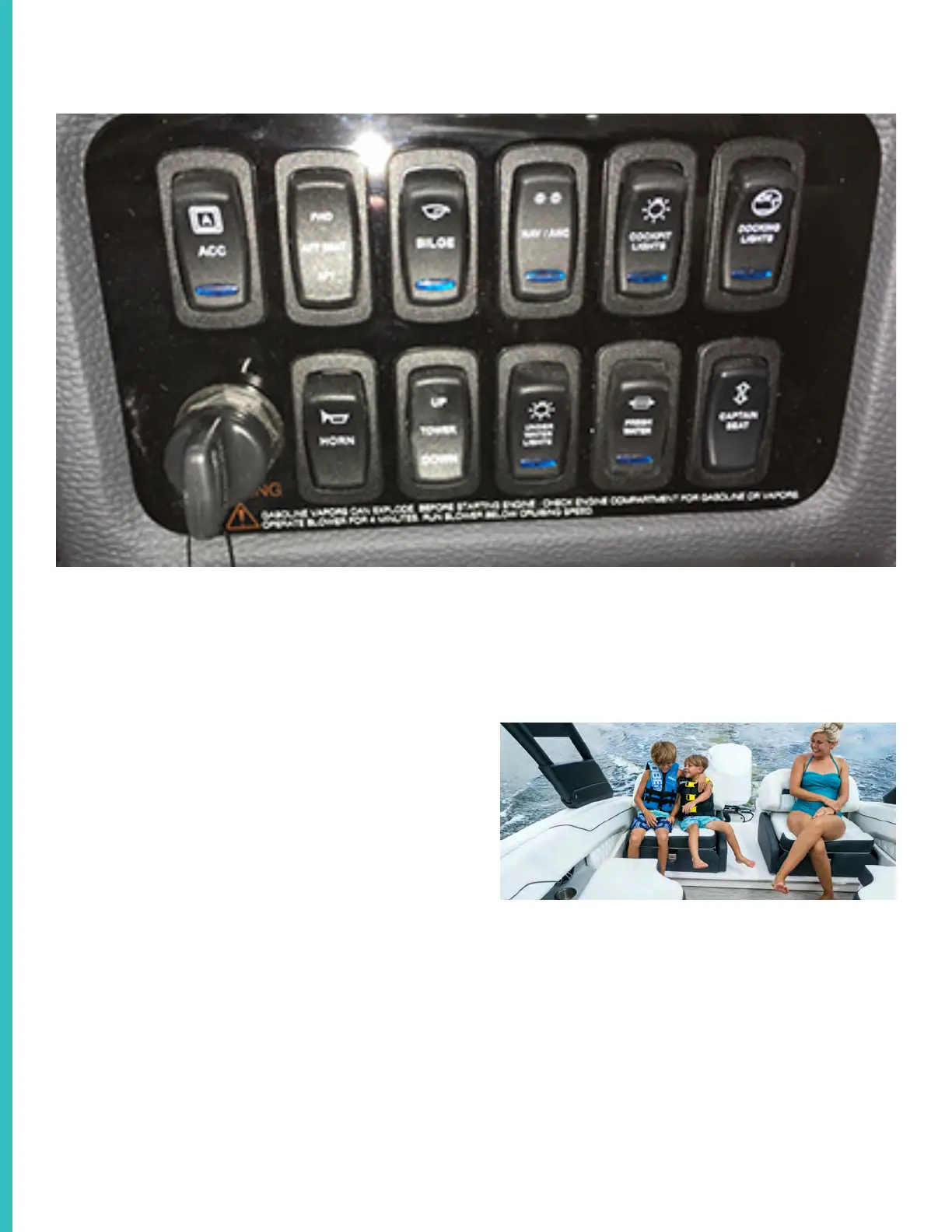
Typical Outboard Helm Switch Panel
Shown above is a typical LX series helm switch panel. It provides switching for various navigation aids and
key vessel systems. Be sure to understand each switches function before embarking on the waterway!
Each switch upon activation features a blue icon which could be helpful with night cruising. Check that the
switches are deactivated when leaving the vessel. Below is a description and function of each switch.
Key Swit Switch
Key Switch
Switch Panel Operation
Accessory
This switch is available for accessories.
Aft Seat
This switch controls the rear slide-away seat fea
-
ture which when positioned fully aft adds one foot
to the coc
kpit space. When cruising always posi-
tion the aft seat fully aft or fully forward as it will
enable the water shedding dam to operate prop-
erly under the seat structure.
Slide-away seat shown in full aft position.
Before attempting to open the Lazarette storage
hatch ensure that the slide-away seat mechanism
is fully aft. This prevents the hatch from contacting
the seat structure when opening.



 To Next Page