EasyManua.ls Logo

Regin REGIO RC-DFO - User Manual

Regin REGIO RC-DFO
5 pages
Print Icon
To Next Page IconTo Next Page
Loading...
RC-DFO
RC-DFO
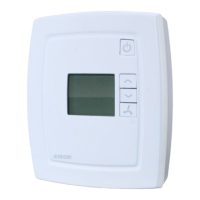
Room controllers with display, fan button and
manual forced ventilation function
RC-DFO is a room controller from the Regio Mini series
intended to control heating and cooling in a single zone.
RC-DFO is a room controller in the Regio series. It has a
button for three-speed fan control (fan-coil) and a display.
The controller does not have a communication port.
Regio
Regio is an extensive range of controllers for control of
heating and cooling.
The controllers are divided into three different series;
Mini, Midi and Maxi. The Midi range consists of
pre-programmed controllers with communication.
Maxi consists of freely programmable controllers
with communication. The Mini controller range, of
which RC-DFO is a part, consists of pre-programmed,
stand-alone controllers.
Applications
The Regio controllers are suitable for use in buildings
requiring optimum comfort and reduced energy
consumption, such as offices, schools, shopping centres,
airports, hotels and hospitals.
See application example on page 3.
Sensor
The controller has a built-in sensor. An external sensor for
room temperature or change-over can also be connected
(PT1000).
Actuators
RC-DFO can control 0...10 V DC valve actuators and/or
24 V AC thermal actuators.
Easy to install
The modular design, featuring a separate bottom plate for
wiring, makes the entire Regio range of controllers easy to
install and commission. The bottom plate can be put into
place before the electronics are installed. Mounting takes
place directly on the wall or on an electrical connection
box.
revision
12 2016
Short facts about RC-DFO
Easy installation
Built-in function for forced ventilation
On/Off or 0...10 V control
Input for occupancy detector, window contact,
condensation detector and change-over
function

Other manuals for Regin REGIO RC-DFO

Question and Answer IconNeed help?

Do you have a question about the Regin REGIO RC-DFO and is the answer not in the manual?

Summary

Regio Controller Series

Applications of Regio Controllers

Sensor Capabilities

Actuator Control

Easy Installation Features

Display Handling and Indicators

Control Modes Overview

Operating Modes

Off Mode

Heating and cooling disconnected. Frost protection active. Activated if window is opened.

Unoccupied Mode

Room not used for extended period. Heating/cooling within configurable interval.

Stand-by Mode

Energy saving mode. Disconnects heating/cooling around setpoint.

Occupied Mode

Room in use. Comfort mode activated. Maintains temperature around setpoints.

Bypass Mode

Room temperature controlled like Occupied. Forced ventilation output active.

Occupancy Detector Integration

Occupancy Button Functions

Forced Ventilation Functionality

Change-over Function Details

Setpoint Adjustment

Built-in Safety Functions

Actuator Exercise Routine

Fan Control

Relay Module RB3 Compatibility

Technical Data Specifications

Input and Output Terminals

Product Dimensions

Product Documentation References

Summary

Regio Controller Series

Applications of Regio Controllers

Sensor Capabilities

Actuator Control

Easy Installation Features

Display Handling and Indicators

Control Modes Overview

Operating Modes

Off Mode

Heating and cooling disconnected. Frost protection active. Activated if window is opened.

Unoccupied Mode

Room not used for extended period. Heating/cooling within configurable interval.

Stand-by Mode

Energy saving mode. Disconnects heating/cooling around setpoint.

Occupied Mode

Room in use. Comfort mode activated. Maintains temperature around setpoints.

Bypass Mode

Room temperature controlled like Occupied. Forced ventilation output active.

Occupancy Detector Integration

Occupancy Button Functions

Forced Ventilation Functionality

Change-over Function Details

Setpoint Adjustment

Built-in Safety Functions

Actuator Exercise Routine

Fan Control

Relay Module RB3 Compatibility

Technical Data Specifications

Input and Output Terminals

Product Dimensions

Product Documentation References

Overview

The RC-DFO is a room controller from the Regio Mini series, designed for controlling heating and cooling in a single zone. It features a display, a fan button for three-speed fan control (fan-coil), and a manual forced ventilation function. Unlike other Regio series controllers, the RC-DFO does not have a communication port.

Function Description

The RC-DFO is part of the extensive Regio range of controllers, which are categorized into Mini, Midi, and Maxi series. The Mini series, to which the RC-DFO belongs, consists of pre-programmed, stand-alone controllers. These controllers are suitable for various building types such as offices, schools, shopping centers, airports, hotels, and hospitals, aiming to provide optimum comfort and reduce energy consumption.

The controller has a built-in sensor for room temperature and can also connect to an external PT1000 sensor for room temperature or change-over functions. It can control 0-10 V DC valve actuators and/or 24 V AC thermal actuators.

Control Modes and Operating Modes:

The RC-DFO can be configured for various control modes and sequences, including:

  • Heating
  • Heating or Cooling via change-over function
  • Heating/Heating
  • Heating/Cooling
  • Heating/Cooling with VAV-control and forced supply air function
  • Heating/Cooling with VAV-control
  • Cooling
  • Cooling/Cooling

There are five distinct operating modes: Off, Unoccupied, Stand-by, Occupied, and Bypass.

  • Off: Heating and cooling are disconnected, but frost protection remains active (factory setting: 8°C). This mode activates if a window is opened.
  • Unoccupied: For extended periods when the room is not in use, heating and cooling are maintained within a configurable temperature interval (FS min = 15°C, max = 30°C).
  • Stand-by: An energy-saving mode for when the room is not in use (e.g., nights, weekends, evenings). The controller transitions to Occupied mode if presence is detected. Heating and cooling are disconnected within a temperature interval around the current setpoint (FS heating setpoint = -3°C, cooling setpoint = +3°C).
  • Occupied: The room is in use, and a comfort mode is active. The controller maintains the temperature around a heating setpoint (FS = 22°C) and a cooling setpoint (FS = 24°C).
  • Bypass: Similar to Occupied mode, but the output for forced ventilation is also active. This mode is useful for situations with many people present, such as conference rooms. When activated by the occupancy button, the controller automatically returns to its preset operating mode (Occupied or Stand-by) after a configurable time (FS = 2 hours). If an occupancy detector is used, it returns to the preset mode if no occupancy is detected for 10 minutes.

Change-over Function:

The RC-DFO has an input for change-over, automatically resetting the output to operate with either heating or cooling. A PT1000 sensor can be connected to monitor the supply temperature of the heating coil. The output is set to Heating when the fluid temperature exceeds 22°C and to Cooling when it falls below 18°C. Alternatively, a potential-free contact can be used: open for heating, closed for cooling. For proper sensor function, continuous primary circuit circulation is required. If the change-over function is not used, the input must be disconnected.

Forced Ventilation:

The Regio RC-DFO includes a built-in function for forced ventilation. Closing the digital occupancy detector input sets the controller to Bypass mode and activates the output for forced ventilation (DO1), which can be used to open a damper. This function terminates after a settable forcing interval (10 min.) or can be activated by pressing a button.

Built-in Safety Functions:

The RC-DFO has an input for a condensation detector to prevent moisture accumulation, stopping the cooling circuit if detected. It also features frost protection, ensuring the room temperature does not drop below 8°C when in Off mode.

Actuator Exercise:

All actuators are exercised at 23-hour intervals. An opening signal is sent for the configured run time, followed by a closing signal for an equal duration, after which the exercise is complete.

Important Technical Specifications

  • Supply Voltage: 18-30 V AC, 50-60 Hz
  • Power Consumption: 2.5 VA
  • Ambient Temperature: 0-50°C
  • Storage Temperature: -20-+70°C
  • Ambient Humidity: Max 90% RH
  • Protection Class: IP20
  • Display: Backlit LCD
  • Built-in Temperature Sensor: NTC type, range 0-50°C, accuracy ±0.5°C at 15-30°C
  • Material, Casing: Polycarbonate, PC
  • Weight: 110 g
  • Colour: Cover: Polar white RAL9010, Bottom plate: Light gray
  • EMC Standards: Conforms to EMC Directive 2014/30/EU (EN 61000-6-1, EN 61000-6-3)
  • RoHS: Conforms to Directive 2011/65/EU (EN 50581:2012)

Inputs:

  • External Room Sensor: PT1000 sensor, 0-50°C (e.g., Regin's TG-R5/PT1000, TG-UH/PT1000, TG-A1/PT1000)
  • Change-over Alt. Potential Free Contact: PT1000 sensor, 0-100°C (e.g., Regin's TG-A1/PT1000) or closing, potential-free contact
  • Presence Detector: Closing, potential-free contact (e.g., Regin's IR24-P)
  • Condensation Detector Alt. Window Contact: Regin's condensation detector KG-A/1 or potential-free contact

Outputs:

  • Fan Control: 3 outputs for speeds I, II, and III respectively, 24 V AC, max 0.5 A
  • Forced Ventilation: 24 V AC actuator, max. 0.5 A
  • Valve Actuator Alt. Thermal Actuator: 2 outputs
    • Valve actuators: 0-10 V DC, max 5 mA
    • Thermal actuator: 24 V AC, max 2.0 A
  • Output: Heating or cooling

Actuator Exercise: FS = 23 hours interval Terminal Blocks: Lift type for max cable cross-section 2.1 mm²

Setpoint Settings via Display:

  • Basic Heating Setpoint: 5-40°C
  • Basic Cooling Setpoint: 5-50°C
  • Setpoint Displacement: ±0-10°C (FI = ±3°C)

Usage Features

Easy Installation: The modular design with a separate bottom plate for wiring simplifies installation and commissioning. The bottom plate can be mounted on the wall or an electrical connection box before the electronics are installed.

Display Handling: The display shows current fan speed, forced ventilation status, auto/manual fan indication, setpoint, indoor/outdoor temperature, occupancy indication, current room temperature, and open window status. It also indicates Off, Stand-by, Cool/Heat, and Service modes.

Button Controls: The controller's buttons allow for easy setting of parameter values through a parameter menu on the display. The INCREASE and DECREASE buttons adjust values, and changes are confirmed with the occupancy button.

Occupancy Detector: By connecting an occupancy detector, the RC-DFO can switch between Bypass mode and its preset operating mode (Occupied or Stand-by), allowing for energy savings while maintaining comfort.

Occupancy Button:

  • A short press (<5 seconds) when in preset operating mode activates Bypass mode.
  • A short press when in Bypass mode reverts to the preset operating mode.
  • A long press (>5 seconds) changes the controller's operating mode to "Shutdown" (Off/Unoccupied). The display allows selecting between Off or Unoccupied for Shutdown. A short press in Shutdown mode returns the controller to Bypass.

Fan Control: The RC-DFO has a fan button. Pressing it displays a fan symbol for 10 seconds, during which the fan speed can be changed using the INCREASE/DECREASE buttons. Fan positions include:

  • Auto: Automatic control to maintain desired room temperature.
  • 0: Fan off.
  • I: Manual position with low speed.
  • II: Manual position with medium speed.
  • III: Manual position with high speed. In Off and Unoccupied modes, the fan is stopped regardless of the display setting.

Setpoint Adjustment: In Occupied mode, the heating setpoint (FS = 22°C) or cooling setpoint (FS = 24°C) can be adjusted locally. Pressing INCREASE increases the setpoint by 0.5°C per press up to a maximum offset of +3°C. Pressing DECREASE decreases the setpoint by 0.5°C per press down to a maximum offset of -3°C. Switching between heating and cooling setpoints occurs automatically based on requirements.

Maintenance Features

Relay Module, RB3: The RB3 is a relay module with three relays for controlling fans in fan-coil applications, intended for use with Regio RC-...F controllers. Further information is available in the RB3 instruction manual.

Regin REGIO RC-DFO Specifications

General IconGeneral
BrandRegin
ModelREGIO RC-DFO
CategoryThermostat
LanguageEnglish

Related product manuals