14
The sound module
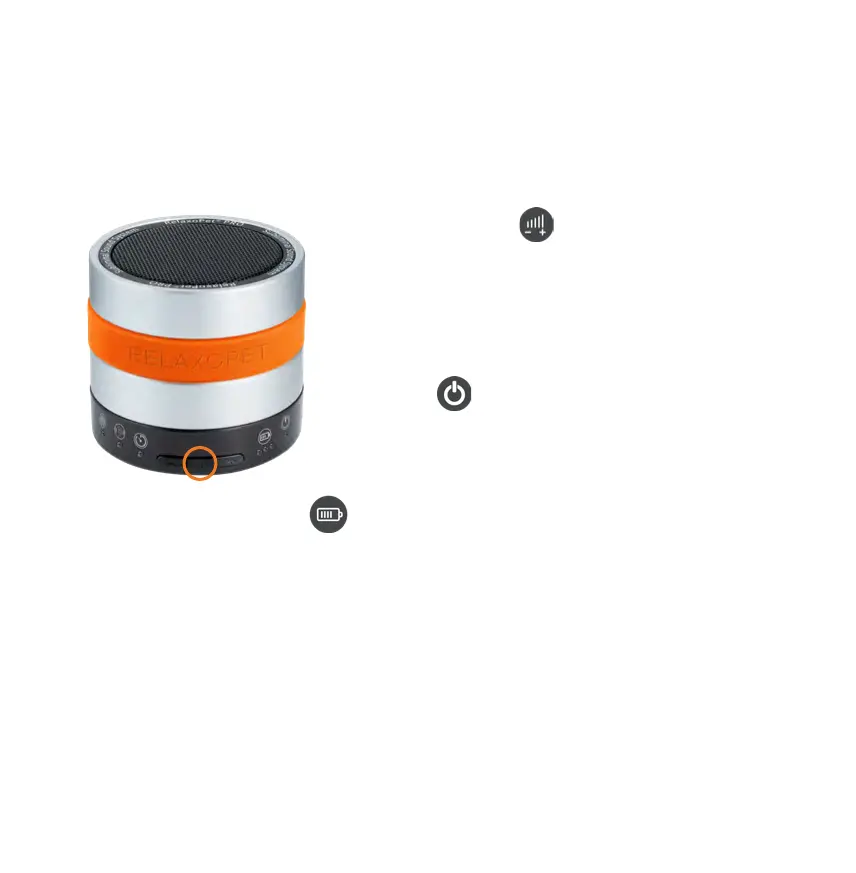
Volume | pause-play | charge indicator
Volume adjustment
Volume is adjustable in 15 steps, whereby the preset volume
at the start is always the middle volume range.
When restarted from pause mode, RelaxoPet
©
PRO resets
automatically at the preset volume.
Play-pause
By pressing the pause button (red circle) once during
operation, RelaxoPet
©
PRO stops immediately.
Operating / charge status LED
The green LEDs with battery symbol indicate the current charge state during operation:
1 LED = 20%, 2 LED = 60%, 3 LED = 100 %
At less than 20% battery power, the last green LED changes from green to red, indicating that
the RelaxoPet
©
PRO needs to be charged immediately.
When charging, the LEDs ash green
• if the battery is more than 20% charged, the rst LED will remain green permanently and the
second LED will ash
• if the battery is more than 60% charged, the rst two LEDs remain permanent green and the
third LED ashes green
• when the battery is fully charged, all LEDs ash green


 To Next Page