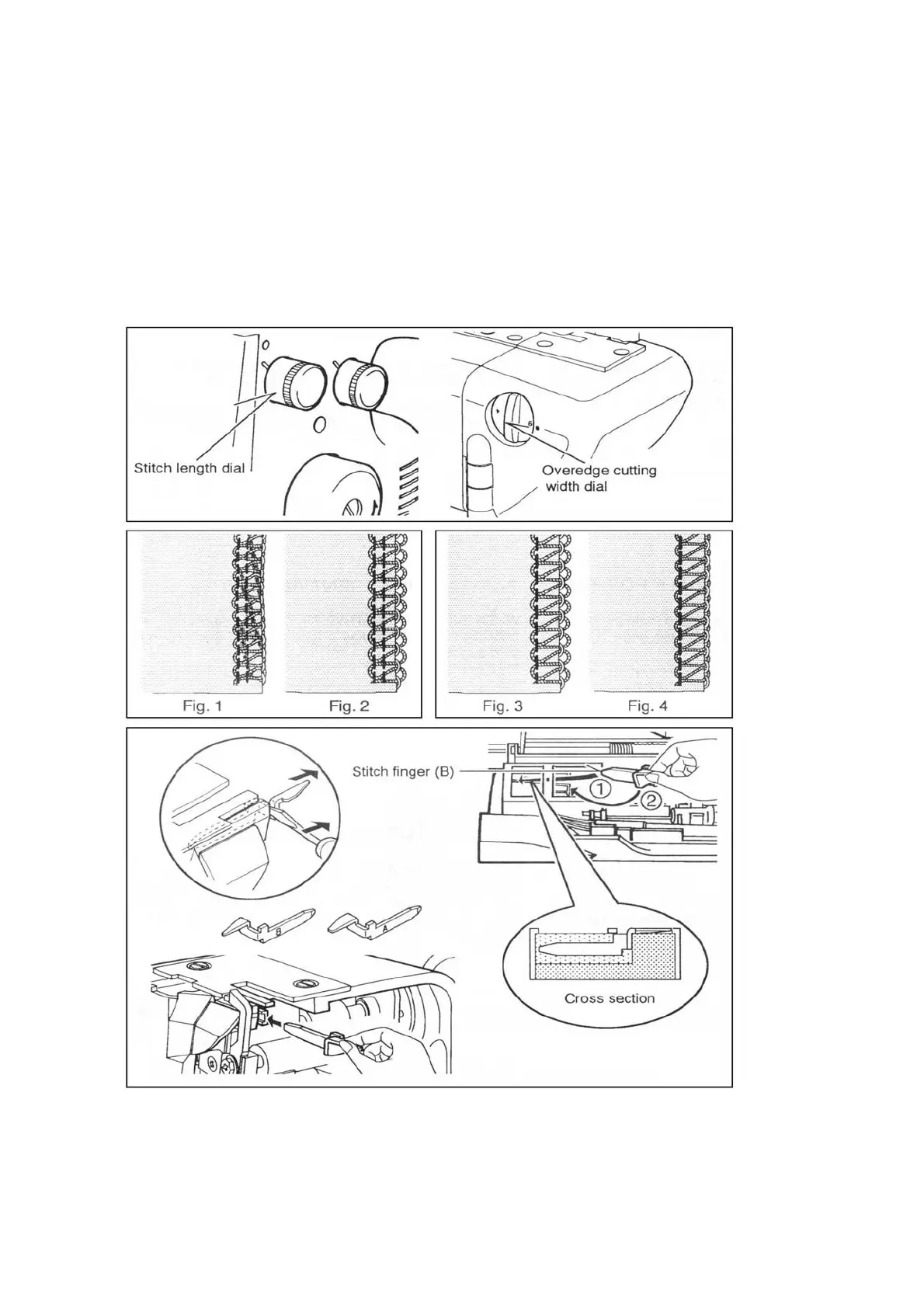
ADJUSTING STITCH LENGTH
Turn the stitch length dial until the
required length is indicated.
The higher the number, the longer
the stitch. This dial can adjust the
stitch length from 1 to 5 mm.
ADJUSTING OVEREDGE CUTTING WIDTH
Overedge cutting width can be adjusted from 4 to 7
mm by simply turning overedge cutting width dial
according to the kind of fabric.
It is set at standard width of 6 mm when delivered
from the factory.
Turn it towards “5” if fabric edge curls while
sewing.( Fig.1)
Turn it toward “7” if loops hang off the edge. (Fig.2)
Stitch finger (B) (Model 320 only)
Loops may hang off the edge, when you sew with lightweight fabric using 3 threads (right
needle only), and setting cutting width dial at 4-5(Fig.3). In such a case change the stitch
finger(A) to (B) to get neat stitching(Fig.4)


 To Next Page