12
PROGRAMMED TEMPERATURE
Auto Mode
The appliance is equipped with a programmed temperature feature which allows it
to iron all ironable fabrics without adjusting the temperature of the iron. It is the
default mode of this appliance.
The ECO indicator will light up when the lowest temperature is being used.
SETTING THE TEMPERATURE
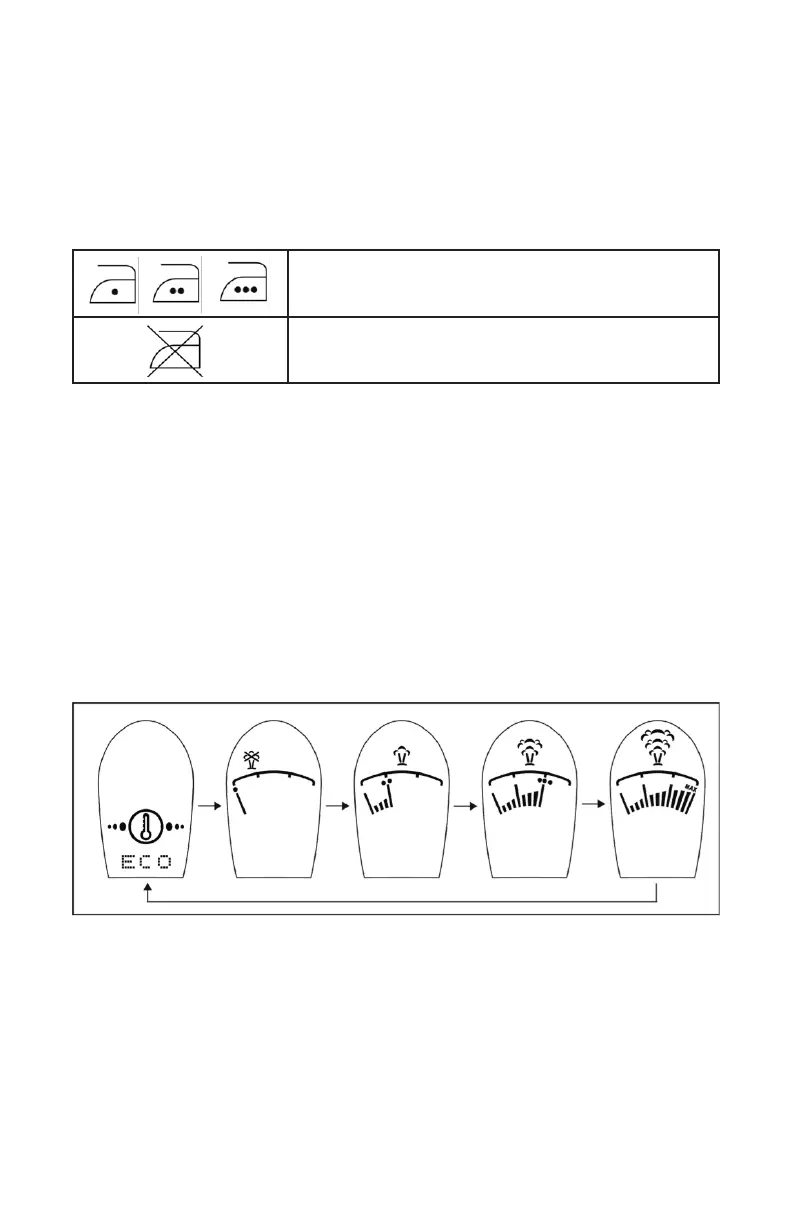
The appliance has different temperature settings for different kinds of fabrics.
Press the function button to turn on the appliance. The appliance will start in auto
mode. If you want to switch to another ironing temperature, press the function key
and the temperature display will loop through the following sequence:
‘auto mode’ -> ‘Dot 1’ -> ‘Dot 2’ -> ‘Dot 3’ - > ‘Dot 4’ -> ‘Max’
IMPORTANT” Before starting to iron, read the garment labels and follow the
manufacturer’s ironing instructions.
Fabrics with these symbols are ironable, for example,
Polyester, Silk, Viscose, Wool, Cotton and Linen.
Fabrics with this symbol are not ironable, for exam-
ple, Polypropylene, Elastane and Acrylic Fabric.


 To Next Page