3
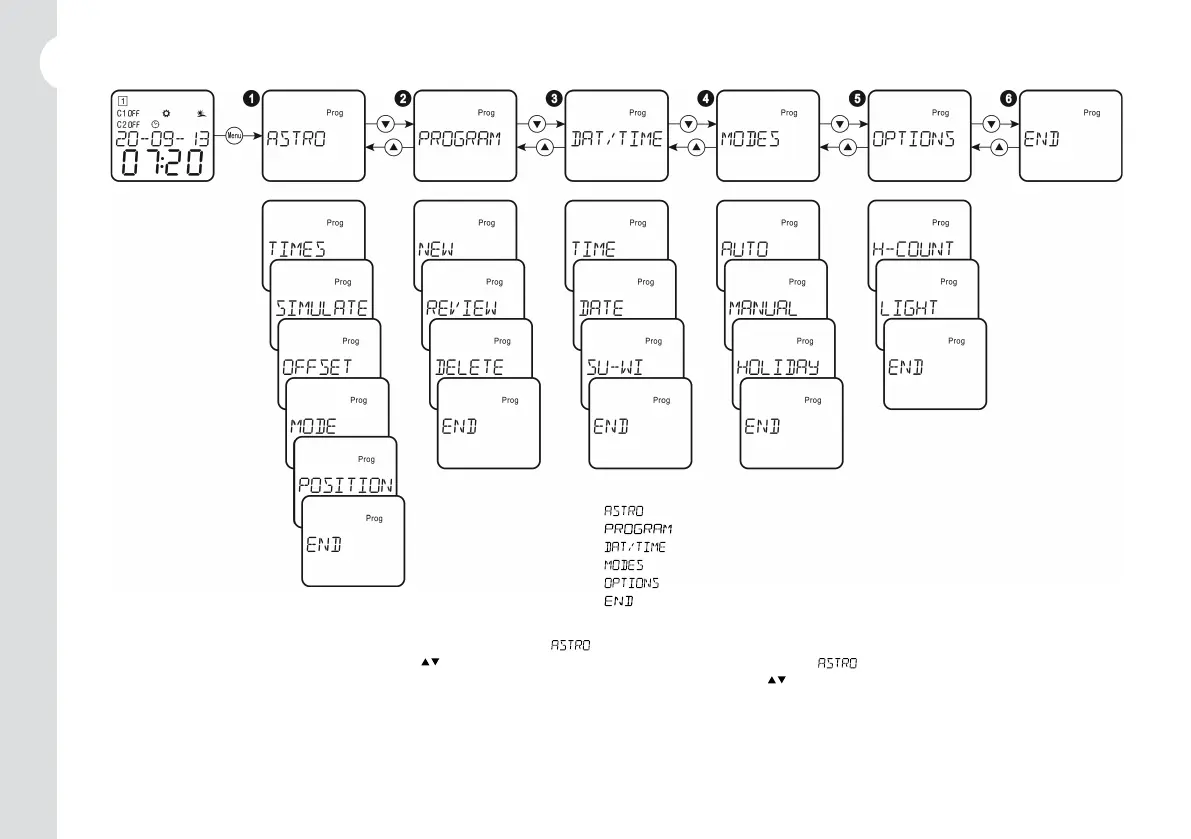
3. Menu główne / Main menu
Naciśnij przycisk „MENU”, aby wejść do ustawień menu, a pojawi się symbol . Brak aktywności przez 1 minutę spowoduje automatyczne
wyjście z ustawień. Wybierz żądane menu przyciskami „
”. / Press ”MENU” button to enter menus setting, and symbol appears.
If not operated for 1 minute, the device will automatically exit from setting. Select the desired menu by pressing ”
” buttons.
¶ : Menu ustawień astronomicznych. / Astronomical setting menu.
· : Menu ustawień programu. / Program setting menu.
¸ : Menu ustawień daty i czasu. / Date and time setting menu.
¹ : Menu ustawień trybów pracy. / Operation modes setting menu.
º : Menu ustawień innych opcji. / Other options setting menu.
» : Zakończ ustawianie i wyjdź z menu. / End settings and exit from menu.


 To Next Page