5
How to connect your camera HERO3, 3+
HERO3, 3+ Wi-Fi SSID, and Password setup
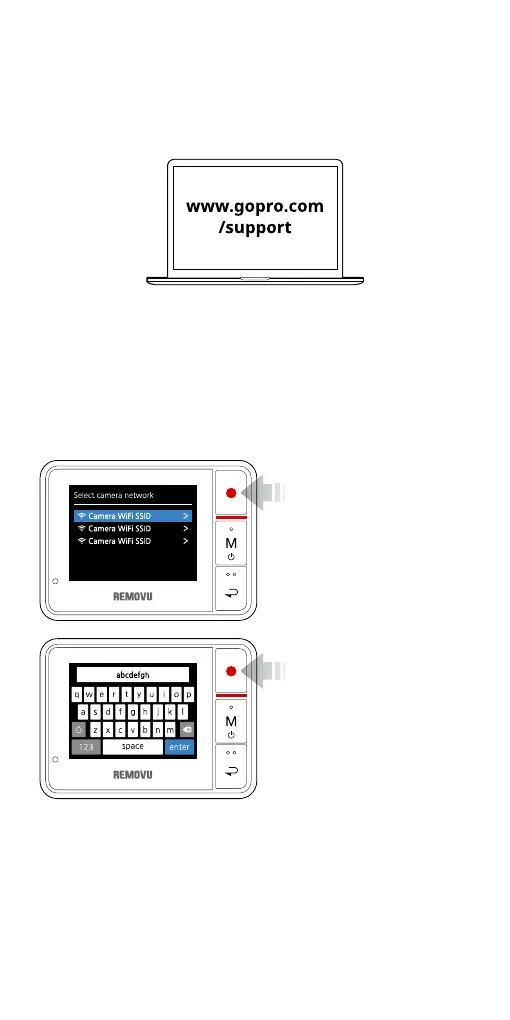
Connecting your GoPro HERO3, 3+ to REMOVU
1. Plese go to the GoPro
App settings menu on
your HERO3, 3+ to turn
on the Wi-Fi fuction.
2. Turn on your REMOVU
R1+.
3. When the Select Cam-
era Network Screen
appears, select your
GoPro’s SSID which you
have created.
4. Please type the pass-
word and press enter.
5. You will see Blue LED
light when the con-
nection is sucessfully
established.
1. Go to GoPro support page on GoPro Website to upgrade your
GoPro Camera to the latest rmware version.
2. While upgrading, you will be asked to set up Wi-Fi SSID, Pass-
word. Please make sure to remember your password and SSID.


 To Next Page