control instruments ....................................
(up to the end of the DU)
indicators:
instrument panel ..................................
(up to the end of the DU)
instrument panel ........................................
(up to the end of the DU)
warning lights.............................................
(up to the end of the DU)
fuel level ....................................................
(current page)
display .......................................................
(up to the end of the DU)
trip computer and warning system.............
(current page)
overspeed buzzer ......................................
(current page)
range with fuel ...........................................
(current page)
fuel level ....................................................
(current page)
1.69
ENG_UD72178_2
Afficheurs et indicateurs (LJL - Renault)
DISPLAYS AND INDICATORS (2/7)
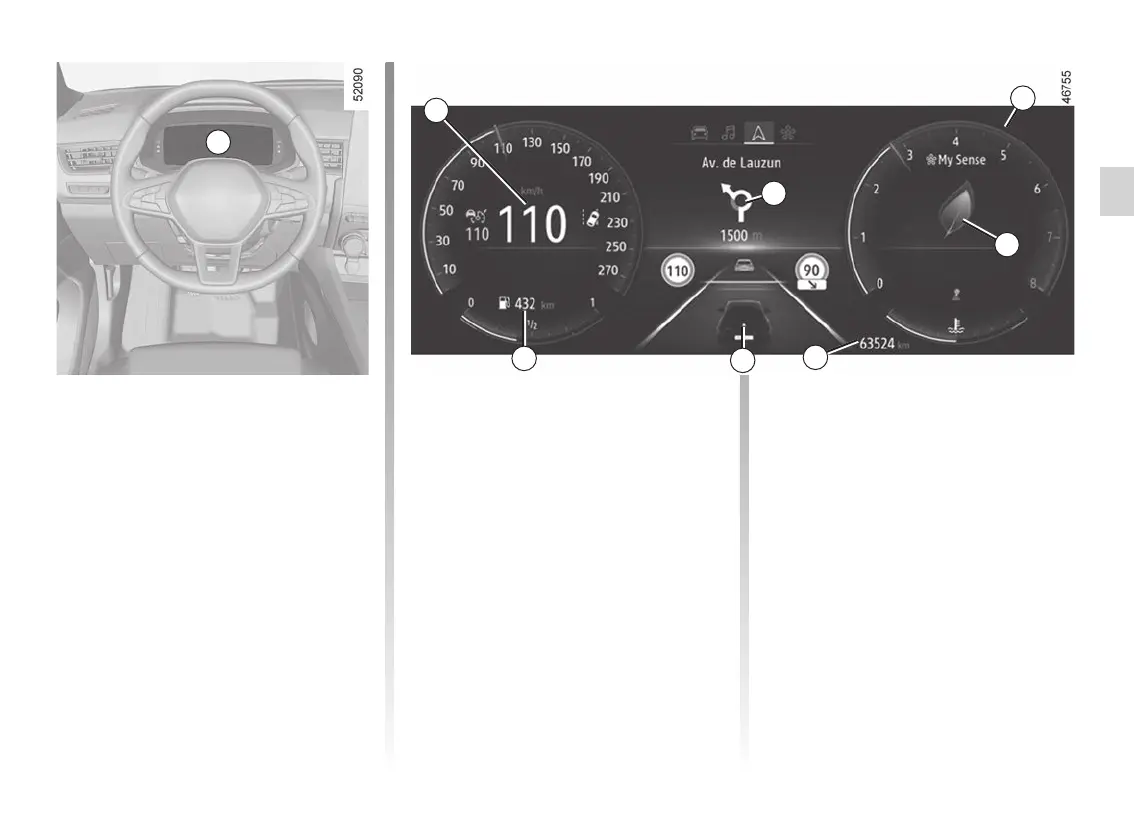
Instrument panel A
It lights up when the ignition is switched
on. In some cases, the appearance of a
warning light is accompanied by a mes-
sage.
Depending on the vehicle, you can cus-
tomise your instrument panel with the
content and colours of your choice.
For vehicles fitted with a multimedia
screen, refer to the multimedia instruc-
tions.
For vehicles not fitted with a multimedia
screen. ➥ 1.21
Speedometer 6
Rev counter 7
(graduations x 1000)
Depending on the selected customisa-
tion, it may not be displayed.
Overspeed buzzer
Depending on the vehicle and coun-
try, the
warning light is dis-
played and a beep sounds. This beep
sounds as soon as the vehicle is trav-
elling at over 75 mph (120 km/h). This
warning light remains lit for as long as
the vehicle is travelling at over 74 mph
(120 km/h).
Driving style indicator 8 ➥ 2.19
A
Total mileage recorder 9 ➥ 1.79
Trip computer 10 ➥ 1.75
Estimated mileage with remaining
fuel 11
The value is displayed after driving
400 metres. ➥ 1.79
Multimedia information 12
Depending on the vehicle, you can dis-
play information from the multimedia
screen (the compass, telephone, navi-
gation, etc.).
Please refer to the multimedia instruc-
tions for more information.
6
7
10
9
12
11
8








 To Next Page