3
FIRST USE (1/4)
Switching on
The multimedia system starts:
– when the vehicle is started;
– when you press the 3 control on the multimedia
panel or the 2 button;
– by touching the multimedia screen 1.
Switching off
The multimedia system switches off:
– when you press the 3 control on the multimedia
panel or the 2 button;
– when the opening elements of your vehicle are
locked.
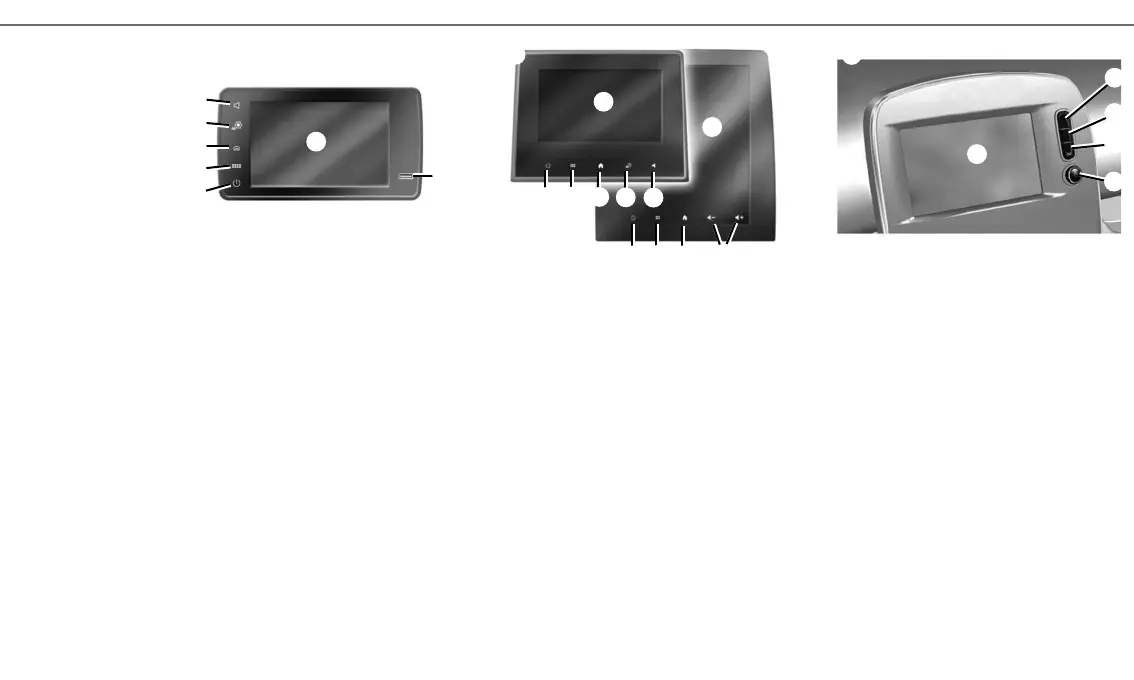
SCREEN CONTROLS A, B AND C
1 Multimedia screen.
2 On/off
Rotary button: volume control.
3 Short press: switch off the radio/music, switch
off the screen, put on standby.
Long press: restarts the system.
4 Access to main menu.
5 Access the home page.
6 Access the settings menu.
7 Volume settings.
8 Socket USB.
Multimedia screen
The system is fitted with a multimedia screen 1.
Select a function or a button on the screen by
touching the 1.
Controls
The multimedia system is fitted with screen con-
trols A, B or C, steering column controls D or E and
steering wheel controls F or G which can be used
equally to interact with the system.
A
C
1
6
5
4
2
3
4
5
B
1
1
5
7
4
6
3
8
7
3
4
6
5
7
1



 To Next Page