4
FIRST USE (2/4)
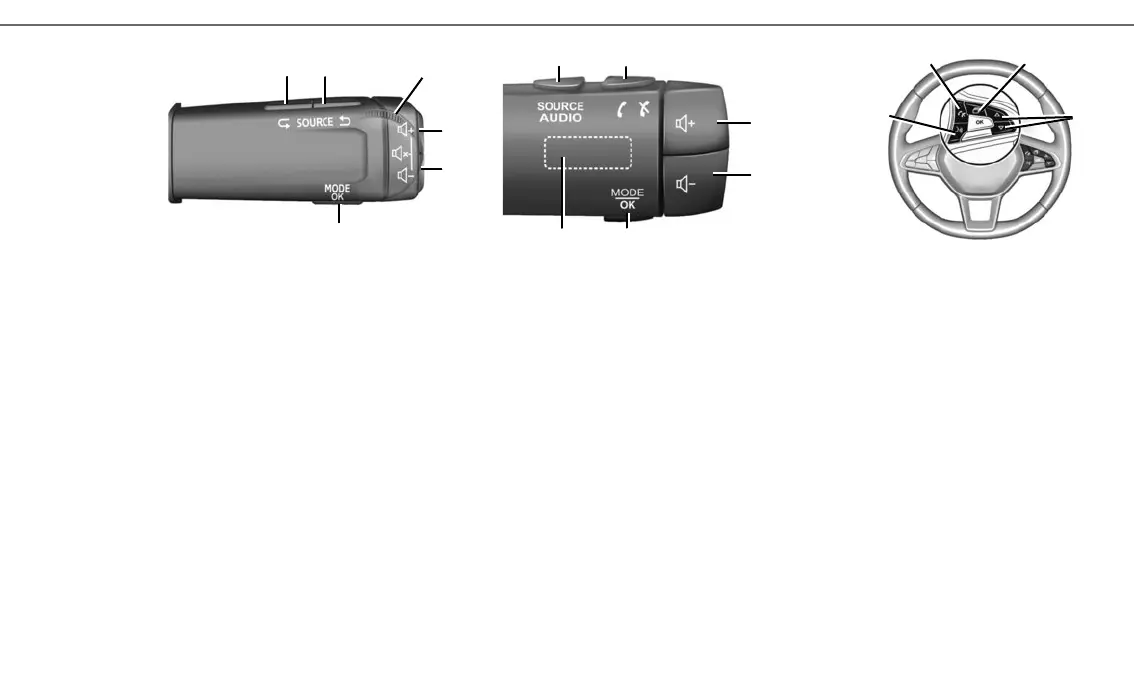
STEERING COLUMN CONTROLS D AND E
9 Choosing the audio source.
10 Increase the volume of the source currently in
use.
10+ 11Mute/unmute the radio sound, pause/play
an audio track, interrupt the voice recognition
voice synthesizer.
11 Decrease the volume of the source currently in
use.
12 Short press: confirm an action.
Long press: return to the previous screen/pre-
vious level when browsing menus, cancel a
current action;
D
STEERING WHEEL CONTROL F
15 Answer/end a call.
16 Scroll through information according to the
display style (audio, compass, engine power,
etc.)
17 Move around a list with the up/down arrows.
18 Activate/deactivate the multimedia system
voice recognition.
REMOTE CONTROL G
19 Return to the previous screen.
20 Access the home page.
21 Access to main menu.
F
13 Browse the radio stations/audio tracks/directo-
ries.
14 Answer/end a call.
E
9
9
13
10
11
12
9
14
10
11
1213
15
16
18
17



 To Next Page